Server Version: 1.20.0.3181 on Windows 10 and a Pentium J5005 with hardware transcoding
Player Version: 8.4.2.19372 on Android 10 and a SGS10e
Both are connected over a decent 5Ghz local Wi-fi network which should easily reach 400Mbit+ connection speed.
When I try to direct-play VC1 videos, they start instantly and scrolling works without problems but they always stutter by a lot so that they are really not enjoyable to watch. It happens on all VC1 videos although it shouldn’t be a network or hardware issue.
Stangely I can play the same files on a 2017 Nvidia Shield Android TV that is connected via a LAN cable without problems.
Please tell me if you need more infos and Please help!
Based on your Plex Web post, it seems your system is having trouble transcoding VC1 video.
VC1 video direct plays on a Nvidia Shield (Android TV).
VC1 video transcodes on my Pixel 3a XL (Android mobile).
Does H.264 video at approximately the same bit rate play smoothly on your phone? You can sort by bitrate in the app to find a video with a similar bitrate.
Check Settings -> Server -> Transcoder. Make sure both Use hardware acceleration when available and Use hardware-accelerated video encoding are selected, and Disable video stream transcoding is not selected.
Play a VC1 video without subtitles on your phone and monitor playback in Plex Dashboard -> Now Playing via Plex Web.
Is the video transcoding? If so, do you see a (hw) for both the decode and encode?
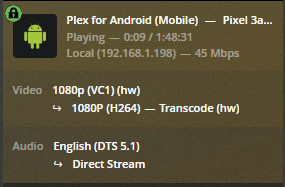
Hi, thanks for your answer!
Yes, a H.264 video with approximately the same bitrate plays smoothly without any problem.
The transcoder settings are correct.

It seems like it direct plays the VC1 video on my Samsung Galaxy S10e. Maybe that is the problem here? Maybe it should instead transcode it?

