Verbose logging is on but transcoding "speed =>" lines are not in logs

Server Version#: 1.24.0.4930
Player Version#: 1.33.0.2444-a220eae4

I’m trying to troubleshoot a slow transcode. According to this support document, I should turn on verbose logging and check the logs for the transcode speed, in lines with “speed =>”. OK, let’s turn on all the log options.

However, despite verbose logging being turned on, and my client choking to death on a slow transcode, there are no server log lines which include “speed =>”.

I’m playing a 4k file and switching from Original to transcoded 1080p. In my dashboard, I can see the stream switching from Playing to Buffering and I see video hangups… I also see SDR tone mapping turn on when I switch to transcode mode. So, I definitely AM transcoding, yet the speed value is not in my logs.

I do see “verbose” on some log lines and I AM sure I am looking at the SERVER log. :slight_smile:

How can I determine my transcode speed?

Take a look at Tautulli.

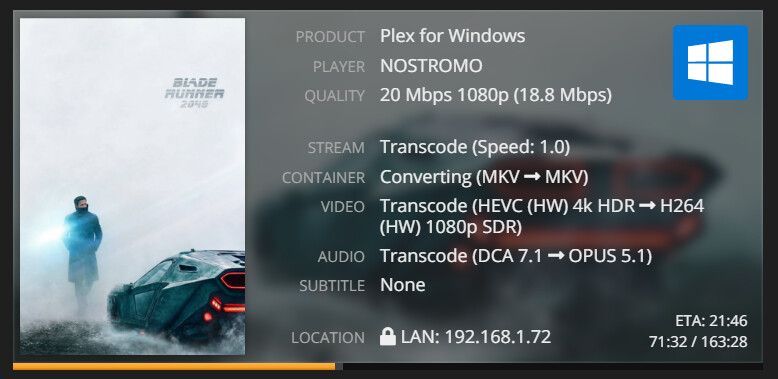
One of its many features is an Activity page similar to the Plex Dashboard, but with additional information, including transcode speed.

Screenshot (760)

1 Like

That’s handy, thanks! I’ll try it out.

wow @FordGuy61 that is exactly what I needed, thanks.

I searched the forum for speed =>.

Looking over the threads, it does appear in verbose log files for PMS v1.23.x.

Checking my own servers, it does not appear in verbose logs for PMS 1.24.x (Windows 10, Synology).

So, I’m not sure why speed => no longer appears, but it definitely isn’t there.

Thanks for confirming I’m not crazy. Plex should update their docs, I guess. Fortunately this led me to Tautulli!

Disable verbose logs.

This topic was automatically closed 90 days after the last reply. New replies are no longer allowed.