Can´t enable Verbose logging level in my Windows Server

Server Version#: 1.19.3.2852

Hello everyone,

I´m struggling to enable verbose level. I need to check my transcoder speed as posted in this article: Why is my video stream buffering? .

I followed the steps to enable the verbose logging as you can see here:
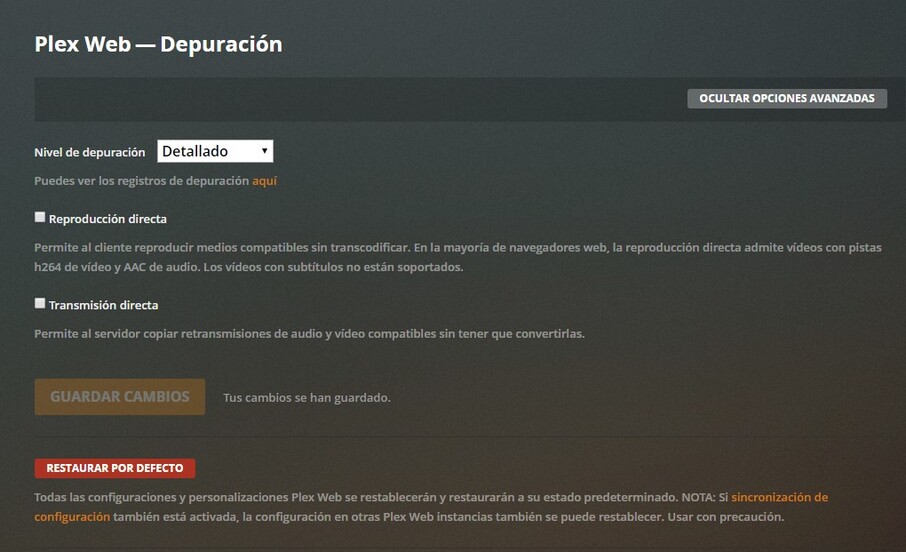
Sorry for the spanish.

I have three options there:

  • “Deshabilitado” which means disabled
  • “Depuración” which means debug
  • “Detallado” which I presume means Verbose.

I save the changes but checking my Plex Media Server.log I only see debugging messages and not the expected verbose logs.

Am I doing something wrong to enable verbose logs?

I hope you can help with these, I really need to perform this test in order to check if my transcoder is working as expected or if there is other issue.

Thanks in advance,
Alfredo.
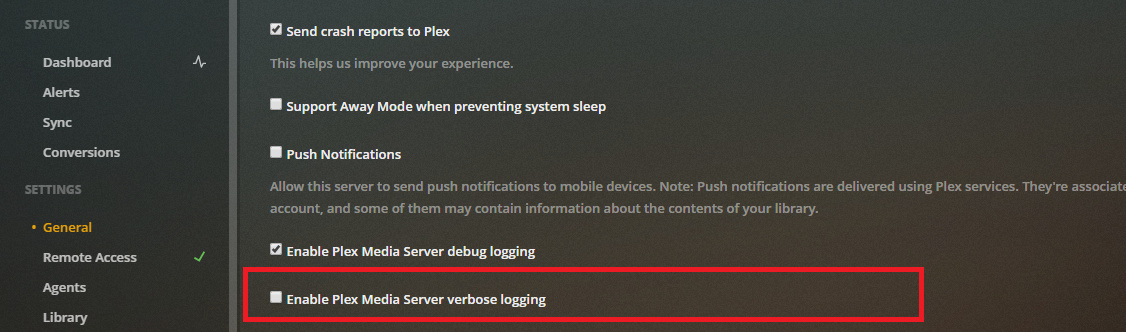
That the setting for the Plex Web client logs. Your PMS settings are further down the list.

And you don’t need verbose logs to check the transcoder. Information on that is already available at the debug level.

Thank you for your reply! I will keep investigating. Do you know what this line means?

May 26, 2020 16:56:11.293 [4508] VERBOSE - * speed => nan

It means it couldn’t determine the speed. The transcoder goes off when it’s not needed so the speed at that time would be “nan”, which is not the same as “0” when it’s trying to work, but can’t.

Excelent, that answer my question. Thank you very much for your time and answer.

This topic was automatically closed 90 days after the last reply. New replies are no longer allowed.
