Videos with subtitles give me server not strong enough error now when I try playing them on any android device and browser but work fine on my iPhone. They used to work fine on all my devices before last few patches.
What kind of subtitles are those (e.g. embedded/external/online, image/text based subtitles)?
Can you double-check you’re using the new player in the Plex for Android settings? The new player should be much better in dealing with subtitles (same as on iOS which seems to be working for you).
Both embedded and external and these videos have always worked before a few patches ago I want to say maybe 2-3months ago they worked fine. Plex on all my fire sticks 4k and nvidia shield 2017/2019 are using the new video player including my H8G which is now using google tv and A9G which is still running android tv.
I found a workaround for now but still shouldn’t need to use a workaround for something that just used to work.
Hello i am experiencing a similar issue.

I have some shows with subtitles that only work if i turn burn subtitles to “image formats only”.
The show that gives that error uses ASS subtitles, I still haven’t tested for other shows/subtitle types.
It happens in my android (samsung s20 fe 5g and samsung tab s6)
(edit)
It seems the windows app works fine but every browser in linux, android or w10 is giving me a transcoder error in all shows tested so far (brave, firefox, chrome).
Server is in a linux mint and was upgraded via apt-get upgrade today
All worked perfectly a week ago
(second edit)
No show really works on any browser for me (giving transcoder errors or an eternal loading screen), they work on the apps for windows and android though.(android only works if i turn burn subtitles to “image formats only”)
So are you saying it can transcode things without subtitles?
Well all my stuff is usually direct play no matter what device I am using never needs transcode. The workaround is as someone mentioned to set burn subtitles to always directly on the device you are using to view movies/shows. I tried setting it on server settings but browser still gives me the same error. But at least I got it working on my devices not the best solution for something that just worked before.
so can your server just not transcode? do you have transcoding disabled on server? afaik if any part of a file needs transcoding it will transcode all.
image formats like PGS will always transcode in web. ASS subtitles with formatting will transcode unless you set the app to strip formatting by setting it to image based only or you set the “override included subtitle styles” to ON in android app
Sorry for giving such a mess of a response above.
I cannot watch any show, with or without subtitles on any browser.
Original or converted. With or without subtitles.
After further testing i noticed that in the apps it only plays when using the original quality, if I set it to convert to some other quality it stops working:

Looking in the console i see a file not found exception when i change the quality:

The file does exist (if it didn’t it wouldn’t play at original quality):
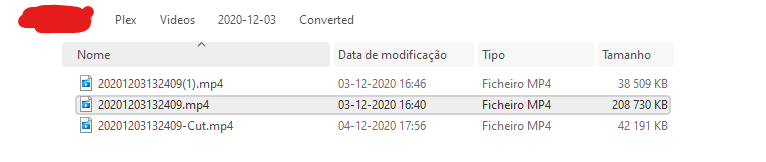
[hidden ip for obvious reason]
Additionaly I am finding some “IntroDetector: Failed to transcode file (1)” messages after some file not found exceptions like the one in the screenshot above (for what it seems to be a variety of other files different from the one failing to stream).
Upating on the browser not being playable I found these when filtering with one of the filenames that failed:
Apr 13, 2021 02:13:07.111 [0x7f06d67fc700] Debug — Streaming Resource: Added session 0x7f06d033c000:ed3034f3-615b-42a9-be5a-059f1ebe67af
Apr 13, 2021 02:13:07.125 [0x7f07267fc700] Debug — Streaming Resource: Terminated session 0x7f06d033c000:ed3034f3-615b-42a9-be5a-059f1ebe67af with reason Conversion failed. The transcoder exited due to an error.
Apr 13, 2021 02:13:07.128 [0x7f06d7fff700] Debug — Streaming Resource: Removing session 0x7f06d033c000:ed3034f3-615b-42a9-be5a-059f1ebe67af
Apr 13, 2021 02:14:44.520 [0x7f06d6ffd700] Debug — [Transcode] MDE: C0001 (2020): Direct Play is disabled
Apr 13, 2021 02:14:44.520 [0x7f06d6ffd700] Debug — [Transcode] MDE: C0001 (2020): media must be transcoded in order to use the dash protocol
Apr 13, 2021 02:14:44.520 [0x7f06d6ffd700] Debug — [Transcode] MDE: C0001 (2020): no direct play video profile exists for http/mp4/h264
Apr 13, 2021 02:14:44.520 [0x7f06d6ffd700] Debug — [Transcode] MDE: C0001 (2020): no direct play video profile exists for http/mp4/h264/pcm
Apr 13, 2021 02:14:44.520 [0x7f06d6ffd700] Debug — [Transcode] MDE: C0001 (2020): selected media 0 / 509
Apr 13, 2021 02:14:44.642 [0x7f06d6ffd700] Debug — [Transcode] [Universal] Using local file path instead of URL: mnt/RAID/Plex/Videos/2020-12-18/C0001.MP4
Apr 13, 2021 02:14:44.642 [0x7f06d6ffd700] Debug — [Transcode/JobRunner] Job running: FFMPEG_EXTERNAL_LIBS='/var/lib/plexmediaserver/Library/Application\ Support/Plex\ Media\ Server/Codecs/73e06c8-3759-linux-x86_64/' X_PLEX_TOKEN=xxxxxxxxxxxxxxxxxxxxy' '/usr/lib/plexmediaserver/Plex Transcoder' '-codec:#0x01' 'h264' '-codec:#0x02' 'pcm_s16be' '-ss' '0' '-noaccurate_seek' '-analyzeduration' '20000000' '-probesize' '20000000' '-i' 'mnt/RAID/Plex/Videos/2020-12-18/C0001.MP4' '-map' '0:#0x01' '-codec:0' 'copy' '-filter_complex' '[0:#0x02] aresample=async=1:ocl='\''stereo'\'':rematrix_maxval=60.000000dB:osr=48000[0]' '-map' '[0]' '-codec:1' 'aac' '-b:1' '256k' '-f' 'dash' '-seg_duration' '5' '-init_seg_name' 'init-stream$RepresentationID$.m4s' '-media_seg_name' 'chunk-stream$RepresentationID$-$Number%05d$.m4s' '-window_size' '5' '-delete_removed' 'false' '-skip_to_segment' '1' '-time_delta' '0.0625' '-manifest_name' 'http://127.0.0.1:32400/video/:/transcode/session/q2wgcyl15cgf9ei2j5qpv27t/2a2c96c4-00af-4cfa-980e-d3a6685e83af/manifest?X-Plex-Http-Pipeline=infinite' '-avoid_negative_ts' 'disabled' '-map_metadata' '-1' '-map_chapters' '-1' 'dash' '-start_at_zero' '-copyts' '-vsync' 'cfr' '-y' '-nostats' '-loglevel' 'quiet' '-loglevel_plex' 'error' '-progressurl' 'http://127.0.0.1:32400/video/:/transcode/session/q2wgcyl15cgf9ei2j5qpv27t/2a2c96c4-00af-4cfa-980e-d3a6685e83af/progress'
Apr 13, 2021 02:14:44.654 [0x7f075d7b1700] Error — [Transcoder] mnt/RAID/Plex/Videos/2020-12-18/C0001.MP4: No such file or directory
I found a file that works in the browser though, I send the info xml of 2 files the 543 is one that works and the 550 is one that does not. (Maybe one can be played without transcoding and the other needs to be transcoded and so it fails?)
info.zip (2.5 KB)
Additionaly the server runs on a mini pc with a Intel® Core™ i3-10110U Processor with the following graphics details (I don’t think it matters given the file not found exception, but I am trying to be as complete as I can):

Additional info, when playing with browser i see in the console (not plex’s console but in the browser’s console)
[MDE] Starting analysis of 1080 (mkv, h264, ac3, 40, high)
54-54-1b6f0b1a2a65c83af3d4-plex-4.55.0.16560-5c02dc7.js:2 [MDE] Analyzing direct play
54-54-1b6f0b1a2a65c83af3d4-plex-4.55.0.16560-5c02dc7.js:2 [MDE] Cannot direct play: noCodecInProfile:h264
54-54-1b6f0b1a2a65c83af3d4-plex-4.55.0.16560-5c02dc7.js:2 [MDE] Analyzing video direct stream
54-54-1b6f0b1a2a65c83af3d4-plex-4.55.0.16560-5c02dc7.js:2 [MDE] Analyzing audio direct stream
54-54-1b6f0b1a2a65c83af3d4-plex-4.55.0.16560-5c02dc7.js:2 [MDE] Analyzing playability
54-54-1b6f0b1a2a65c83af3d4-plex-4.55.0.16560-5c02dc7.js:2 [MDE] Finished analysis of: 1080 (mkv, h264, ac3, 40, high) {
  "canPlay": true,
  "canDirectPlay": false,
  "canDirectStreamVideo": true,
  "canDirectStreamAudio": false,
  "bitrate": 5415,
  "videoResolution": 1080
}
54-54-1b6f0b1a2a65c83af3d4-plex-4.55.0.16560-5c02dc7.js:2 [PDE] Player decision: {
  "playerType": "html",
  "protocol": "dash",
  "canDirectPlay": false
}
54-54-1b6f0b1a2a65c83af3d4-plex-4.55.0.16560-5c02dc7.js:2 [PDE] DASH and HLS should seek forward by default, offset=0
54-54-1b6f0b1a2a65c83af3d4-plex-4.55.0.16560-5c02dc7.js:2 [Transcoder] Video (start) options: {
  "hasMDE": 1,
  "path": "/library/metadata/1227",
  "mediaIndex": 0,
  "partIndex": 0,
  "protocol": "dash",
  "fastSeek": 1,
  "directPlay": 0,
  "directStream": 1,
  "subtitleSize": 100,
  "audioBoost": 700,
  "location": "lan",
  "addDebugOverlay": 0,
  "autoAdjustQuality": 0,
  "directStreamAudio": 1,
  "mediaBufferSize": 102400,
  "X-Plex-Session-Identifier": "o6lcikoatjh44n69d58qg316",
  "session": "h19v7kutflm48ulz2qt8m3sj",
  "subtitles": "burn",
  "X-Plex-Client-Profile-Extra": "append-transcode-target-codec(type=videoProfile&context=streaming&audioCodec=aac&protocol=dash)",
  "X-Plex-Incomplete-Segments": 1
}
54-54-1b6f0b1a2a65c83af3d4-plex-4.55.0.16560-5c02dc7.js:2 [PDE] DASH and HLS should seek forward by default, offset=0
54-54-1b6f0b1a2a65c83af3d4-plex-4.55.0.16560-5c02dc7.js:2 [Transcoder] Video (decision) options: {
  "hasMDE": 1,
  "path": "/library/metadata/1227",
  "mediaIndex": 0,
  "partIndex": 0,
  "protocol": "dash",
  "fastSeek": 1,
  "directPlay": 0,
  "directStream": 1,
  "subtitleSize": 100,
  "audioBoost": 700,
  "location": "lan",
  "addDebugOverlay": 0,
  "autoAdjustQuality": 0,
  "directStreamAudio": 1,
  "mediaBufferSize": 102400,
  "X-Plex-Session-Identifier": "o6lcikoatjh44n69d58qg316",
  "session": "h19v7kutflm48ulz2qt8m3sj",
  "subtitles": "burn",
  "X-Plex-Client-Profile-Extra": "append-transcode-target-codec(type=videoProfile&context=streaming&audioCodec=aac&protocol=dash)",
  "X-Plex-Incomplete-Segments": 1
}
54-54-1b6f0b1a2a65c83af3d4-plex-4.55.0.16560-5c02dc7.js:2 [Player] Timeline, {
  "ratingKey": "1227",
  "key": "/library/metadata/1227",
  "playbackTime": 0,
  "playQueueItemID": "6088",
  "state": "playing",
  "hasMDE": 1,
  "context": "home:hub.movie.recentlyadded",
  "row": 1,
  "col": 0,
  "time": 0,
  "duration": 5331000
}
Followed by:
chunk-123-75104004d5….16560-5c02dc7.js:2 GET https://192-168-1-199.2f777b2….plex.direct:32400/video/:/transcode/universal/dash/h19v7kutflm48ulz2qt8m3sj/1/0.m4s 404 (Not Found)
chunk-123-75104004d5….16560-5c02dc7.js:2 GET https://192-168-1-199.2f777b2….plex.direct:32400/video/:/transcode/universal/dash/h19v7kutflm48ulz2qt8m3sj/1/initial.mp4 404 (Not Found)
chunk-123-75104004d5….16560-5c02dc7.js:2 GET https://192-168-1-199.2f777b2….plex.direct:32400/video/:/transcode/universal/dash/h19v7kutflm48ulz2qt8m3sj/0/0.m4s 404 (Not Found)
chunk-123-75104004d5….16560-5c02dc7.js:2 GET https://192-168-1-199.2f777b2….plex.direct:32400/video/:/transcode/universal/dash/h19v7kutflm48ulz2qt8m3sj/0/initial.mp4 404 (Not Found)
chunk-123-75104004d5….16560-5c02dc7.js:2 GET https://192-168-1-199.2f777b2….plex.direct:32400/video/:/transcode/universal/dash/h19v7kutflm48ulz2qt8m3sj/0/initial.mp4 404 (Not Found)
chunk-123-75104004d5….16560-5c02dc7.js:2 GET https://192-168-1-199.2f777b2….plex.direct:32400/video/:/transcode/universal/dash/h19v7kutflm48ulz2qt8m3sj/1/0.m4s 404 (Not Found)
chunk-123-75104004d5….16560-5c02dc7.js:2 GET https://192-168-1-199.2f777b2….plex.direct:32400/video/:/transcode/universal/dash/h19v7kutflm48ulz2qt8m3sj/1/initial.mp4 404 (Not Found)
chunk-123-75104004d5….16560-5c02dc7.js:2 GET https://192-168-1-199.2f777b2….plex.direct:32400/video/:/transcode/universal/dash/h19v7kutflm48ulz2qt8m3sj/0/0.m4s 404 (Not Found)
chunk-123-75104004d5….16560-5c02dc7.js:2 GET https://192-168-1-199.2f777b2….plex.direct:32400/video/:/transcode/universal/dash/h19v7kutflm48ulz2qt8m3sj/1/0.m4s 404 (Not Found)
chunk-123-75104004d5….16560-5c02dc7.js:2 GET https://192-168-1-199.2f777b2….plex.direct:32400/video/:/transcode/universal/dash/h19v7kutflm48ulz2qt8m3sj/1/initial.mp4 404 (Not Found)
My transcoder is on and usually only transcodes audio if I play on my iPhone but when I play on any other home device it direct plays audio and video. It uses my iGpu on my i5 for transcoding. I prefer direct play when available highest quality possible.
Hello any information on this issue? I am still getting the file not found errors when trying to convert to any quality or use some subtitles. The videos only play on original quality.
Any clue or is there more information i should be getting besides the one already provided?
By the way I tested again, in the windows app, and the only error that appears in the console is the same file not found error when converting a video to a lower resolution.
In the browser player I cannot play any video at all, original or transcoded.
PlasticDuck go under plex settings on app and for embedded subtitles turn to always on instead of automatic as far as playing content off plex on browser on pc no clue it hasn’t worked for me for a while now I get error saying my pc is not powerful enough. All these things got broken back in January through March don’t recall anymore.
Thanks for the help.
Had already done that, but I was still hoping for some news or fixes for this problem as when I am travelling I would need some transcoding to tone down quality to save a bit of my data.
Today trying to play some movies, on the android app, I got the same transcoder file not found error, while on the windows app it plays just fine (if i play it at original quality).
There are some additional problems that come with this issue:
Some videos, for example, were recorded with an half decent camera and playing a 50fps 2k video is not the best option when I travel to places were i can only get 3G or something. Or when I have ASS subtitles for a video and it just gives the same error.
Always the same Transcoder’s file not found error.
I love Plex and even got the lifetime license because I could see it doing miracles for me, but these issues are starting to kind of hurt on the plans I had for it.
I finally “fixed it”.
Basically I changed to windows to try it and it worked… At least I have had no errors so far.
The thing is, when on linux, the only thing i did before it stopped working was to upgrade the server. No permissions changed, not even new files uploaded to the storage.
This way I cannot tell what happened during the upgrade and to be honest i can’t say what the error cause was…
Maybe I ruined something with the apt-get upgrade command (doubt it, litteraly just that command was made), or something was already wrongly configured before and only started giving problems after the upgrade?
Without knowledge or guidance i will never know. Maybe it was my fault but now i will never know. What matters is that it was “fixed” thx to a windows key i had around my room.
This topic was automatically closed 90 days after the last reply. New replies are no longer allowed.
