WD2100 1080p Transcoding

Server Version#: 1.18.4.2171-ac2afe5f8 December 20, 2019
Player Version#: WebPage plex

Hi,
I just bought a WD PR2100 NAS server and get some problems with 1080p transcoding over internet and webpage on plex.

Every 5min i get pause and buffering time and the CPU activity is around 70% but never more. (maybe at 80/90% on 1 second)

Any idea to resolve this problem ? or this NAS is not able to transcode 1080p?

Thanks a lot for your help.

The Western Digital NAS boxes are very under powered for Plex transcoding. You will not see much success with software transcoding.

This unit is capable of Hardware Transcoding with a Plex Pass, where you could get at least 4 streams without any issues and low CPU usage.

However the WD PR2100 seems to have rather good performances.

The specs are :

  • Processors Installed : 1 x Intel Pentium N3710 1.6 GHz
  • Number of Cores : Quad-Core
  • Ram : 4GB DDR3L

So it’s seems ok.

On the following doc (from plex support) it says we don’t need the Plex Pass to Hardware Transcoding on the WD PR2100.

I can send it back to the reseller and buy another model until 31 January. So if you think i have to change, which model with 2 bay do you recommend for transcoding over web browser in 1080p ?

Thanks a lot

Yup, you are correct.
I totally forgot that the Western Digital boxes were the first to support Plex Hardware Transcoding and thus it did not require a Plex Pass.

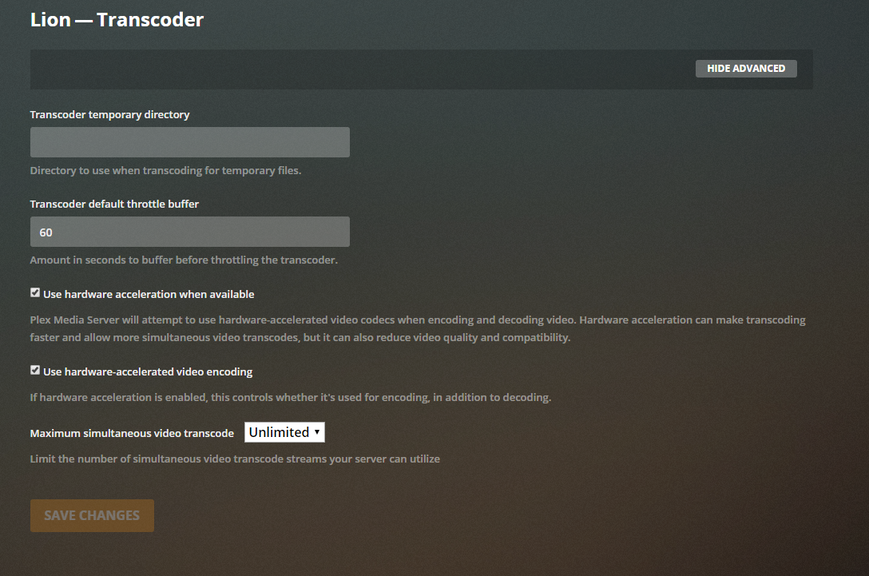
However the spreadsheet does also show it will have trouble doing software transcoding. The results you are experiencing indicate that it might not be utilizing hw transcoding. Can you confirm in the server settings that hardware transcoding is enabled?

Also provide a screenshot of the dashboard for the media you are attempting to play that is transcoding.

The nas seems to use hw transcode…

i try again and i get some pause and loading gif during the vidéo playing.

My internet is anoptical fiber.

I don’t know why i have this problem…

The nas perf seems ok on this screen :

Post the server logs and we’ll see if one of the mods can help figure out what’s going on (I’m at work and can’t sort through it at the moment)

Not a fix but a workaround, if you are on a computer try Plex Media Player or Plex for Windows/Mac. While a browser is passable, it does not have the best playback performance.

Ok, wich log do you need ? the complete folder or specific one ?

(Yesterday i tried with “verbose” option for log and also disabled and re-enable the HW acceleration)

I’m gonna try the plex media player for windows :slight_smile:

Just the server log with Verbose disabled.

Doesn’t do HEVC/h.265, you screenshot shows software decoding and hardware encoding.

HEVC takes more CPU than you have.

So all persons who say “i transcode 4K with PR2100” are liars (the package too) or work only on local network ? Is there any other explanation except the CPU ?

With the media player for windows i get 0% CPU usage and seems ok but i think it’s because i’m on the same LAN. But i’m not sure about this.

I have to try over internet with the plex media player for Windows.

I just get last session log
Plex Media Server.log (307.8 KB)

If the media is encoded with h.264 then you have support.

After test => using plex media player resolve this problem.
The CPU load stay under 15% and it seems to have 0 pause.

To resume it’s bad idea to use the plex website to access my media.

I’m not really sure why but i understood this :

  • nas encode + decode for the plex web
  • nas encode video and plex media player decode ?

Am i right ?

I still have a question about the Window app.

What is the difference between Plex pour Windows 1.4.1.940 (found at this link) and the version you linked ?

Because on the site the version is Plex for Windows 1.4.1.940 and the link in the announce is version Plex Media Player v2.48.0

Plex Media Player, PMP, is targeted towards HTPC users. It has the capability to passthrough TrueHD, dts-HD, etc audio codecs to home theater systems (receivers, soundbars, etc).

Plex for Windows and Plex for Mac are targeted towards desktop/laptop users. It does not have the audio passthrough capabilities of PMP.

From a video point of view, both products are built with mpv, so their video playback capabilities are the same. They can both direct play H.264 or H.265 video, including 4K HDR. However, neither will pass HDR video to an attached TV/monitor.

Either is preferable to Plex Web, as both will direct play more video and audio codecs than Plex Web.

There are two parts to a transcode: decoding the video from its original format and encoding it to the desired format.

As mentioned by @pl_5309, the N3710 does not have the capability to decode HEVC video in hardware on Linux based systems. It does have the ability to encode H.264 video in hardware.

Therefore, when transcoding HEVC video, it will be decoded in software and encoded to H.264 in hardware.

That is why you do not see (hw) on the decode portion of the transcode in the Plex Dashboard.


References:
N3710 at ark.intel.com

N3710 Datasheet Table 8-4:

Example of hardware accelerated HEVC decode / H.264 encode:
Note the (hw) after both (HEVC Main) and Transcode

Screenshot (233)

Plex for Windows

Direct playing 4K HDR video on a Win10 PC with a 1080p SDR display.
Screenshot (234)

Thanks for all infos :slight_smile:

This topic was automatically closed 90 days after the last reply. New replies are no longer allowed.