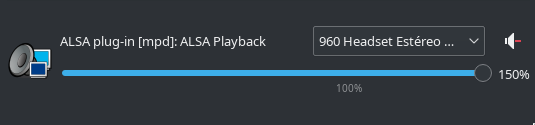
If I reduce the system global gain, I wouldn’t listen at all Plexamp. I’m with headphones and if someone is speaking in the room, I can listen that person even if I have the sound of system at 100% and Plexamp mixer at 100%, while other sounds on the rest of the applications, at 60% and global mixer at 100% blast my ears.
The only setting’s combination seems to work -with no distortion, even listening neo-classical- seems to be increasing the gain just for Plexamp, and let both the system sounds and the rest of the other single application’s sound settings by default.
Why would you implement a loudness leveling feature by default when most other players utilize native volume? I generally expect my audio to play back without any processing applied to it unless I specifically want it to be.
I love the idea of Plexamp but to me this should be a user toggleable feature and be off by default. This just forces the user to make additional adjustments to their volume settings where they normally would not be expected to make adjustments, making the software more difficult to use.
I disagree. Without volume leveling, you will be forced to adjust the volume all the time, particularly when playing a mixed playlist from different sources, because the tracks all can have a different loudness.
With loudness leveling, you will only have to adjust the volume once. Because afterwards each track will have the same loudness.
That is the whole point. Keep in kind that Plexamp doesn’t do “processing”. All it does is to ‘turn the volume knob’ (virtually).
Yes and then I can enjoy abnormal volume in all my other applications because Plex forces me to adjust my global volume to accommodate itself.
This is not a good solution, I’m sorry I disagree very strongly with this as someone who uses multiple devices and works with audio software on a regular basis.
You don’t have to tell me that this feature is useful, I agree completely hence why user should be allowed to turn it on if they choose.
That’s my opinion, do what you want with it. I love Plex and use it almost daily.
The fact is many of us noticed Plexamp sound quite lower than the rest of the system sound, which forced us to rummage with systems sound settings in order to listen the music with the volume we want to. I think plexamp developers should, at least, let the user to disable that volume leveling thing, or even better, leave it disabled by default, and let the user to enable it, if they found it useful.
Now, after I’ve spent some time to investigating, and after knowing how to workaround the problem, I don’t mind so much, but being sincere, for me is more “a bug” than a “feature”: not only because it doesn’t level anything, it just like the volume for Plexamp were at 45% at maximum, but also because if users needs to configure the internals of the sound card or per-application settings, the problem is not in our side, but in the conflictive application.
I know the idea behind volume leveling is to help users, and that is great. But this simply doesn’t work. I hope it will never will be ported to the other plex instances (web, android, TV and so)
Thank you so much! I had the MacOS issue of the volume being too loud even when it was turned all the way down on the Mac. This allowed me to adjust it.
Having read this thread, I’m still not sure what to do. I have all my lossless music files in Plex but I haven’t been able to listen to them properly because of the volume issues. Instead I have to stream them in ■■■■ quality. What can I do to make Plex not mess with my music?
On mac should be the same than in linux. Under your home directory, should be a .config/Plexamp/config.json file, you need to edit and set the key combination, my “ui” sections is like this:
So, in my case, I turn volume up/down with Ctrl+Shift+Alt Up/Down. So I don’t mess the VolUp/VolDown on my multimedia keys, as they’re mapped to Global volume.
It’s supposed to disable the “volume leveling” feature as developer suggested, but he forgot to point how to do it, so I have no idea how to disable it. Anyway, putting the Plexamp at max sounds quite good