Oh. 

Yesterday was the first time I was motivated to get help on the forums in a couple years, I had no idea the changes were so recent! It’s cool that they’re getting updated, so many companies ignore their forum communities (or don’t even have them) these days.
1 Like
It’s working, thank you very much Otto! Despite testing seemingly likely options, I haven’t been able to get Plex to pull data into content rating, tagline, or country. Do you know how to do it?
I’ve dug into this quite a lot today, and wanted to restate my results here since they don’t seem to be compiled anywhere.
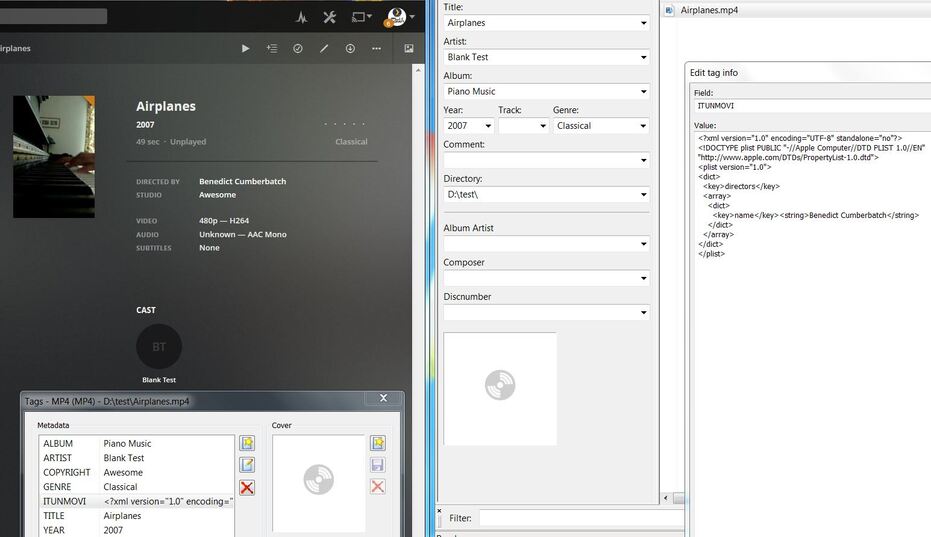
Your [ITUNMOVI] solution allows me to set the studio, cast, and directors. The adamid and integer fields are unnecessary, don’t seem to matter to Plex, and can be removed from the XML, as they are internal to iTunes. It also turns out that you can use [ARTIST] to set the cast, [COPYRIGHT] to set the studio, [PODCASTDESC] to set the description, [YEAR] to set the originally available date, [ALBUM] to set collections, [TITLESORT] to set the sort title, and [GENRE] to set genres.
Credit expressed with links to relevant articles throughout, and also to @MTI for this awesomeness. Commas should be used to separate multiple entries, and the program used was mp3tag v2.88a on a Windows 7 64-bit machine. Plex library settings were; Other Videos library type, Plex Movie Scanner, Personal Media Agent, and Local Media Assets were at the top in server settings for the Personal Media Agent.
2 Likes
You mean ‘Director’ here, right?
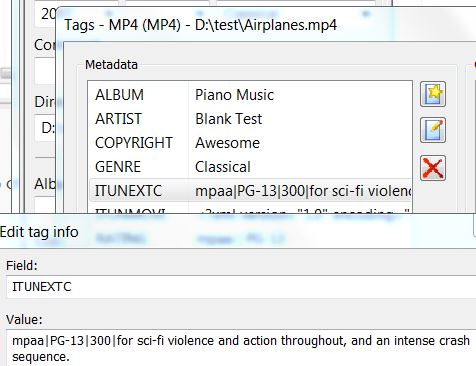
Content rating is in the field ITUNEXTC
and has in my example the content
mpaa|PG-13|300|for sci-fi violence and action throughout, and an intense crash sequence., from which PG-13 appears in Plex.
It doesn’t look like the other things get imported into Plex.
No, I mean Artist. It’s entirely possible that it changes based on what metadata program you’re using though, or maybe it imports both? I’ve attached a screenshot showing an example of what I’m doing.
Thank you! I’ll try that.
It’s a shame it doesn’t import anything into country or tagline, but we’re 95% of the way there so I’m more than satisfied.
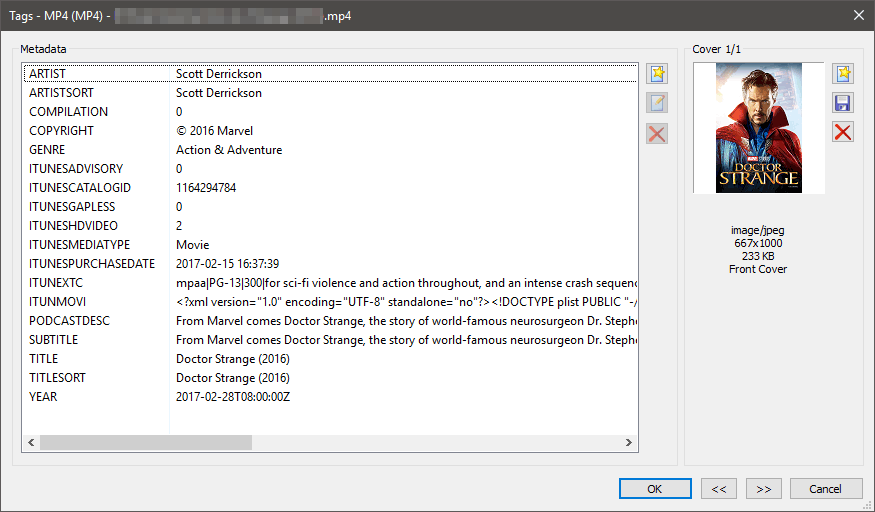
I’ve tried a variety of things for the field that I thought Plex would recognize (ITUNEXTC, Rating, Content_Rating, etc.) and everything under the sun as the value. Different separators, text, just the rating, just mpaa and the rating, your example copied verbatim, etc, and none of them work. Even the almighty Plex Dance™ makes no difference - it definitely is reading updates to the metadata properly, just not importing rating info.
In my test, the content of the ‘Artist’ tag ends up as the movie’s director in Plex.
Maybe it has to do with the presence of the tag ITUNESMEDIATYPE=Movie.
The different behavior is quite strange  (sorry, couldn’t resist). We’re using the same program, and if you’re on a windows pc, practically everything else is the same too. Yet your copyright is actually copyright, and where ITUNEXTC doesn’t work for me, it does for you.
Even after I add the ITUNESMEDIATYPE tag, save, refresh metadata, and Plex Dance, it doesn’t change those differences. Gah!
Not likely. Yes and no. It’s all up to PMS. What version do you have installed?
We aren’t? The UI from your screenshot looked like mp3tag…
I’m using PMS 1.13.2.5154-fd05be322. (if hardware specs matter: Windows 7 Ultimate OS, ASRock Extreme 11 mobo, i7-4930k CPU not overclocked, 32GB RAM, multiple hard drives for total storage of 40TB+, dedicated SSD to store the Plex database.)