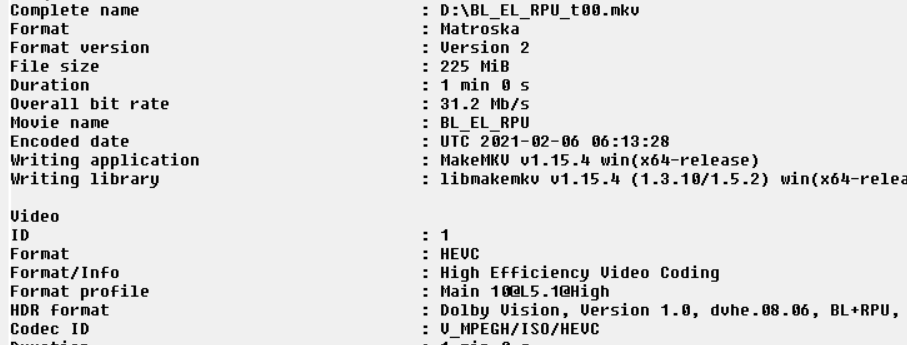
When MakeMKV converts from Dual Track Dual Layer to Single Track Dual Layer, no information is lost. It’s just stored differently. It’s another valid way to encode the information, per the DV specs. The process is reversible.
The Shield doesn’t know to look in a second track. When both layers are stored in a single track, the Shield detects and applies the dynamic metadata/RPU/MEL information.
If the disc was a FEL disc, that information is still preserved in the file. There’s no way to make a Shield decode FEL data, regardless of how it’s stored.
@ rv112 if you really want to re-encode DV, you have to first extract the RPU metadata into a .bin file. Then you can use a x265.exe GUI like staxrip to encode the base layer with the RPU bin file to a profile 8 hevc stream. then remux the encoded file with tsmuxer or the mp4muxer. RPU parser staxrip
btw, forget about handbrake, it’s no good even for HDR10 because it can’t do complete 10 bits pipeline.
So is there a general consensus of what the 2019 Nvidia Shield Pro should play with regards to DV and Plex Clients? Specifically:
FEL
MEL
Makemkv (latest version)
With my Sony 950H I am only able to see DV using the Plex client running on the TV and MEL makemkv rips from my physical media. The Plex client on the Shield does not work nor can I enable HDR/DV - greyed out for some reason which may be the issue.
It seems that most of my 4K backups are all FEL with a few exceptions. Bummer that we can’t see it.
Assuming you’re referring to UHD BD/DV Profile 7 backups:
No. Playable, but the FEL 12-bit expansion data is ignored. The results are the same as MEL-only media. Dynamic metadata / RPU is parsed.
Yes. The RPU/dynamic metadata is parsed. This is very roughly equivalent to HDR+.
Yes. This produces a Single Track Dual Layer MKV that the Shield can parse.
Caveats:
The Shield DV decoder sometimes crashes. You may need to restart playback multiple times. Others have reported that Nvidia is aware.
The “red push” color issue. It’s minor, unless it bothers you, in which case it’s catastrophic.
You may need to manually set refresh rates. Some report that DV doesn’t work reliably if automatic rate matching is enabled. Plex staff have mentioned that it’s difficult/impossible to query for DV support on other rates.
Some discs with FEL data exhibit pulsing brightness. This appears to be because the FEL and RPU/dynamic metadata were designed to be used together. Using just the RPU/dynamic metadata causes strobing.
clbflyec_grr_la & Volts - thanks for the information. I’ll have to go back and see why my shield isn’t letting me play the content then. The Sony client does but only MEL. Knowing the shield should play similar MEL content then I have another issue somewhere in the middle and I’m guessing maybe my old avr.
Bummer on the FEL though. I was hoping I missed something because I was going to watch Bladerunner and the 2nd one this weekend.
@saf1 - I also have an XH950 and a 2019 Shield Pro, and can play “most” DV content successfully. You will have to read my full post earlier up the timeline, dated Jan 9th.
However it may well be that you haven’t yet discovered all the hidden settings that has made things work on my setup.
To my knowledge it’s not (currently) possible to merge the Profile 7 BL + FEL + Dynamic Metadata/RPU, while preserving the FEL data. I assume the FEL data is ignored/discarded by the dovi_tool - I’m going to investigate.
I think you’d be wise to preserve your files as-is, with the FEL, in case a method for doing so is identified in the future.
@axemanuk666 no, I did not see that post. I’ll go back and see the posts before and after. Also thank you very much for the details. Amazing TV by the way - I’m a relatively new owner and what DV content I have watched I’m really impressed.
This helps me a lot to troubleshoot. The last thing I did two weeks back is update all of my cables to newer 8k ultra hd high speed 48Gpbs hdmi cables. I’ll have to see if my AVR is the blocker which is a older yamaha 677 which probably only supports 1.4 hdmi specs.
I assumed, incorrectly, that maybe it would just pass it through. Everything is plugged into the AVR which then routes to the Sony’s earc. Anyway this is great and many thanks. Also apologies that I missed the post!
I would definitely suggest that the AVR will be causing a number of limitations, certainly in regards to the lack of EARC support for HD audio formats, however I am not sure if that would cause any issues in regards to DV on your Shield via the AVR.
To troubleshoot, indeed do double check all the settings I have highlighted previously, and if you still cannot play DV content on the Shield after confirming those settings, try plugging the Shield directly into the TV just to see if anything changes.
In regards to the TV, I only bought it in December and I’m also absolutely loving it
Your cables were probably fine. Many older cables are perfectly adequate for HDMI 2.0.
I agree with both of you that the AVR is probably an issue.
Dolby Vision might work with HDMI 1.4 @ 24Hz - there’s enough bandwidth. But HDCP 2.2 is assumed for 4K, so sometimes there’s an assumption that HDMI 2.0 is required.
Historically for me, it was a ton of research and window shopping in October / November, followed by the realization that in order to achieve “it all”, it was gonna be a costly proposition… And then came December, and I emptied my bank account to replace the lot!.. TV, AVR and then the Shield… Still feeling the pain now, but OMG it was worth every darn penny!
It all looks and sounds sooo good… And now this has all highlighted how crap my Sub is, and so that is next to be replaced… It never ends!
I’m pretty sure the RPU parser is converting the FEL RPU to 8.1 properly. FEL can be 10gb of data, huge waste of space considering the shield is ignoring it. Of course, i would actually use the yusesope tool and not the parser(which is based on yusesope)… The parser is for x265 encoding
1- extract HEVC layers with tsmuxer or ffmpeg.
2- yusesope tool convert to 8.1
3-mux with mkvtoolnix and atmos
4- import the mkv in MakeMKV and create a new DV p8 MKV
more time consuming but you save tons of space and get the same quality on the shield
I’m talking about shield playback. the FEL is useless there.
The shield is probably doing something similar to the p7 to p8 conversion: it’s using the dynamic metadata from FEL-RPU . That’s my whole point, p8 RPU metadata rips is all you need if you play movies on the shield.
Are there still color issues using Dolby vision and the shield in Plex. I have ripped my Dolby vision using make mkv and I am getting the Dolby vision logo. I read there are color issues right now and to try the custom Kodi builds. I tried that and none of my movies on my Plex server play.


 Many older cables are perfectly adequate for HDMI 2.0.