Yes you can, just make sure you’ve selected the Library tab instead of Recommended and then make these selections:
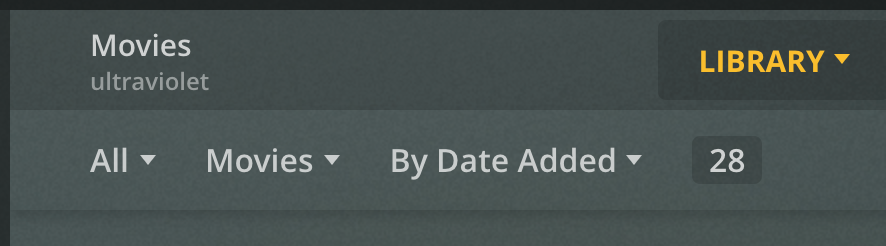
Thanks darc,
However… I’m familiar with the sequence and it used to work. Here’s what I get now.

Whereas any of the other choices i.e. : by Year work fine.

I re-installed the server today thinking that might do the trick but same result.
Next plan of Action?

mike
Does it work with 4.x at https://app.plex.tv ?
Can you try optimizing database.
1 Like
Could you run me through the procedure for optimizing the database please. Not certain what you mean by 4.x
I’m running Version 1.16.6.1592 if that helps?
I you are accessing the server at IPaddress:32400/web is it the Web app that comes with the server. That version which is currently 3.108 will almost always be a lower version number than the one hosted at https://app.plex.tv which is currently at version 4.6.2 (to be clear even though you are accessing via that web URL you are still accessing and connecting to your server locally)
go into setting and on the bottom left settings side bar is the Troubleshooting area where there is a button to optimize database.
The IP address that accesses the server is: http://127.0.0.1:32400/web/index.html#
I went ahead and optimized the database. I still get the same result.
I’ve been using the safari browser all along. I’m wondering if it’s something connected with it?
Is one version preferred over the other? I get the same result either way. Diving in a little further I see now I don’t have complete control over most libraries. I’ve tried sorting by folders, and my other videos library I get the unexpected error when I click on the the library tab now.
The music library is the only one that works like they all used to. What a mess!
Nobody else has this issue?
I’m moving the Plex Media Server onto a stand alone Mac mini soon and maybe it will get it’s s**t straight then? We’ll see!
Perhaps the Plex database is corrupt?
Well, if it wasn’t corrupt before it is now. I did something wrong attempting to repair it through the link you sent. Thanks by the way. * I really opened a can of worms*. Can’t get the app. to open or locate the server through Safari browser. Doomed for the time being!

Terminal Saved Output.txt (6.28 KB)
Do you have database backups being made?
https://support.plex.tv/articles/202485658-restore-a-database-backed-up-via-scheduled-tasks/
If you mean the default backup every 3 days setting? Then No, I unchecked it because It took too much drive space if I recall.
I have time machine backups and also a backup service if needed.
Here’s the files I have:
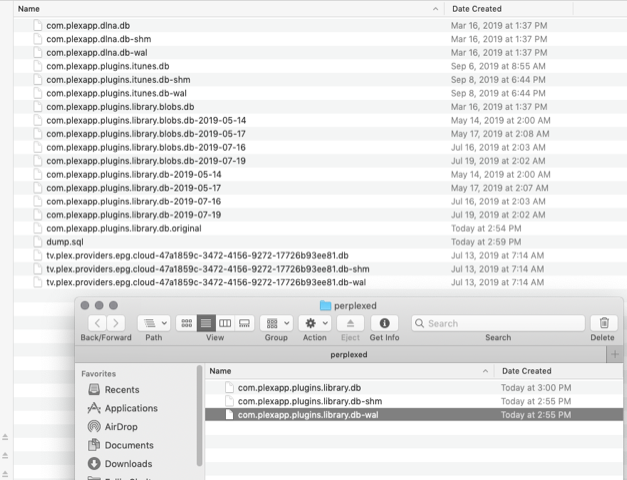
The second window with three files are the location I’m storing as in Step 2 of “Restoring a Backup" on the link you sent.
A little confused on Step 3. Duplicate the database backup file into the correct directory and then rename it to com.plexapp.plugins.library.db
Which one is the backup file to duplicate and to what correct directory? The rename I get!
you don’t have any back ups then that won’t help. the backup files would have the date they were backed up in the file name. Like the ones that say 2019-07-19 at the end. so that means the last back up you have in your timemachine was from July. dunno if you want to go that far back. you would need to rescan everything you added since then as new.
means after you quit server so it is not running
1 take the original com.plexapp.plugins.library.db and rename it to something else or move it someplace else like your desktop just incase you want to go back to it.
2. copy the back up file like com.plexapp.plugins.library.db-2019-07-19 into that same directory that the original was
3. rename the com.plexapp.plugins.library.db-2019-07-19 to com.plexapp.plugins.library.db (like the original was) so when the server launches again it thinks the back up file is the current database file
I don’t mind going back that far if that’s the only option outside of rebuilding from scratch.
If you could walk me through that procedure or send me a link that would be great.
all it is is the steps i mentioned above. did you find the database files in the location which is the link i posted earlier
This topic was automatically closed 90 days after the last reply. New replies are no longer allowed.
