In my audiobooks, Plex automatically fills in my “Artist” field by authors first name, which is not how to name Authors. Sometimes it automatically re-names the “artist” for only a particular Author and I have to go in and re-name 20+ audiobooks. For one of my book series, it puts one of the characters as the writer and won’t keep my actual author in the field. PLEASE ALLOW ME TO LOCK THIS FIELD! This field is one of the primary ways to organize this library, and I don’t want to do it with authors first/last, rather last/first. And defiantly not by a book character.
The field is lockable. Keep in mind that the field is locked when the lock icon is orange. There has been a lot of confusion about this.

Also, there is a special “Sort Artist” field where you can define how the artist is sorted.
As for Plex putting a character name as the author, that’s weird. Are you certain that there are no metadata tags embedded in the files? Was Plex able to find an online match for the book? Did it find the correct match? You can see what Plex finds by looking at the ‘Fix Match’ process:
https://support.plex.tv/articles/201018497-fix-match-match/
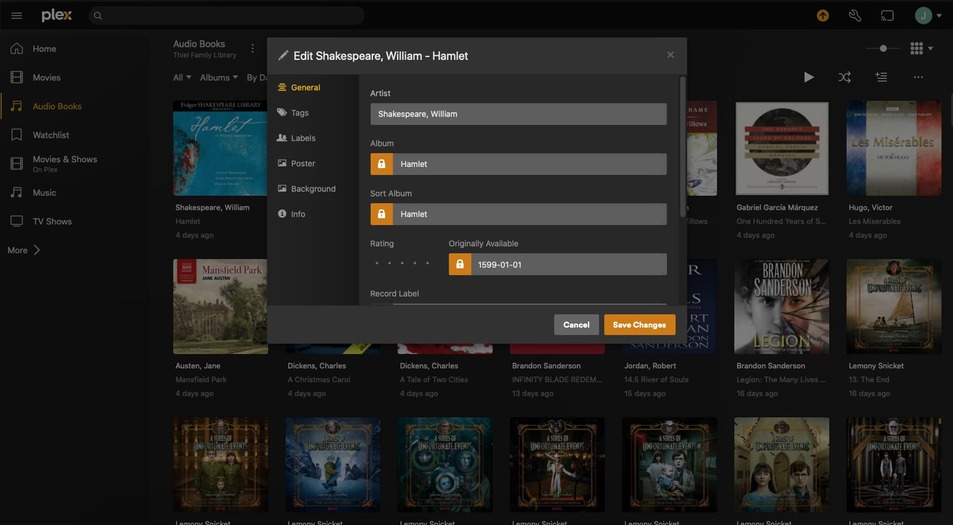
You have to edit the artist entry, not the album. Once you change it at the artist level, it should propagate to all items that are associated with that artist/author.
As for
I’d recommend locally tagging your files with the right artist/album artist/sort artist/etc tags (and enable ‘Prefer local metadata’ for the library) if you want to be explicit about how Plex should organize the files in your library. Also, Plex doesn’t officially support audiobooks, so if you’re using a third-party agent to get book metadata, then it’s the agent that’s deciding how to set the author, not Plex.
