Ok, on my phone it shows that I can stream direct. On my plex web browser on my laptop it’s still transcoding. I can’t find the option under the web version to allow direct play. The only thing I found was this.

When you say Plex Web Browser do you mean you’re streaming Plex with Chrome/Safari? You should be using the Plex App for Windows/Mac:
If you haven’t already, you should also try the Plex app on your Samsung TV to see if it can direct play/stream.
interestingly enough, the plex app on my Samsung TV can stream direct . . . so what gives, is it the Roku then?
I also have a Roku Ultra 4800 and it has no problems Direct Playing/Streaming.
You mentioned it is connected using Ethernet? Try disconnecting the Ethernet and using Wi-Fi instead. Remember to change Direct Play to Auto since you set it to Force earlier.
Thanks, I’ll try that next, but why would a direct connection not want to play direct? My TV that I tested the plex app on is directly connected to my network with an ethernet cable . . . I’ll check wifi on the Roku next. Thanks!
Interestingly enough, I actually am on Wifi. I forgot with my new setup, I can’t go hard wired. But when I put it in auto for direct playing, I received an error saying the app cannot direct play this item. Direct play is diasbled.
Dean
I was just experimenting to see if Wi-Fi would work since Ethernet didn’t. But it turns out your Roku wasn’t using Ethernet, is that right? I think we may have found the problem. The Wi-Fi signal isn’t strong enough so it didn’t have the speed necessary to Direct Play/Stream a 4K file.
The reason you got the “Direct play is disabled” message is because you turned on “Disable video stream transcoding” in your Plex settings. The Roku needed to transcode but your server wouldn’t let it.
So if you want your Roku to Direct Play/Stream, you will have to rearrange your router to get better Wi-Fi to your Roku. You mentioned you have Orbi, so maybe add another Orbi to your Mesh network.
Hey Happy Taz,
My orbi is right next to my Roku and my signal strength is excellent, so I’m just at a loss as why it won’t direct play . . . faulty Roku? At any rate, I can try to plug in an ethernet cable to see if that fixes it, but that’s just weird. I did t test of my connection and my download speeds are 166 Mbps. Is that not good enough?
Did you test your connection with the Roku or another device? The Roku may not be receiving the same speeds as other devices. You should also make sure the Roku is connected to the 5Ghz Wi-Fi band instead of the 2.4Ghz band.
You should definitely try connecting the Roku to the Orbi with an ethernet cable to see if Direct Play/Stream works.
Could it be due to the type of HDMI cord? The way I have it set up is that I have my Roku connected to my Samsung TV through the Samsung HDMI connector and the Samsung HDMI connector is connected to the Samsung. I have a Sonos sound bar that is also connected to the Samsung HDMI connector. So when I force the 4K, the picture stutters, so I just don’t know what else could be going on.
It’s very unlikely the HDMI cord is the issue. Have you tried connecting the Roku to your Orbi with an ethernet cable instead of using Wi-Fi?
So I hard wired the connection and then I changed the settings on my plex video on my Roku from Force direct play to Auto and this error came up, “Playback Error” App cannot direct play this item. Direct play is disabled. Retry, Stop.
I also had another error come up on my Roku. I took a screen shot and attached it here. I just don’t get why I’m having so many issues?
Thanks!
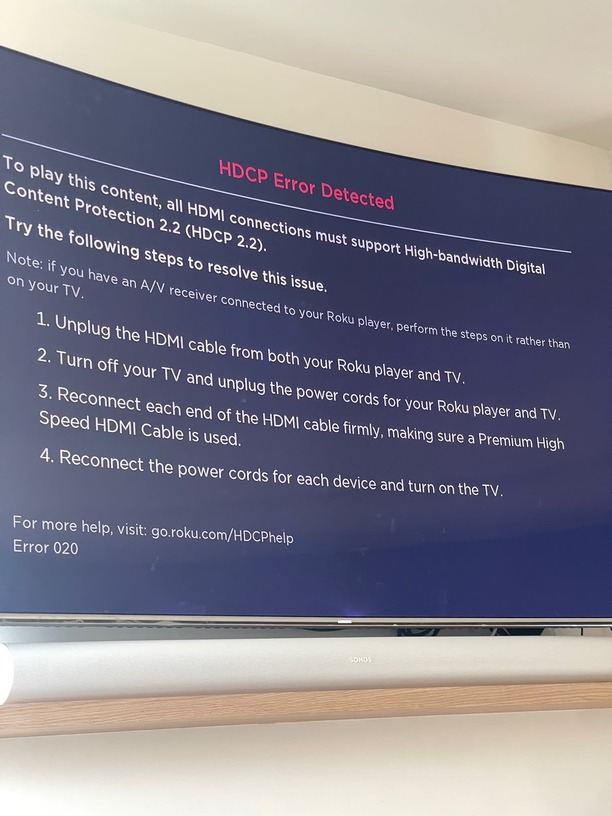
You may have a bad HDMI cable, but it’s unrelated to the 4K streaming issue.
As for the “Playback Error”, does your file have subtitles or did you disable video transcoding in your Plex Server settings?
post server logs.
So I have MKV files that have subtitles in the file itself, not added subtitles and I do have disable video transcoding in the plex server settings. Does that actually make a difference? Thanks for all your help!
Ironically enough, when I turn off the disable video transcoding along with direct play on auto, the 4k video will not play without stuttering and then saying that error where the cpu isn’t strong enough . . .
I will post later tonight.
So the Roku is causing your Plex Server to transcode 4K instead of direct playing it. The server logs should tell you the reason for the transcode.
Thanks for the help. I’ll drop the logs in a little bit. What’s funny is that I have another Samsung TV that has the plex app built in and when I play 4k, it plays smoothly and perfectly . . . so it looks like it’s my Roku, but why on earth would the Roku have issues that the built in app on the Samsung does not? Isn’t the Roku app a better version typically than that app built into the TV apps?
Here is the start of my log when I started to play a 1080P video. It was stuttered and was unpleasant to watch. I don’t know what the logs mean, but I am posting it here. I took out the IP Address and just put in the work IP Address.
Jan 27, 2023 08:55:35.443 [50548] INFO - Plex Media Server v1.30.2.6563-3d4dc0cce - Microsoft PC x64 - build: windows-x86 windows - GMT -08:00
Jan 27, 2023 08:55:35.443 [50548] INFO - Windows version: 10.0 (Build 19045), language en-US
Jan 27, 2023 08:55:35.443 [50548] INFO - 8 3100 MHz processor(s): Architecture=0, Level=6, Revision=15363 Processor Identifier=Intel64 Family 6 Model 60 Stepping 3, GenuineIntel
Jan 27, 2023 08:55:35.443 [50548] INFO - Compiler is - MSVC 1929
Jan 27, 2023 08:55:35.443 [50548] DEBUG - C:\Program Files (x86)\Plex\Plex Media Server\Plex Media Server.exe
Jan 27, 2023 08:55:35.411 [60600] DEBUG - Request: [IP Address (Subnet)] GET /video/:/transcode/universal/session/rn4cpc00qkj8r7a0vxpw2201/0/498.m4s (7 live) #536a TLS GZIP Signed-in
Jan 27, 2023 08:55:35.411 [60600] DEBUG - [Req#536a/Transcode/rn4cpc00qkj8r7a0vxpw2201] Asked for segment 498 from session.
Jan 27, 2023 08:55:35.412 [60600] DEBUG - [Req#536a/Transcode/rn4cpc00qkj8r7a0vxpw2201] Returning segment 498 from session
Jan 27, 2023 08:55:35.413 [60600] DEBUG - Content-Length of C:\Users\we\AppData\Local\Plex Media Server\Cache\Transcode\Sessions\plex-transcode-rn4cpc00qkj8r7a0vxpw2201-5e5ade85-1f7d-409e-b8cc-c81ed65fcf6c\init-stream0.m4s,C:\Users\we\AppData\Local\Plex Media Server\Cache\Transcode\Sessions\plex-transcode-rn4cpc00qkj8r7a0vxpw2201-5e5ade85-1f7d-409e-b8cc-c81ed65fcf6c\chunk-stream0-00499.m4s is 16994102 (of total: 16994102).
Jan 27, 2023 08:55:35.441 [60600] DEBUG - [Req#538a/Transcode/rn4cpc00qkj8r7a0vxpw2201/5e5ade85-1f7d-409e-b8cc-c81ed65fcf6c] Session rn4cpc00qkj8r7a0vxpw2201 (4) is unthrottling
Jan 27, 2023 08:55:35.445 [60600] DEBUG - [Req#538c/Transcode/rn4cpc00qkj8r7a0vxpw2201/5e5ade85-1f7d-409e-b8cc-c81ed65fcf6c] Throttle - Getting back to work.
Jan 27, 2023 08:55:35.513 [61848] DEBUG - Completed: [IP Address] 200 GET /video/:/transcode/universal/session/rn4cpc00qkj8r7a0vxpw2201/1/498.m4s (7 live) TLS GZIP 109ms 1207858 bytes (pipelined: 268)
Jan 27, 2023 08:55:35.546 [60600] DEBUG - [Req#537c/Transcode/rn4cpc00qkj8r7a0vxpw2201/5e5ade85-1f7d-409e-b8cc-c81ed65fcf6c] Transcoder segment range: 320 - 507 (507)
Jan 27, 2023 08:55:35.653 [60600] DEBUG - [Req#538f/Transcode/rn4cpc00qkj8r7a0vxpw2201/5e5ade85-1f7d-409e-b8cc-c81ed65fcf6c] Transcoder segment range: 320 - 508 (508)
Jan 27, 2023 08:55:35.829 [60600] DEBUG - [Req#538d/Transcode/rn4cpc00qkj8r7a0vxpw2201/5e5ade85-1f7d-409e-b8cc-c81ed65fcf6c] Session rn4cpc00qkj8r7a0vxpw2201 (4) is throttling
Jan 27, 2023 08:55:35.830 [60600] DEBUG - [Req#5392/Transcode/rn4cpc00qkj8r7a0vxpw2201/5e5ade85-1f7d-409e-b8cc-c81ed65fcf6c] Throttle - Going into sloth mode.
Jan 27, 2023 08:55:37.565 [57196] DEBUG - Request: [IP Address (Subnet)] GET /:/timeline?key=%2Flibrary%2Fmetadata%2F43295&ratingKey=43295&state=playing&time=2757486&duration=6423458&playbackTime=1166272&playQueueItemID=60227&context=home%3Ahub.continueWatching&row=0&col=0 (8 live) #536f TLS GZIP Signed-in Token (zismycat03) (TV 2021)
Jan 27, 2023 08:55:37.567 [57196] DEBUG - [Req#536f] Client [xmi6jqezzgr9b29zaxgwkhaw] reporting timeline state playing, progress of 2757486/6423458ms for guid=, playbackTime=1166272ms ratingKey=43295 url=, key=/library/metadata/43295, containerKey=, metadataId=43295, source=
Jan 27, 2023 08:55:37.569 [57196] DEBUG - [Req#536f] Play progress on 43295 ‘The Terminator’ - got played 2757486 ms by account 1!
Jan 27, 2023 08:55:37.570 [57196] DEBUG - [Req#536f] [Now] User is zismycat03 (ID: 1)
Jan 27, 2023 08:55:37.570 [57196] DEBUG - [Req#536f] [Now] Device is Tizen (TV 2021).
Jan 27, 2023 08:55:37.570 [57196] DEBUG - [Req#536f] [Now] Profile is Generic
Jan 27, 2023 08:55:37.570 [57196] DEBUG - [Req#536f] [Now] Updated play state for /library/metadata/43295.
Jan 27, 2023 08:55:37.570 [57196] DEBUG - [Req#536f] Statistics: (xmi6jqezzgr9b29zaxgwkhaw) Reporting active playback in state 0 of type 1 (scrobble: 0) for account 1
Jan 27, 2023 08:55:37.574 [61848] DEBUG - Completed: [IP Address] 200 GET /:/timeline?key=%2Flibrary%2Fmetadata%2F43295&ratingKey=43295&state=playing&time=2757486&duration=6423458&playbackTime=1166272&playQueueItemID=60227&context=home%3Ahub.continueWatching&row=0&col=0 (8 live) TLS GZIP 8ms 795 bytes (pipelined: 127)
Jan 27, 2023 08:55:44.898 [34480] DEBUG - Completed: [IP Address] 200 GET /video/:/transcode/universal/session/rn4cpc00qkj8r7a0vxpw2201/0/498.m4s (7 live) TLS GZIP 9487ms 16994102 bytes (pipelined: 12)
Jan 27, 2023 08:55:44.968 [13096] DEBUG - Request: [IP Address (Subnet)] GET /video/:/transcode/universal/session/rn4cpc00qkj8r7a0vxpw2201/1/499.m4s (7 live) #538e TLS GZIP Signed-in
Jan 27, 2023 08:55:44.968 [13096] DEBUG - [Req#538e/Transcode/rn4cpc00qkj8r7a0vxpw2201] Asked for segment 499 from session.
Jan 27, 2023 08:55:44.968 [13096] DEBUG - [Req#538e/Transcode/rn4cpc00qkj8r7a0vxpw2201] Returning segment 499 from session
Jan 27, 2023 08:55:44.969 [13096] DEBUG - Content-Length of C:\Users\we\AppData\Local\Plex Media Server\Cache\Transcode\Sessions\plex-transcode-rn4cpc00qkj8r7a0vxpw2201-5e5ade85-1f7d-409e-b8cc-c81ed65fcf6c\init-stream1.m4s,C:\Users\we\AppData\Local\Plex Media Server\Cache\Transcode\Sessions\plex-transcode-rn4cpc00qkj8r7a0vxpw2201-5e5ade85-1f7d-409e-b8cc-c81ed65fcf6c\chunk-stream1-00500.m4s is 1209092 (of total: 1209092).
Jan 27, 2023 08:55:44.972 [13096] DEBUG - Request: [IP Address (Subnet)] GET /video/:/transcode/universal/session/rn4cpc00qkj8r7a0vxpw2201/0/499.m4s (7 live) #53aa TLS GZIP Signed-in
Jan 27, 2023 08:55:44.972 [13096] DEBUG - [Req#53aa/Transcode/rn4cpc00qkj8r7a0vxpw2201] Asked for segment 499 from session.
Jan 27, 2023 08:55:44.972 [13096] DEBUG - [Req#53aa/Transcode/rn4cpc00qkj8r7a0vxpw2201] Returning segment 499 from session
Jan 27, 2023 08:55:44.972 [13096] DEBUG - Content-Length of C:\Users\we\AppData\Local\Plex Media Server\Cache\Transcode\Sessions\plex-transcode-rn4cpc00qkj8r7a0vxpw2201-5e5ade85-1f7d-409e-b8cc-c81ed65fcf6c\init-stream0.m4s,C:\Users\we\AppData\Local\Plex Media Server\Cache\Transcode\Sessions\plex-transcode-rn4cpc00qkj8r7a0vxpw2201-5e5ade85-1f7d-409e-b8cc-c81ed65fcf6c\chunk-stream0-00500.m4s is 13260840 (of total: 13260840).
Jan 27, 2023 08:55:45.037 [34480] DEBUG - Completed: [IP Address] 200 GET /video/:/transcode/universal/session/rn4cpc00qkj8r7a0vxpw2201/1/499.m4s (7 live) TLS GZIP 69ms 1209092 bytes (pipelined: 269)
Jan 27, 2023 08:55:45.157 [57196] DEBUG - [Req#53a9/Transcode/rn4cpc00qkj8r7a0vxpw2201/5e5ade85-1f7d-409e-b8cc-c81ed65fcf6c] Session rn4cpc00qkj8r7a0vxpw2201 (4) is unthrottling
Jan 27, 2023 08:55:45.160 [57196] DEBUG - [Req#53ae/Transcode/rn4cpc00qkj8r7a0vxpw2201/5e5ade85-1f7d-409e-b8cc-c81ed65fcf6c] Throttle - Getting back to work.
Jan 27, 2023 08:55:45.495 [60600] DEBUG - [Req#5391/Transcode/rn4cpc00qkj8r7a0vxpw2201/5e5ade85-1f7d-409e-b8cc-c81ed65fcf6c] Transcoder segment range: 320 - 509 (509)
Jan 27, 2023 08:55:45.549 [60600] DEBUG - [Req#53af/Transcode/rn4cpc00qkj8r7a0vxpw2201/5e5ade85-1f7d-409e-b8cc-c81ed65fcf6c] Session rn4cpc00qkj8r7a0vxpw2201 (4) is throttling
Jan 27, 2023 08:55:45.551 [60600] DEBUG - [Req#53b2/Transcode/rn4cpc00qkj8r7a0vxpw2201/5e5ade85-1f7d-409e-b8cc-c81ed65fcf6c] Throttle - Going into sloth mode.
Jan 27, 2023 08:55:47.572 [57196] DEBUG - Request: [IP Address (Subnet)] GET /:/timeline?key=%2Flibrary%2Fmetadata%2F43295&ratingKey=43295&state=playing&time=2767490&duration=6423458&playbackTime=1176277&playQueueItemID=60227&context=home%3Ahub.continueWatching&row=0&col=0 (7 live) #5399 TLS GZIP Signed-in Token (zismycat03) (TV 2021)
