I have no idea why this happens, but I can’t figure out a pattern.
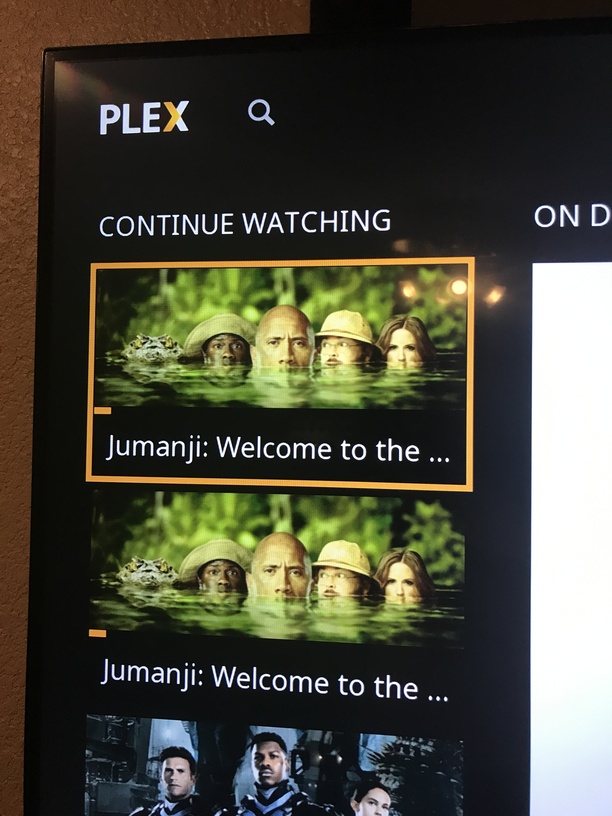
Sometimes when I watch a movie and stop part way through, then go back in it will actually show two entries in the “continue watching” screen, one for each of two version of the movie I may have. For example, this is a screen shot from my Roku Ultra app after partially watching Jumanji. I have this movie in 3D as well and BOTH now show up in my “continue watching” even though they are even in different libraries. I have all my 3D separate.
Thank you for the link. I did search prior to posting this. Perhaps not well enough… I have found many answers by searching for something because it’s likely someone else has had the same issue before!
“For Plex, these two files are the same “movie”.”
I understand your explanation over there. That does explain WHY this is happening from a technical standpoint. However, to me, movies in different libraries with different names are NOT the same movie. I have a 4K, library and have changed the name to reflect that. Same with my 3D library which is also separate. Even if they had the same title they are not the same movie. One is 4K, one is 1080 and one is 3D. Also, it does not happen for me consistently. If I have 3 copies of a movie like “Wonder Woman” for example which I have in 4K, 3D and 1080, only two of those three options may appear in my “Continue Watching” list.
IMO, if this was intended to be a “feature” that is supposed to make it easier for folks to start on one client then move to another platform, wouldn’t it make more sense to simply integrate that into a “watch version” option than to display multiple versions of the same movie on EVERYONE’S player?
I have to be honest that I have never gone from my Roku Ultra to my phone with a movie. I guess it could happen, but 100% of the time for me it has been going from one room to another on a real TV. This “feature” is an annoyance to be honest. Maybe I’m wrong, but I’d have to take a guess that it is FAR more common for folks to stop something and resume on the same or similar screen than it is to go from a 65" TV to a phone over cellular.
An additional thought: what about movies that have different lengths? For example “Batman vs Superman” had a theatrical cut (the only version made in 3D) and a director’s cut on home video. The latter is 30 minutes longer than the theatrical cut. However, based on the Plex definitions, this is the “same movie”.
Well, the workaround could be just that they stop doing it this way. lol
If you started the 1080 version for example, it is FAR more likely that you will continue that version than have the need to switch mid-stream. How many people are in a situation where they more often need to choose a different version of the same movie mid-way through it than are annoyed by having multiple versions come up every time?
Maybe it is just me, but frankly, I see no benefit to this that wouldn’t be better served by changing this to a “play version” type thing. If you had one single entry in the “continue watching” that represented the ACTUAL version you were watching then used a “play version” function, you could pick a different one if you want, but in the majority of cases people wouldn’t have to look at multiple copies of the movie in their home screen. I’d much prefer to see the actual last three DIFFERENT programs I watched than 2 or three copies of the same program, which tells me less about my current state.

 I have found many answers by searching for something because it’s likely someone else has had the same issue before!