Server Version: 1.30.2.6563
Plex Web Version: 4.87.2
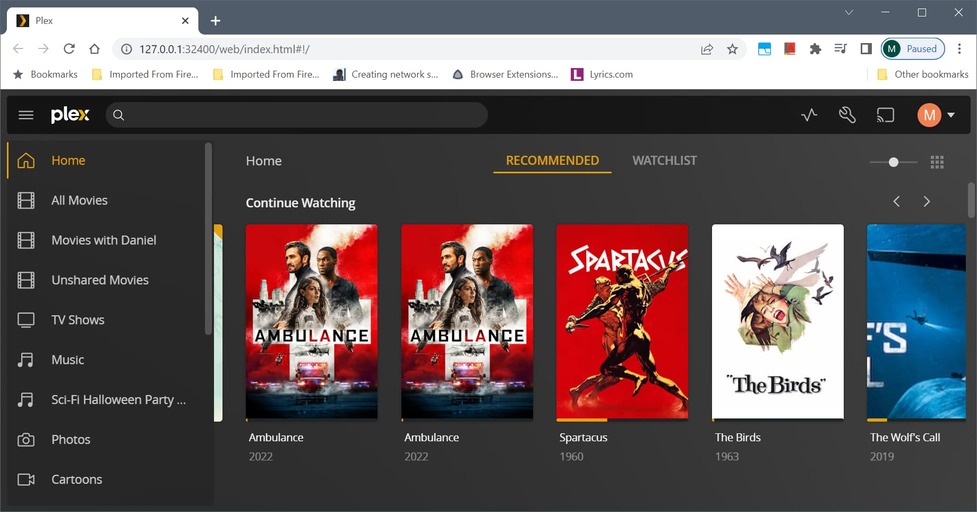
Occasionally a partially watched movie shows up twice under Continue Watching.
That happens if you have the same movie title (and no different Edition of that movie) in more than one library.
Ok, but that’s still a bug. There is only a single copy of the movie in one physical directory and that directory participates in two libraries. This is not intuitive behavior.
I’d call that a bug. By adding the same file to different libraries, you are creating two unconnected media items. With completely separate metadata.
The norm for Plex is to use a Collection for cases where you want a different view of the same data (e.g. a subset of films for a Movie Club or something) and use a Library only when the idea is for it to be different data. I assume you have separate movies in order to set permissions differently depending on the movie? I’m not sure the intended workflow for something like that.
Respectfully, I must disagree. There is only one user, me, and one movie. How can there be more than one distinct set of metadata?
Here is my use case. My son is a stuntman and has appeared in numerous movies. All of the movies in which he has appeared are in their own physical directory (and that is the only instance of the movie on the server). That directory (with his movies) is the only directory that participates in the library named “Movies with Daniel.”
This allows his movies to really pop out, as there is a library named “Movies with Daniel.” And this organization makes it easy for guests of mine to find his movies; there is no need to look for a collection holding his movies in the general “All Movies” library.
But, despite my specific (and maybe unique use case), I stand by my claim that this is not intuitive behavior. Nobody expects to see two copies of the identical movie, paused at the identical spot, in Continue Watching.
Because you added the same file/folder to more than one library.
Your use case is a prime example for the use of Collections. This will allow you to collect all appearances of your son together, without the need to create a separate library. https://support.plex.tv/articles/201273953-collections/
If you want, you can also publish this collection to the Home page so it will get the attention you seek: https://support.plex.tv/articles/publishing-collections/
Thus exposing a design flaw. If it worked the way I expect it to work, I doubt anyone would file a bug report claiming “I go to Continue Watching and I see my movie only once. I should see it n times.”
However, I do appreciate the proposed solution and I will try to exploit that. If it works as described, I will mark your suggestion as a solution.
I choose one of the movies that is in both libraries (All Movies and Movies with Daniel). From All Movies, I start the movie from the beginning and let it play until it reaches the 5 minute mark. I stop playing the movie.
I got to the other library, Movies with Daniel, select the same movie and hit play. Plex asks me if I want to start from the 5 minute mark or from the beginning. I choose to start the movie from the 5 minute mark. At the 10 minute mark, I stop the movie.
I go back to the All Movies library and again click on play. Now I am asked if I want to start from the 10 minute mark or from the beginning.
It looks like there is only a single set of metadata. So are you correct or are you mistaken when you say “with completely separate metadata?”
You are mistaken. Playback status is unified.
However metadata are not.
Here’s how to verify this: edit the movie in one of the libraries. Assign a different poster or overwrite its title or description.
Now go into the other library and look at the detail page. Your changes won’t be there.
I don’t want to hijack this thread, but it was similar enough to the issue I’m having when I searched before posting. Should this also happen with Plex Movies & Shows? I’m seeing more than one result for the same episode in continue watching, but one of the results takes me to watch the Plex streaming version.

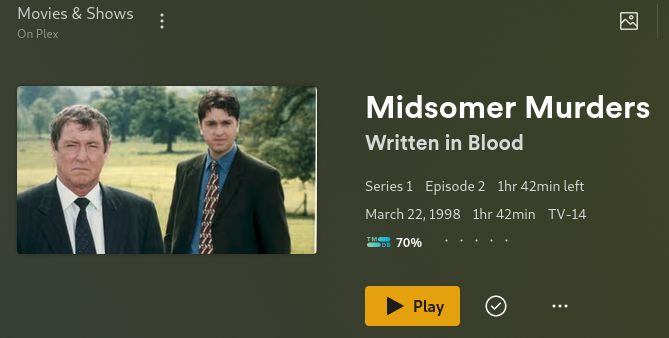
As above.
That happens if you have the same movie title (and no different Edition of that movie) in more than one library.
The on-demand library is just another library.