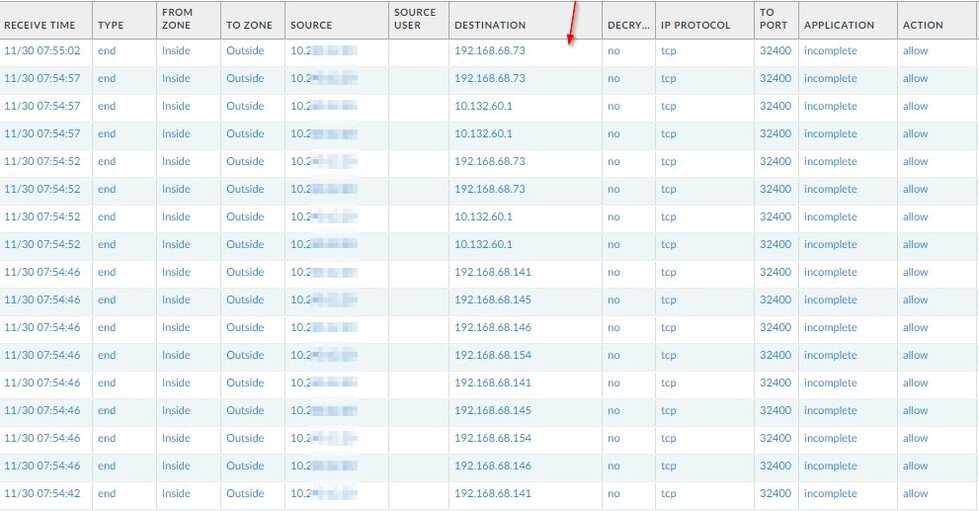
Whenever I load up my Plex Server web interface, OR if I run the Plex Media player application on another computer at home, my firewall is recording some strange RFC1918 (internal IP) traffic that I don’t have. My network is 10.2xx.xxx.0/24 and the bad traffic is 192.168.68.x or 10.132.60.1.
Since those IP’s do not exist on my home network, the firewall punts it out to the Internet. Sure, I could put in a block (which I will), but more importantly WHY is this happening? What is embedded in the Windows Plex applications to seek out these IP’s?
The traffic does not happen unless the Web interface (or player app) is running. Here are some FW logs.
No, it doesn’t. All these IPs are in the range for private networks, which makes them not routable. (For properly configured routers, that is. But this rule is even applied properly by the cheapest routers.)
So it is not of concern at all.
Now here is a possible reason:
If you have access to servers by other people, your Plex clients will always try the local IP of these servers first.
This is to make more complex routing situations work. (e.g. you could have a LAN-to-LAN bridge and a special route so you can access the other LAN directly.)
It describes using secure connections with Plex. You have to read between the lines a bit and understand what’s happening in the background to make things work. In short, they’re not indiscriminately reaching out to bare IP addresses attempting connections.
Each server to which you have been granted access, including your own, has a dedicated *.*.plex.direct URL associated with it. The second star in that string is specific to each server (and is called the CertificateUUID in the Plex settings in you Windows registry in your case). This is the base URL of a wildcard certificate provided for every Plex Media Server using secure connections.
When a client starts, and you’re signed into your account, it queries Plex (Inc.) if possible to determine the servers to which it has access. The server’s *.*.plex.direct URLs are returned, for which the client performs DNS lookups and attempts to connect (securely, if the client is configured to do so) to the IP addresses returned.
Each server normally has both local and remote connection information (if it is being shared).
You can use the information here to query your connection information based on your Plex token.
So the last question remains - this is normal behavior for everyone who has shared Plex accounts? Surely I can’t be the first person to notice it? Any way to prevent those internal IP packets if the server is remote?
No you didn’t explain it, but pshanew did. And it’s still bad coding to do that.
If I had a more complex LAN, those other RFC1918 IP’s could be on my network and they would be hit with bogus traffic. Just because I have a single hop before the Internet doesn’t mean someone else might have bad traffic being bounced around their network for no reason.
All these IPs are in the range for private networks, which makes them not routable.
Oh they are quite routable, just not to the Internet. Imagine a Plex server on a corporate network with several RFC1918 ranges. This is a bad idea.