Why i don't have a direct diffusion?

Server Version#:DSM 6.2.2-24922 Update 5
Player Version#:1.19 .3 .2843-e3c1f7bcd

hi,
I usually transcode my video before uploading them on my nas.doing that ,plex or more precisely my nas (ds918+)don’t need to do it why I’m watching videos on more people can watch videos on my Plex server.

are usually transferred my video witzh handbreak :

codec audio AAC

codec video H.264

MKV contener

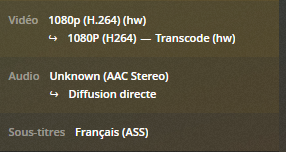
sometimes Plex telling me that’s the video I’m watching is in “direct diffusion “

As you can see

image
but sometimes Plex telling me that is transcoding my video
as you can see
image
I don’t understand why because I transcode my videos with the same preset on handbreak.

Why Plex is transcoding some video sometimes and sometimes not ?

thanks for your answer

how can i know the maximum bitrate i can apply when i transcode my video?

are you an handbrake user? what should i modifie in my preset for always having a “direct diffusion “

i’m transcoding in MKW to have multiple audio and subtitle tracks. i am not sure but i think i can’t enable Web Optimised.
is there an alternative?

is the encoder preset have any impact on the direct diffusion ? if i put the placebo option to optimize file size for example

one more time thanks a lot for your answers

Still don’t know why it’s transcoding.
Still don’t know what it’s being played on.
… and being a long-duration Hater of ASS subs - if not set right they’ll transcode on just about everything. <— Subtitles/Burn/Image Only will help, but not cure.

Here are some Bulletproof Handbrake Settings. Adjust as necessary:

maybe using MP4 will stop the transcoding and by this way i will always have the “Direct Stream”. but i really want to use MKW because with them i can use mkvtoolnix who is very powerfull. you told me to enable Web Optimised on MP4 to have the “Direct Stream” but without using MP4 i have sometime a “Direct Stream” and sometime not. and i don’t get what’s changing in this 2 kind of videos because i transcode both of them before uploading them on my nas.
what should i change in my preset to always have this “Direct Stream” without using MP4 files?

i tried to put a bitrate average to 2000 on a video who was transcoding but it don’t work

by the way what the (hw) mean ?

why do you hate ass subfiles ? i don’t think there are the probleme? no?

They would be the source of a big, fat transcode at my house, but it depends what you’re watching on.

If you turn 'em off - and it Direct Plays - you’ll know.
(disable them from the ‘Pre-Play’ Screen - so they never load - it might not switch to Direct Play on the fly - depends what you’re watching on… ahem…)

ok after verification you was true the ASS sub are the probleme. how can i convert my ass sub in srt when i transcode with handbrake ( or keep my srt sub in srt because it convert automaticly in ass)

Handbrake turns your srt subs into ASS.
Oh, yes - it’s very annoying.

Don’t use Handbrake to deal with any subs you are NOT burning in. Handbrake can burn in those subs.

Save the subs until last and either add them as sidecar srt files, or mux them in with Xmedia Recode - or something else - later… after Handbrake.

To convert your ASS subs back to srt - use Subtitle Edit - or just get some new ones: https://subscene.com/

Some clients will have a special subtitle setting in the ‘Burn’ area in the Plex App - Burn Image Formats ONLY. That may allow ASS subs - and it may not - it depends very much on the client/device.

thanks for your quick answer. for sur save the sub somewhere, before the handbrake transcode, an after readdthem should work but i spend lot of time enough and making this little manipulation will take lot of time, when i have lot of stuff to transcode.
and downloading sub from an other platform could be dangerous because some
shifts could appear. for example if you download the dvd sub and have a WebRIP video version. the time of the two version couldn’t be the same. x media record is able to transcode a media and transcoding in the same way the sub of the media in srt ? ( i don’t know i never use it)
is it also possible to make a preset who keep all the sub tracks and audio track? like on handbrake?
(btw do you know why handbrake transcode all sub in ass? it a little bit stupid to not let the choise to the user. there isn’t a comand line to fix that ?)

Tell me about it.

You can adjust your workflow - or you can buy a Shield.

A Shield will never darken my door.
I know how to deal with Handbrake and ASS.
Nothing good ever happens without hard work - or money.
Pick one.

It is the main goal of computer science to automate repetitive tasks.
I tell myself that there may be other options that you can choose before choosing to manually extract the subtitles, keep them if they are in srt or convert them if they are in ASS. and then put them back in the video they came from. or worse having to look for subtitles on the internet. pay attention to the quality of these (not that they are versions made by amateurs) and, if necessary, re-synchronize them. besides, no luck for me, but I am a French speaker and French subtitles are more difficult to find than English subtitles (although it is possible to find them on the internet for most of the time ) yes I agree that it does not take a lot of time per video whatever the synchronization could but if I have to transcode a lot of video or big series like doctor who (37 seasons), do the tasks you describe at the hands tightened really super long. in addition to the time to download video from nas on the PC, transcode, rename and re-upload. compared to find a solution like: a way to directly transcode the subtitles with the transcoding of the video would appear like a miracle solution. and knowing the vibes of the internet these last years, there is surely a way, free of rights, which would solve my problem. but I don’t know enough about it to already know this way
when you talk about shield i imagine you mean NVIDIA shield. that could be an alternative, but you will grant me that it is not a very interesting alternative knowing that I watch, most of the time, the videos from my NAS on my computer. and I can not ask everyone who has access to my plex library to buy a shield. In my opinion, it is more relevant to resolve the problem at the source
thank you again for your detailed and quick response. I don’t know how I would have done without your directions

I will dig on the side of xmedia to see how that if function and if it is possible to transcode the subtitles? why on your side have you never tried to automate the subtitles? Isn’t it boring not to be able to transcode everything at once?

Apparently you think I do this 'cause it’s fun.

Well… it’s not much fun, but it is necessary - if I want Direct Play.

Maybe if you keep posting, someone will tell you what you want to hear.
The truth is often painful - but it remains the truth.
Handbrake + Subtitles = ASS

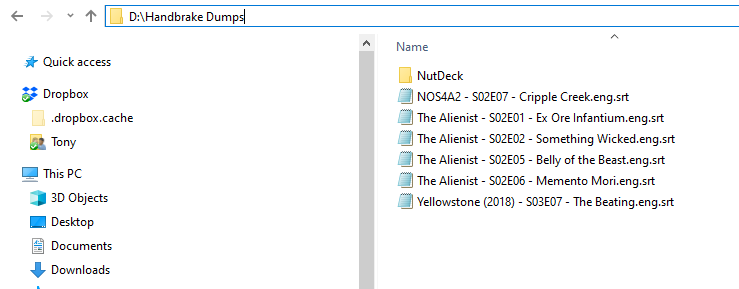
Here are the subs for the items that are in Handbrake right now:

I stripped them out of the original files with Subtitle Edit, removed all the SDH, repaired common errors, removed all the music symbols without lyrics and balanced the lines. They’re all tagged and ready to go.

The files fall out of Handbrake having had ALL AUDIO PASSED THROUGH and go immediately into Xmedia Recode for an Audio Normalization - 84db for 5.1 and 89db for 2.0 and an audio conversion to AC3 at the same time.

IF I want to mux those subs back in - I can do it at the same time I do everything else with Xmedia Recode with the last thing that will ever touch these files before they go to the libraries.

If I don’t mux the subs back in - they’re already named correctly. They can ride along - and those will ride along 'cause I’ve had a rash of ‘original embedded’ subs that don’t match the words being spoken and if I want to adjust them in Plex, they need to be external, don’t they? They ‘might be right’. I have left that discovery step out - 'cause I’m busy - if I care - I’ll check 'em and sync them in SE while they’re in there.

I don’t need to tag subs with my language to mux them in - the track is tagged with my language in Xmedia Recode. Those particular subs are external - they’re tagged.

The files are going through Xmedia Recode anyway.
Subs can be muxed in at the same time. It adds no time at all. It’s just a mux.

Xmedia Recode can encode video.
It really sucks at it tho.
Handbrake is great at encoding video.
Unfortunately it ■■■■■ up the subs.
… and there you have it.

My workflow is such that it may have a few more steps than most people do - but when I’m done - they’re going to Direct Play on everything that will ever play them.

For that Guarantee - whatever I have to do is worth it.
Do the above a few thousand times - and it’s as easy as falling off a log.

Good Luck

This topic was automatically closed 90 days after the last reply. New replies are no longer allowed.