Why is an additional "Refresh Metadata" needed sometimes?

My issue:

When I add a new TV show or a new season of a TV show and then perform a library scan (auto or manual), the episodes doesn’t get updated with online metadata. The titles of the episodes are “Episode 1, Episode 2…” and so on, and the thumbnails are just extracted from the video, rather than scraped from online.

If I select the newly added TV show or season and then perform a “Refresh Metadata” everything updates as expected. I’ve this behavior on both of my Plex Servers (NAS and NUC, both running in Docker).

However, if a new episode is added to an existing season, then the metadata is updated as expected.

Does anyone else have this problem? Can some library setting cause this, or could this be a bug in PMS?

Additional information:

I’m using PMS 1.41.0.8994.

Scanner: Plex TV Series, Agent: Plex Series

All my TV shows have a .plexmatch file, I’m using the tmdbid hint.

Enabled options (the rest is disabled):

  • Use original titles
  • Use local assets
  • Prefer local metadata (my media files have no embedded tags) - however, disabling this option didn’t help
  • Find extras
  • Only show trailers
1 Like

Just wondering if anyone else can confirm if they have this problem.

Any ideas what could be problem is appreciated! :slightly_smiling_face:

Use TVDB ID for tv shows, TMDB and IMDB for movies. The main source that Plex uses for shows is TVDB.

1 Like

The next time you add media and its not recognized (before refreshing the metadata) please upload a copy of your server logs

1 Like

Thank you @ChristianKent and @dbirch for taking your time to help me!

As @ChristianKent suggested I used the TheTVDB ID in my .plexmatch file (instead of The Movie Database ID).

tvdbid: 77847
# tmdbid: 2875

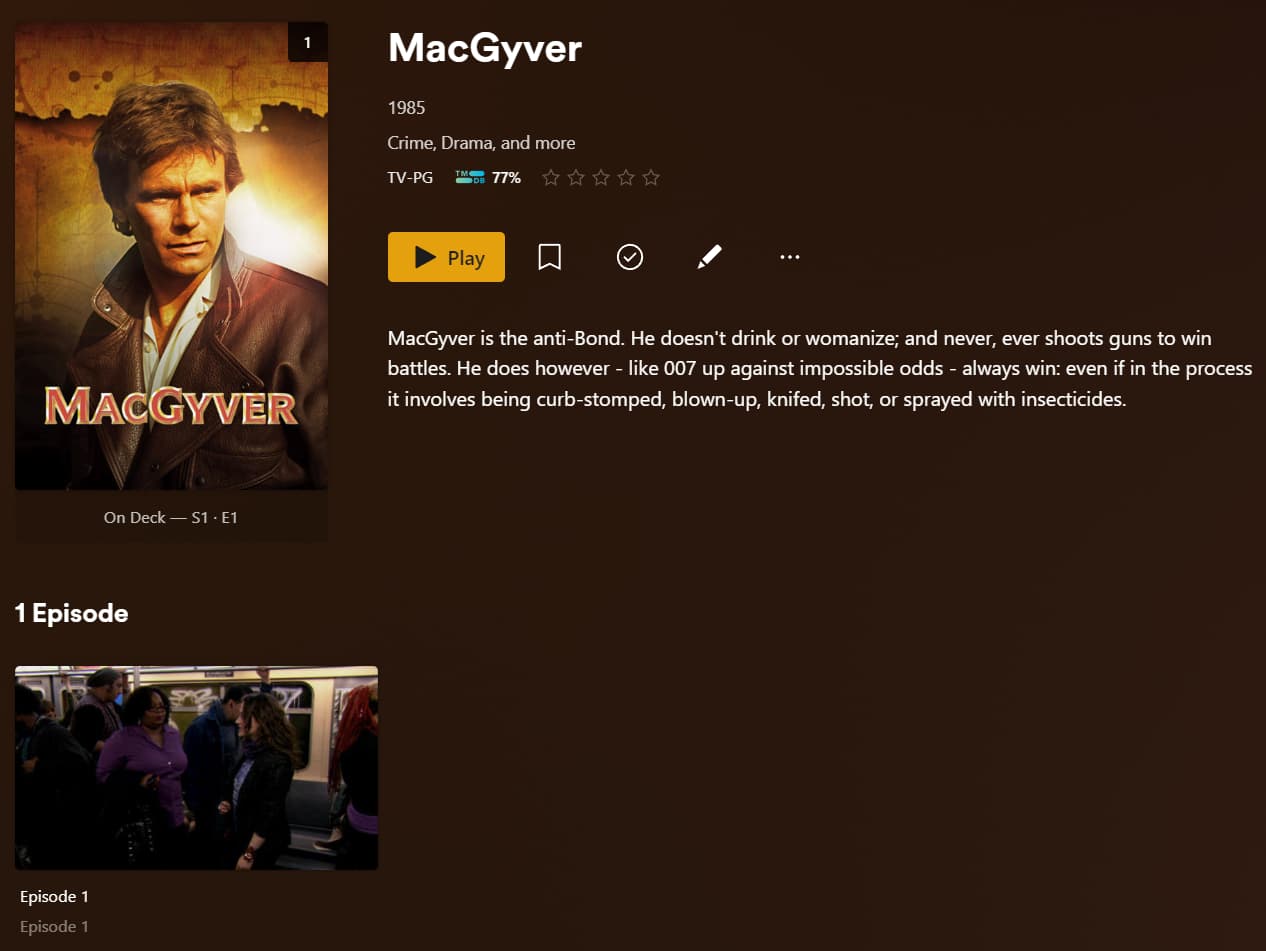
I’m using MacGyver as an example. :slightly_smiling_face:

After adding:

As you can see, episode metadata is missing. Metadata for the show is found.

If I select the show or season and perform a “Refresh Metadata”:

This is what the log looks like when adding the TV show:

Oct 21, 2024 18:16:03.062 [139857279978296] INFO - Library section 49 (Serier) will be updated because of a change in "/Media/TV Shows/Other/MacGyver (1985)"
Oct 21, 2024 18:16:08.158 [139856906586936] WARN - [Req#29bf12] QueryParser: Invalid field 'pinnedContentDirectoryID' found, ignoring.
Oct 21, 2024 18:16:08.158 [139856906586936] WARN - [Req#29bf12] QueryParser: Invalid field 'contentDirectoryID' found, ignoring.
Oct 21, 2024 18:16:08.335 [139856918756152] WARN - [Req#29bf10] SLOW QUERY: It took 330.000000 ms to retrieve 99 items.
Oct 21, 2024 18:16:08.855 [139856906586936] WARN - [Req#29bf12] QueryParser: Invalid field 'pinnedContentDirectoryID' found, ignoring.
Oct 21, 2024 18:16:08.855 [139856906586936] WARN - [Req#29bf12] QueryParser: Invalid field 'contentDirectoryID' found, ignoring.
Oct 21, 2024 18:16:09.448 [139856906586936] WARN - [Req#29bf12] QueryParser: Invalid field 'pinnedContentDirectoryID' found, ignoring.
Oct 21, 2024 18:16:09.448 [139856906586936] WARN - [Req#29bf12] QueryParser: Invalid field 'contentDirectoryID' found, ignoring.
Oct 21, 2024 18:16:13.151 [139856863865656] WARN - [Req#29bf21] QueryParser: Invalid field 'pinnedContentDirectoryID' found, ignoring.
Oct 21, 2024 18:16:13.151 [139856863865656] WARN - [Req#29bf21] QueryParser: Invalid field 'contentDirectoryID' found, ignoring.
Oct 21, 2024 18:16:13.685 [139856863865656] WARN - [Req#29bf21] QueryParser: Invalid field 'pinnedContentDirectoryID' found, ignoring.
Oct 21, 2024 18:16:13.685 [139856863865656] WARN - [Req#29bf21] QueryParser: Invalid field 'contentDirectoryID' found, ignoring.
Oct 21, 2024 18:16:14.087 [139856863865656] WARN - [Req#29bf21] QueryParser: Invalid field 'pinnedContentDirectoryID' found, ignoring.
Oct 21, 2024 18:16:14.087 [139856863865656] WARN - [Req#29bf21] QueryParser: Invalid field 'contentDirectoryID' found, ignoring.
Oct 21, 2024 18:16:14.958 [139856724151096] WARN - MDE: unable to find a working transcode profile for video stream
Oct 21, 2024 18:16:14.959 [139856724151096] WARN - MDE: unable to find a working transcode profile for video stream
Oct 21, 2024 18:16:16.173 [139856918756152] WARN - [Req#29ec23] QueryParser: Invalid field 'libraryHubsOnly' found, ignoring.
Oct 21, 2024 18:16:18.164 [139856900176696] WARN - [Req#29ebf8] QueryParser: Invalid field 'pinnedContentDirectoryID' found, ignoring.
Oct 21, 2024 18:16:18.170 [139856900176696] WARN - [Req#29ebf8] QueryParser: Invalid field 'pinnedContentDirectoryID' found, ignoring.
Oct 21, 2024 18:16:18.170 [139856900176696] WARN - [Req#29ebf8] QueryParser: Invalid field 'contentDirectoryID' found, ignoring.
Oct 21, 2024 18:16:18.832 [139856900176696] WARN - [Req#29ebf8] QueryParser: Invalid field 'pinnedContentDirectoryID' found, ignoring.
Oct 21, 2024 18:16:18.832 [139856900176696] WARN - [Req#29ebf8] QueryParser: Invalid field 'contentDirectoryID' found, ignoring.
Oct 21, 2024 18:16:19.330 [139856900176696] WARN - [Req#29ebf8] QueryParser: Invalid field 'pinnedContentDirectoryID' found, ignoring.
Oct 21, 2024 18:16:19.330 [139856900176696] WARN - [Req#29ebf8] QueryParser: Invalid field 'contentDirectoryID' found, ignoring.

Some warnings, but no errors.
Looks like your logs have debug turned off. I would make sure you have debug enabled.

1 Like

For what its worth I’ve experienced this behaviour and to be honest I’ve always felt its been designed that way.

It appears that when plex detects a new episode be it when its added as a single episode or multiple episodes across one season or multiple seasons plex will update the metadata for THE EPISODE during the scanning process. That will pull some episode specific metadata like title, summary, rating, cast etc… however it does not refresh season or show level metadata.

So as an example show/season level posters, show/season specified cast etc… will not update/refresh. during the scanning process. To get that metadata you need to refresh after the scanner has processed new content.

I’d guess its done intentionally to help with performance. Think of a show like The Simpsons (800+ episodes) or Pokemon (1000+ episodes), you really don’t want plex auto refreshing all that content just when you add a new episode. The larger refresh can be done manually or you just wait until the nightly butler task kicks via the scheduler.

1 Like

@dbirch So I enabled debug logging.

There are no errors in the log.

I can see that the matching is working:

Oct 22, 2024 17:54:27.747 [139857029073720] DEBUG - [PlexMatch] Using 'tmdb://2875' for show_guid
...
Oct 22, 2024 17:54:28.057 [139856796457784] DEBUG - [MetadataAgent/tv.plex.agents.series] Found 1 provider matches for 'MacGyver'.
Oct 22, 2024 17:54:28.057 [139856796457784] DEBUG - Scanner [Plex TV Series]: found agent match for file '/Media/TV Shows/Other/MacGyver (1985)/MacGyver S01E01.mkv': 'MacGyver'

I can also see that some metadata is being scraped from The Movie DB, such as poster and fanart for the show.

Oct 22, 2024 17:49:23.646 [139857337002808] DEBUG - [HttpClient/HCl#8533] HTTP/2.0 (0.4s) 200 response from GET https://image.tmdb.org/t/p/original/7q4u6lXXQR2wcP2FnvH9PpZ7Qir.jpg
Oct 22, 2024 17:49:23.722 [139857337002808] DEBUG - [HttpClient/HCl#8534] HTTP/2.0 (0.1s) 200 response from GET https://image.tmdb.org/t/p/original/dW58Jn2Fi29P5tC0oSJ6YWhiV9E.jpg (reused)
Oct 22, 2024 17:49:23.850 [139857337002808] DEBUG - [HttpClient/HCl#8535] HTTP/2.0 (0.1s) 200 response from GET https://metadata-static.plex.tv/1/683a142553/1e78ece912fe24b23137cfb1c5d2d08a.png
Oct 22, 2024 17:49:24.004 [139857337002808] DEBUG - [HttpClient/HCl#8536] HTTP/2.0 (0.2s) 200 response from GET https://tvthemes.plexapp.com/77847.mp3

However, episode specific metadata such as…

  • Episode name
  • Episode info
  • Episode thumbnail

… is not downloaded until I perform a manual refresh metadata.

Oct 22, 2024 17:55:47.938 [139856763607864] DEBUG - [Req#2c89e2] Activity: registered new activity 74d28df0-a887-4421-b4fa-5fd040fc743c - "Updating Metadata"
...
Oct 22, 2024 17:55:48.349 [139856763607864] DEBUG - [Req#2c89e2/HCl#8542] HTTP requesting GET https://image.tmdb.org/t/p/original/oXlghBNIsbbYGMjrcEn769ECpWp.jpg
...
Oct 22, 2024 17:55:48.711 [139856763607864] DEBUG - [Req#2c89e2/HCl#8543] HTTP requesting GET https://image.tmdb.org/t/p/original/e2XDTN8HGA8NnM3hlJiIbMiaAHk.jpg
Oct 22, 2024 17:55:48.755 [139856763607864] DEBUG - [Req#2c89e2] Loaded metadata for Pilot (ID 559533) in 51ms

This time season poster and episode thumbnail (and info) is downloaded.

I think that @anon5074910 is on to something. Maybe this is by design?

@dbirch When you add a new show, do you get episode info and thumbnails?

I would check for database corruption just in case.

1 Like

Yes, I almost never have to refresh metadata.

Are you using the modern agent and scanner or are you using a legacy agent?

1 Like

@SwiftPanda16 Thanks for your suggestion, I ran PlexDBRepair yesterday. I’m affraid it didn’t help though, the problem still exist.

Worth mentioning again is that I’ve two Plex Media Server, both running i Docker. I’ve the same behavior in both instances.

@dbirch I use the modern agent and scanner (Plex Series/Plex TV Series) on both my Plex Media Servers. So if you add a new show you get everything scraped including episode information when adding the show?

I guess I should mention that I’ve disabled the scheduled task “Refresh library metadata periodically”.

If, by design, Plex does not add all metadata when a new show is added, I guess the scheduled task could do it in hindsight. That’s why I’m asking if someone can verify that Plex actually adds all metadata (including episode names and thumbnails) when the show is added the first time.

This is due to the .plexmatch file. I had the same thing, and when that file isn’t created the metadata is added normally.

2 Likes

Interesting… I don’t use .plexmatch but I do use matching ids in my folder names. Like this Star Trek: Prodigy (2021) {tmdb-106393}. I’ll run some tests in the coming days without using the ids and see if the same happens.

2 Likes

Thank you so much @psikoh! Finally an answer, so this might very well be a bug in PMS after all.

@anon5074910 I will test this as well.

1 Like

The develop version of Sonarr now includes episode mapping in the .plexmatch file, which seems to resolve this.

1 Like

I tried to get in contact with Plex to report a bug, pointing to this forum post, this is their response:

Unfortunately, we can’t provide general support, troubleshooting, or investigation via email. We handle those requests through our support forums (at https://forums.plex.tv/), which allow for an in-depth investigation into issues by both our staff and helpful community members. Please post your own, specific details about your issue there for assistance.

Since they asked me to create a forum post I’m guessing they didn’t even read my mail. How big is the chance that someone from plex actually reads this?

Please prove me wrong people at Plex! :slightly_smiling_face:

@ChuckPa Can you provide some insight?

1 Like

The episode mapping in the plexmatch file works for series that already exist, but when adding a new series it’s still just getting the series info, and no episode info.

2 Likes

My (general) library settings are as follows (if it helps in any way):

Maybe it’s by design that the initial scan picks up the show and seasons for a newly added show, and later the periodically scanning picks up episodes.

Would be very appreciated if someone from Plex could straighten this out, so I don’t put effort in trying to solve something that’s a design choice.
