Hi all,
I’m trying to make Plex work on my older machine. It should still work fine AMD FX-8350, 16GB of RAM.
I have a video file that I optimized overnight - I used original quality expecting that Plex will adjust the format and container, hoping for Direct play, but when I cast it to my CC Ultra, it starts as direct play, in dashboard, but then immediately switches to transcode.
I updated the XML file (bellow). This is the file info from MediaInfo:
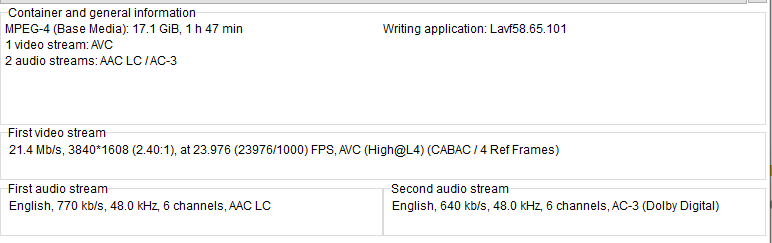
I am very new to all this, so please have patience and let me know what else to provide.
Thank you!
Here is XML
<?xml version="1.0" encoding="utf-8"?>
<Client name="Chromecast">
  <!-- Author: Plex Inc. -->
  <!-- Updated for Chromecast Ultra by ambroisemaupate. -->
  <TranscodeTargets>
    <VideoProfile protocol="http" container="mkv" context="streaming" />
    <MusicProfile container="mkv" codec="opus" />
    <PhotoProfile container="jpeg" />
    <SubtitleProfile container="ass" codec="ass" />
  </TranscodeTargets>
  <DirectPlayProfiles>
    <VideoProfile container="mkv" codec="mpeg1video,mpeg2video,mpeg4,h264,vp8,vp9,Hevc,h265" audioCodec="eac3,ac3,dca,aac,mp2,mp3,pcm" subtitleFormat="srt,ass" />
    <VideoProfile container="mp4,webm" codec="h264,mpeg4,Hevc,h265,vp8,vp9" audioCodec="eac3,ac3,dca,aac,mp2,mp3,pcm" subtitleFormat="srt,ass" />
    <MusicProfile container="mp3" codec="mp2,mp3" />
    <MusicProfile container="mp4" codec="eac3,ac3,dca,aac,mp2,mp3,pcm" />
    <MusicProfile container="flac" codec="flac" />
    <MusicProfile container="ogg" codec="vorbis" />
    <PhotoProfile container="jpeg,gif,webp,png" />
    <SubtitleProfile container="ass" codec="ass" />
    <SubtitleProfile container="srt" codec="srt" />
  </DirectPlayProfiles>
  <CodecProfiles>
    <VideoCodec name="h265,Hevc,vp9">
      <Limitations>
        <UpperBound name="video.width" value="3840"/>
        <UpperBound name="video.height" value="2176"/>
		    <UpperBound name="video.bitrate" value="75000"/>
      </Limitations>
    </VideoCodec>
    <VideoCodec name="h264,mpeg4">
      <Limitations>
        <UpperBound name="video.width" value="3840"/>
        <UpperBound name="video.height" value="2176"/>
        <UpperBound name="video.bitrate" value="75000"/>
		    <UpperBound name="video.bitDepth" value="10" />
        <UpperBound name="video.level" value="42" />
      </Limitations>
    </VideoCodec>
    <VideoAudioCodec name="mp3">
      <Limitations>
        <UpperBound name="audio.channels" value="2" />
      </Limitations>
    </VideoAudioCodec>
    <VideoAudioCodec name="aac">
      <Limitations>
        <UpperBound name="audio.channels" value="2" />
      </Limitations>
    </VideoAudioCodec>
    <VideoAudioCodec name="ac3">
      <Limitations>
        <UpperBound name="audio.channels" value="6" />
      </Limitations>
    </VideoAudioCodec>
    <VideoAudioCodec name="eac3">
      <Limitations>
        <UpperBound name="audio.channels" value="6" />
      </Limitations>
    </VideoAudioCodec>
    <VideoAudioCodec name="dca">
      <Limitations>
        <UpperBound name="audio.channels" value="6" />
      </Limitations>
    </VideoAudioCodec>
  </CodecProfiles>
</Client>
[mod-edit: fixed xml formatting]
Server Version#: 1.28.2.6151
Player Version#:
