Server Version#: 1.23.6.4881
Player Version#: 1.33.0.2444-a220eae4
I recently repurposed an ITX computer I had. It’s running Windows 10, an Intel i7 7700k with 16GB of DDR4 3200Mhz ram. No GPU, just using the integrated HD 630 graphics on the 7700k.
The purpose of this machine is to simply stream content from my Plex server to my TV.
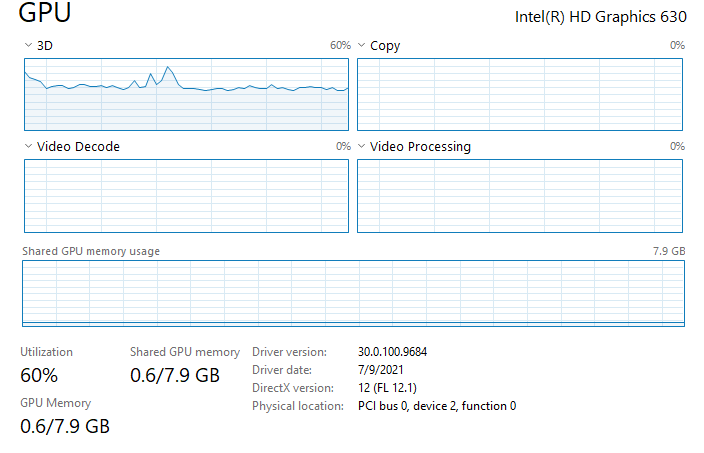
It streams everything just fine, but when it comes to 4K/UHD content (doesn’t matter if it’s super high bitrate REMUX or just some standard quality 4K/UHD content), it’s very choppy. Also note this is all “Direct Play”. The iGPU is shooting to 99-100% usage.
I understand the 7700k is an older CPU these days being 4ish generations old, but it use to be my main gaming PC. Is the 7700k just not capable to play 4k content via Plex? I can play all of these files in VLC without a single issue.
I’ve tried this with and without hardware encoding on… but once again I’m unsure why this matters if it’s direct play. Does VLC just handle HEVC content better than Plex for Windows does?
The iGPU should be able to deal with “regular” HEVC 4K. The CPU could be overwhelmed if there’s some elements in your files that the iGPU cannot deal with (e.g. burning in subtitles) – this still requires your CPU and that’s just at the edge of 4K transcoding.
The i7-7700K has a passmark score of approx. 12000. That’s the benchmark to transcode one 4K SDR to 1080p.
Can you double-check this from your server’s dashboard?
As you can see my GPU is through the roof. But if I play that same file in VLC, barely anything is touched. Even if I turn off subtitles, it changes nothing.
Ok… this is from the playback device, isn’t it?
It appears the Plex Media Server will stream the original format but the machine obviously needs to decode it. Given the spike in GPU usage, I take it you have enabled Settings > Plex for Windows > Player > Video – Use Hardware Decoding?
I can turn on logs. I run it in docker on unraid. So I’m guessing you want the logs from the server? Or are there client side logs I can generate that you’d rather have?
Also, in case I wasn’t clear in my original post. I run PMS on my actual unraid server, not the same machine I’m streaming too. This is just an ITX build I put in the living room since it use to be my gaming PC. And in case it helps at all, both systems are connected via Ethernet. No wifi.
Looks like there’s something weird going on with your iGPU. I cannot really place those errors – let me ask. I suppose it shouldn’t keep the GPU busy like this if nothing is playing and once it’s cache is full.
Do you happen to have a native mpv player/app on your Windows machine to verify if this issue happens on that as well?
You said you get the same result independent if hw decoding is enabled in Plex for Windows or not? Just double-checking because the log was pointing out it was disabled.
The same 4K media file plays fine on VLC, MPV or Films & TV.
With Plex it is choppy and the GPU is 100%. The only workaround to make Plex usable is to change the Windows Graphics performance preference for Plex to use my dedicated GPU.
I also have this problem with both Plex HTPC and Plex for Windows.
My hardware is i7 7500u with integrated intel HD620.
Playback is completely fine i PMP and in MPV. I have found that both PMP and MPV use hardware decoding (d2d11va), but Plex HTPC and Plex for windows is not using hardware to decode (I think it fails), and toggling the “Use Hardware Decoding” doesn’t do anything either way (on or off).
Even though I am not the thread starter, and I assue you are asking him, I can confirm that I have tried MPV 0.33 (downloaded from mpv.io) and the video is not stuttering, because mpv is hardware decoding the videofile with hwdec=d2d11va. Plex for windows (or Plex HTPC) is not HW decoding anything as far as i can tell.