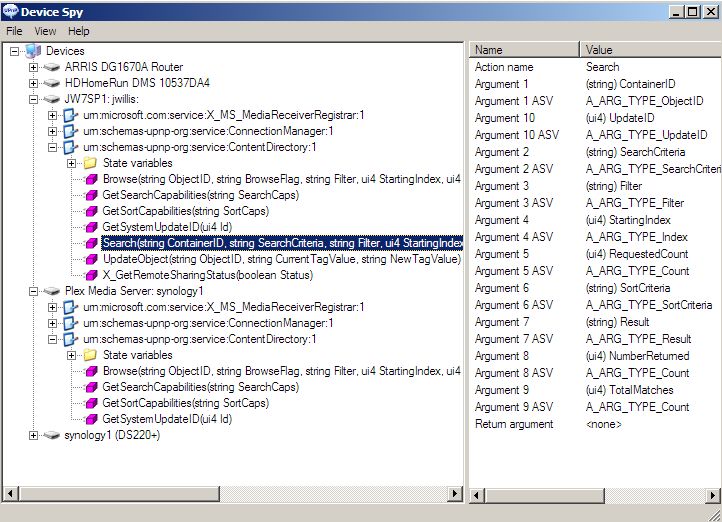
The current Plex server only implements a [portion] of the Content Directory Service functions that Windows Media Player uses to find content to show in the subfolders in Windows Media Player.
There are two “big” CDS functions; [Browse] and [Search].
Plex currently only supports the [Browse] function, it has a [Search] function stubbed in, but the code is not complete, it returns “null” for now.
Windows Media Player defaults to using the [Search] function to return a folder listing. Right now Plex always returns “null” for everything, so the subfolders appear empty.
Windows Media Player is a convenient and preinstalled DLNA client for most Windows users, you don’t have to go out and download anything and deal with the hassel of installing it.So it is the natural Plex client for most Windows users.
But there are other DLNA clients for Windows you can dowload and install (that don’t look as good or work as well as Windows Media Player) but they default to using the CDS [Browse] function to find content and will show media in the subfolders.
MediaMonkey is the first DLNA server and client I can think of that works and connects to Plex and shows all your content.
MediaMonkey will also serve all your content over DLNA and supports both CDS functions [Browse] and [Search] so Windows Media Player will also show content in subfolders when connecting to a MediaMonkey DLNA server.
But its doesn’t look as good or appear as reliable or native to Windows as Windows Media Player.
I would prefer they just did the extra coding effort and added the CDS [Search] function to the next version of Plex and everything would just work, nice and simple.
There isn’t a way that I know to change the Windows Media Player default behavior from using CDS [Search] to using CDS [Browse]. I rather think its because non-intuitively its a better Browse function than DLNA CDS [Browse] for the things you want to do in Windows Media Player.
CDS [Search] encourages fast and targeted queries, and can be tailored to the purpose. CDS [Browse] strums the entire file system and pulls all that data into a space where you have to trim it down… which is kind of wasteful and hard on the system… its also slow.
But when they were looking at DLNA and thinking about adding it to Plex, they probably were not familiar with it and its history, so they picked the first function that seemed to fit what they were trying to do and now they’ve delivered something that [sort of works] and may have less time to invest in refining their previous choice. So here we are.
They have it stubbed in place… they don’t have to refactor everything… they could just make it sort of a synonym for CDS [Browse] and kind of do the same thing… then Windows Media Player would work… but a true CDS [Search] function could be faster.
Those top level folders Windows Media Player is displaying; in case your wondering… are “media type folders” autogenerated by Windows Media Player to serve as a scaffolding to insert other media and subfolders defined by “type” when they are returned by the CDS [Search] function.
Its not like WMP is going back and forth using [Browse] and then [Search], it always uses CDS [Search].
Until recently, many DLNA clients were coded lazily and defaulted to supporting only one or the other function but not both… now we’re starting to get a few clients like MediaMonkey and DLNA Browser that support both functions.
The reason why was a mystery to me so I went and dug up a 2011 Upnp developers tool kit to Exercise the functions of the Plex server… and that functionary Christmas Tree was kind of bare… compared to the Full Service Windows Media Player.