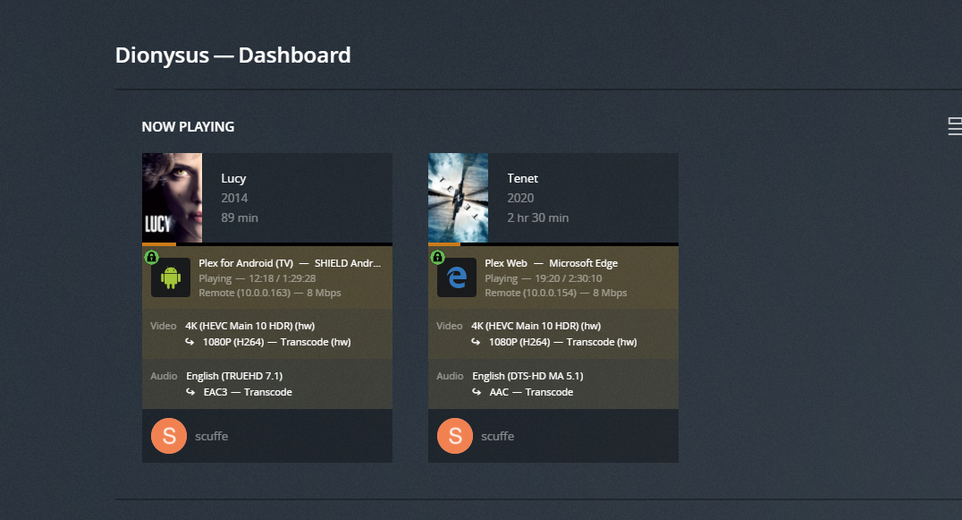
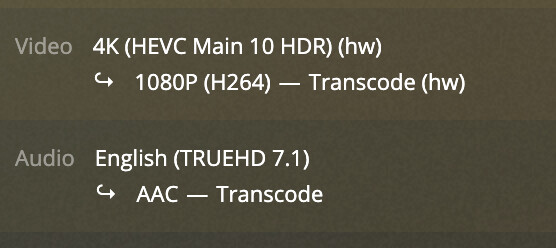
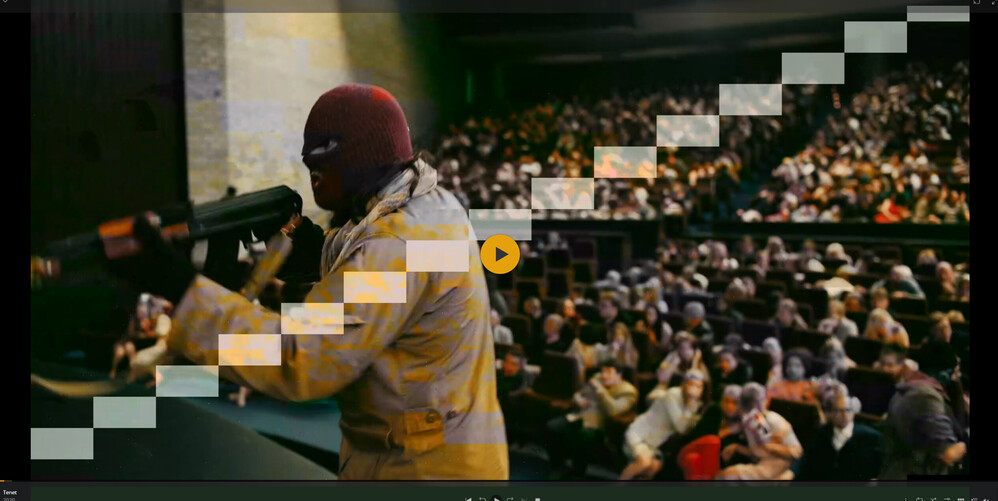
Working Rocket Lake GPU with HDR the easy way both docker and bare metal!

@scuffe This post was super helpful to me! I have the exact same processor that you have and I’m running 21.04 (upgraded from 20.04) and now have hw transcoding working, but now I have the flickering green block artifacts. The kernel upgrade alone didn’t resolve that. I do not have guc enabled so I’ll have to give that a try. I can also try your dockerfile and see if that helps.

I’m very new to Plex and Docker but eager to help get this resolved.

@scuffe I tried installing the neo libraries on the host and using your dockerfile but I still have the artifacts. But I’m not entirely sure whether I did it all right.

The full process is:

Fresh install ubuntu 21.04, apt update, apt upgrade -y, follow the steps to install the latest intel neo packages, install docker, launch the container following the same steps listed on dockerhub for the plex container just change the image repository to the one i published.

That being said, i’m getting static now and occasional artifacts mainly when something transitions quickly and it’s dark. The last version of the neo drivers and the previous revision of plex worked almost perfect so something changed but i can’t say what.

@scuffe I tried a fresh install of 21.04, applied updates, installed latest versions of neo (tried both apt and dpkg), and used your docker image (via docker-compose). Yet I have the same results. I wonder if my motherboard and/or chipset might also be contributing to the problem (ASRock Z590M-ITX/ax).

I wonder if the docker image is using the host’s intel libraries.

I updated the neo runtimes to the latest version both on my host and in the docker container. I’m still seeing some static on the screen but performance wise its better than it was before. I’m able to play 4k content with hardware transcode W/HDR tone mapping enabled and on my nvidia shield it actually plays and doesn’t stop to buffer constantly. Neo seems to be dropping new releases every week or two so i’ll try to keep on top of the latest version.

Since this rev seems to be working better i’m going to leave is as latest in dockerhub but for future updates i’ll start tagging then with the neo version so it’s easier to roll back if needed.

I’m running a H510 chipset

Here are the full proc and motherboard specs for my box:
Processor: Intel Core i511400 Processor 12M Cache up to 4.40 GHz Product Specifications
Motherboard: H510M-A PRO (msi.com)

Since i’ve had ok luck and have a somewhat “bleeding edge” box i’m running stuff on If there are test/debug builds that you want to try out I’m willing to try them out and repot back/upload logs. I’m running the container in k8s (1.21) with cri-o (1.21) as the container runtime, GPU is added via the k8s intel gpu plugin (0.21) Worst case if something happens to my library directory it’s rsynced to the nas daily and the whole box can be rebuild with a handful of scripts.

Here are the full proc and motherboard specs for my box:
Processor: Intel Core i511400 Processor 12M Cache up to 4.40 GHz Product Specifications
Motherboard: H510M-A PRO (msi.com)

Latest CPU/GPU stats

@scuffe

What the folks will want to know, cutting right to the chase ----

Does it do multiple HEVC HDR transcodes with HW tonemapping – without locking up ?

Yes. I’m getting short buffering chunks on the 2nd stream but both continued to play and it didn’t lock anything up. The CPU usage doubles vs the single stream, active memory up ~1gb. Also if it’s worth noting transcode is set to 60 second throttle and the transcode directory is on an NVME.


IF it’s buffering – then it’s not a solution. That buffering could indeed be the GPU locking up but recovering.

A valid solution, in the purest sense, must allow at least one full playback without any interruptions whatsoever (how I spec NAS system on the NAS Compatibility Guide)

If i only play a single transcode I can play a full file without buffering. That showed up when i started the 2nd stream, also it seems that the buffering only shows up on the 2nd transcode session and the first one continues to play. The static i’m chalking up to the near constant changes in neo mixed with the kernel. I’ll take a longer look at the upstream kernels and might try to compile the bleeding edge to see if it makes any difference.

I haven’t read your NAS guide but i’ll check it out too!

That GPU (a RocketLake) has enough GPU power to do 6 full streams without flinching because even an i7-7700 can do that much.

I still think the kernel / i915 is hanging up. This is far better but not quite there yet.

Good news folks, I managed to make everything work perfectly. Here’re the steps:

  1. For ubuntu 20.04 LTS, install the OEM kernel
  2. Or alternatively, use ubuntu 21.04 (with its stock kernel)
  3. No need to install any userspace lib on host (no need to install/upgrade neo on host)
  4. create a shell script, I’d call it neo.sh here but you may name in anyway you want.
  5. put the following content in neo.sh:
#!/usr/bin/env bash
set -ex

# install latest intel graphic libs
# use latest release at https://github.com/intel/compute-runtime/releases
mkdir /neo
cd /neo
curl -O -L https://github.com/intel/compute-runtime/releases/download/21.28.20343/intel-gmmlib_21.2.1_amd64.deb
curl -O -L https://github.com/intel/intel-graphics-compiler/releases/download/igc-1.0.7862/intel-igc-core_1.0.7862_amd64.deb
curl -O -L https://github.com/intel/intel-graphics-compiler/releases/download/igc-1.0.7862/intel-igc-opencl_1.0.7862_amd64.deb
curl -O -L https://github.com/intel/compute-runtime/releases/download/21.28.20343/intel-opencl_21.28.20343_amd64.deb
curl -O -L https://github.com/intel/compute-runtime/releases/download/21.28.20343/intel-ocloc_21.28.20343_amd64.deb
curl -O -L https://github.com/intel/compute-runtime/releases/download/21.28.20343/intel-level-zero-gpu_1.1.20343_amd64.deb
apt install -y ./*.deb
  1. give neo.sh execute permission (chmod a+x neo.sh)
  2. launch your plex container with neo.sh mounted as initialize script. For docker-compose, add something like this
  plex:
    image: plexinc/pms-docker
    volumes:
      - ./neo.sh:/etc/cont-init.d/neo.sh

That’s all, enjoy!

HEVC HDR 4K content transcodes perfectly, without any green artifacts.

More details

About kernel choice

Since we’re running with docker, what really matters is the host kernel & HW drivers. Userspace libs (like the neo libs installed by neo.sh) installed on the host typically don’t make any difference (that’s the whole point of docker)

With that said, as long as we have a relevantly new kernel that supports the GPU, we’re good. Stock 20.04 kernel is too old, but both 20.04 OEM kernel and 21.04 kernel are new enough for the job.

Why installing all NEO packages

After dealing with the kernel, we need to find the right userspace libs for transcoding. Those are the NEO packages in this case. Here’s what I’ve done that let me to the solution.

first try – failed

With the libs shipped with plexinc/pms-docker, the kernel driver hangs:

# dmesg | grep i915
[251550.794602] i915 0000:00:02.0: [drm] GPU HANG: ecode 12:1:8ed9fff2, in Plex Transcoder [1533347]
[251550.896030] i915 0000:00:02.0: [drm] Resetting rcs0 for stopped heartbeat on rcs0
[251550.896078] i915 0000:00:02.0: [drm] Plex Transcoder[1533347 context reset due to GPU hang

second try – failed

I upgrade the NEO libs that pre-installed in the plexinc/pms-docker images by re-config these environment variables. (just like what @scuffe did in his image)

INTEL_NEO_VERSION=""
INTEL_IGC_VERSION=""
INTEL_GMMLIB_VERSION=""

I made sure that these libs are the only things changed compare with plexinc/pms-docker image. For the sake of controlling variables.

With these adjustments, i915 stopped complaining. However, plex log shows these

beignet-opencl-icd: no supported GPU found, this is probably the wrong opencl-icd package for this hardware
(If you have multiple ICDs installed and OpenCL works, you can ignore this message)

Despites the logs, hardware transcoding are still activated but the transcoding results are full of green artifacts:

third try – success

Since plex logs this is probably the wrong opencl-icd package for this hardware, I just tried to install all neo packages instead of the selected ones in plexinc/pms-docker. That’s what neo.sh does. And turns out this time everything worked.

I just tested your suggestion and this is what i get. I had similar results above before i changed to the 21.04 based image. I’m basically doing the same thing by not installing any of the old intel libs and just running the latest neo runtimes.

So I’ve been following this and a few other threads for a while. This thread has gotten me a bit further in that I’m now able to transcode using hardware without visual glitches. However, I’m running into buffer issues maybe every 30s on 4K content. Doesn’t matter output resolution. On some of the content this happens in under 10 seconds.

One other very odd behaviour. In chrome, it only uses HW transcoding with HDR if I turn on subtitles. Without subs, it uses software only. Using Android plex client, HDR is stuck in software transcoding no matter what and HW transcoding is fine with HDR off.

There are some interesting behaviours in CPU and GPU usage I noticed (all in chrome browser on Linux):

  • 4K+HDR+Subs: 300% CPU, 8%/390Mhz GPU (Buffering every few seconds to 30 seconds)
  • 2x 4K+HDR+Subs: Double above numbers, either stream is playable in any form
  • 4K+HDR: 700%CPU, 0%GPU (Software transcoding only and seems a bit faster but eventual buffering)
  • 4K+Subs: 150% CPU, 14%/500Mhz GPU (fewer buffering)
  • 4K: 50% CPU, 52%/1200Mhz GPU (some studders here and there, drops down to under 20% CPU and intermittent 20% GPU usage at 500Mhz)

Based on above, following are my observations:

  • HDR and Subtitles both require CPU processing and can’t feed the GPU fast enough based on GPU load and frequency under different transcoding scenarios (Had Celeron G3930 previously and it could handle at least 3 streams with CPU handling HDR)
  • Issue where HDR without subs doesn’t use HW transcoding
  • Without HDR/Subs, it’s feeding the GPU quickly enough and for the time being I’m going to say the random studdering is an issue with my wifi where if my output resolution is dropped it seems fine

Ran another test to confirm not an issue in GPU encoding with HW decoding only (HW encoding disabled)

  • 4K+HDR: 350% CPU, 6%/300Mhz GPU. Same buffering behaviour of every few seconds to 30 seconds depending on source content bitrate
  • 4K: 140% CPU, 11%/530Mhz GPU. No buffer issue. Seems to be loading GPU with decoding more without HDR enabled.

Continuing further… Software only with HDR: 900% CPU which drops to around 300% after a couple minutes with no buffer issues. Adding subtitles: 500% CPU instead of 900% so there’s also a subtitle bottleneck it seems.

Does that mean there’s some issue in HDR tone mapping with this GPU somewhere maybe in decoding?

Here’s what I’m running now:

i5-11500
Asus PRIME B560M-A
16GB RAM (2x8GB)
6x8TB Hardware RAID5 video storage
Samsung 860 Evo SSD OS storage (and Plex cache)
Ubuntu 21.04 (upgraded from 20.04)
5.11.0-25-generic Kernel
Not using Docker
Plex 1.23.2.4656 (also tested latest 1.23.5.4862 with same results)
Latest Intel Neo libs as of today

I’ve been a bit behind on testing and replying to messages. I built out the container with NEO 21.30.20482 and pushed it to dockerhub under tag 20482. The performance of this release is better than the last one. I’m able to transcode 2 streams in parallel, i pushed it up to 4 and then it started to get hangs on 1-2 of the streams at different intervals. It made it look like the GPU was switching between tasks and when it switched away from one of the streams it would buffer for 3ish seconds then start back up. I’m testing out kernel 5.13.8 and DRM-Tip today and some point to see if any changes have happened on that front. The precious tests of 5.13 wouldn’t properly transcode with HDR enabled and DRM-Tip would cause the transcoder to lock up and the stream would never start. If either have any change in behavior I’ll post an update.

Hi ericxw,
Thanks for the detailed info. I’ll run through the same tests later today and post my results to see if they line up with what your seeing. I’ve been using a variety of devices to test with, Edge browser (chrome based), chrome, nvidia shield, roku’s (2 different versions), and Vizio smartcast. The specs of the box running plex in my case are:

CPU:
vendor_id : GenuineIntel
cpu family : 6
model : 167
model name : 11th Gen Intel(R) Core™ i5-11400 @ 2.60GHz
stepping : 1
microcode : 0x40

GPU:
Intel Corporation Device 4c8b (rev 04) 256M]

Motherboard:
MSI H510M-A PRO LGA 1200 Intel H510
Overview H510M-A PRO | MSI USA

Ram:
G.SKILL Ripjaws V Series 16GB (2 x 8GB) Dual Channel

Storage:
Local:: Inland Professional 256GB SSD 3D TLC NAND PCIe Gen 3 x4 NVMe M.2 (OS/App/Transcode)
Remote: Synology DS2415+ DSM7 with volume in SHR-1 (video storage)

Network: gig all on the same vlan with jumbo frames (9k)

OS/App:
Ubuntu 21.04 base install
Kernel 5-11.0-25-generic
CRI-o 1.21.0
kubernetes 1.21.0
Plex: always latest version for tests
Intel NEO: always latest version of tests

Yesterday, my ubuntu server lts 20.04.2 received the HWE 5.11 kernel, and i thought…“yayyy, my green artifacts while transcoding using hw will be gone”…and know what? it’s still happening… I think mid august 20.04.3 will be released…that’s my last hope… if not, I really don’t know who needs to solve this issue…

My HW configuration
lshw -c CPU,Display
  *-cpu
       description: CPU
       product: 11th Gen Intel(R) Core(TM) i5-11600K @ 3.90GHz
       vendor: Intel Corp.
       physical id: 5e
       bus info: cpu@0
       version: 11th Gen Intel(R) Core(TM) i5-11600K @ 3.90GHz
       serial: To Be Filled By O.E.M.
       slot: LGA1200
       size: 4600MHz
       capacity: 4900MHz
       width: 64 bits
       clock: 100MHz
       capabilities: lm fpu fpu_exception wp vme de pse tsc msr pae mce cx8 apic sep mtrr pge mca cmov pat pse36 clflush dts acpi mmx fxsr sse sse2 ss ht tm pbe syscall nx pdpe1gb rdtscp x86-64 constant_tsc art arch_perfmon pebs bts rep_good nopl xtopology nonstop_tsc cpuid aperfmperf tsc_known_freq pni pclmulqdq dtes64 monitor ds_cpl vmx smx est tm2 ssse3 sdbg fma cx16 xtpr pdcm pcid sse4_1 sse4_2 x2apic movbe popcnt tsc_deadline_timer aes xsave avx f16c rdrand lahf_lm abm 3dnowprefetch cpuid_fault epb invpcid_single ssbd ibrs ibpb stibp ibrs_enhanced tpr_shadow vnmi flexpriority ept vpid ept_ad fsgsbase tsc_adjust bmi1 avx2 smep bmi2 erms invpcid mpx avx512f avx512dq rdseed adx smap avx512ifma clflushopt intel_pt avx512cd sha_ni avx512bw avx512vl xsaveopt xsavec xgetbv1 xsaves dtherm ida arat pln pts hwp hwp_notify hwp_act_window hwp_epp hwp_pkg_req avx512vbmi umip pku ospke avx512_vbmi2 gfni vaes vpclmulqdq avx512_vnni avx512_bitalg avx512_vpopcntdq rdpid fsrm md_clear flush_l1d arch_capabilities cpufreq
       configuration: cores=6 enabledcores=6 threads=12
  *-display
       description: VGA compatible controller
       product: Intel Corporation
       vendor: Intel Corporation
       physical id: 2
       bus info: pci@0000:00:02.0
       logical name: /dev/fb0
       version: 04
       width: 64 bits
       clock: 33MHz
       capabilities: pciexpress msi pm vga_controller bus_master cap_list rom fb
       configuration: depth=32 driver=i915 latency=0 mode=1680x1050 visual=truecolor xres=1680 yres=1050
       resources: iomemory:600-5ff iomemory:400-3ff irq:165 memory:6000000000-6000ffffff memory:4000000000-400fffffff ioport:5000(size=64) memory:c0000-dffff
lshw
  *-core
       description: Motherboard
       product: PRIME H570M-PLUS
       vendor: ASUSTeK COMPUTER INC.
       physical id: 0
       version: Rev 1.xx
       serial:
       slot: Default string
     *-firmware
          description: BIOS
          vendor: American Megatrends Inc.
          physical id: 0
          version: 0820
          date: 04/27/2021
          size: 64KiB
          capacity: 24MiB
          capabilities: pci upgrade shadowing cdboot bootselect socketedrom edd int13floppynec int13floppytoshiba int13floppy360 int13floppy1200 int13floppy720 int13floppy2880 int5printscreen int14serial int17printer int10video usb biosbootspecification uefi
My Software configuration
 uname -a
Linux harbor 5.11.0-22-generic #23-Ubuntu SMP Thu Jun 17 00:34:23 UTC 2021 x86_64 x86_64 x86_64 GNU/Linux
lsmod
Module                  Size  Used by
xt_multiport           20480  6
nft_limit              16384  2
xt_limit               16384  0
xt_comment             16384  31
veth                   28672  0
xt_nat                 16384  94
xt_tcpudp              20480  123
xt_conntrack           16384  9
nft_chain_nat          16384  44
xt_MASQUERADE          20480  22
nf_nat                 49152  3 xt_nat,nft_chain_nat,xt_MASQUERADE
nf_conntrack_netlink    49152  0
nf_conntrack          147456  5 xt_conntrack,nf_nat,xt_nat,nf_conntrack_netlink,xt_MASQUERADE
nf_defrag_ipv6         24576  1 nf_conntrack
nf_defrag_ipv4         16384  1 nf_conntrack
xfrm_user              40960  1
xfrm_algo              16384  1 xfrm_user
nft_counter            16384  255
xt_addrtype            16384  3
nft_compat             20480  290
nf_tables             212992  1060 nft_compat,nft_counter,nft_chain_nat,nft_limit
nfnetlink              20480  4 nft_compat,nf_conntrack_netlink,nf_tables
br_netfilter           28672  0
overlay               131072  24
nls_iso8859_1          16384  1
bridge                249856  1 br_netfilter
dm_multipath           36864  0
stp                    16384  1 bridge
llc                    16384  2 bridge,stp
scsi_dh_rdac           16384  0
scsi_dh_emc            16384  0
scsi_dh_alua           20480  0
snd_hda_codec_hdmi     65536  1
iwlmvm                421888  0
snd_sof_pci            24576  0
snd_sof_intel_hda_common    94208  1 snd_sof_pci
mac80211             1028096  1 iwlmvm
snd_soc_hdac_hda       24576  1 snd_sof_intel_hda_common
snd_sof_intel_hda      20480  1 snd_sof_intel_hda_common
snd_sof_intel_byt      28672  1 snd_sof_pci
snd_hda_codec_realtek   139264  1
snd_sof_intel_ipc      20480  1 snd_sof_intel_byt
snd_hda_codec_generic    81920  1 snd_hda_codec_realtek
snd_sof               131072  4 snd_sof_pci,snd_sof_intel_hda_common,snd_sof_intel_byt,snd_sof_intel_ipc
libarc4                16384  1 mac80211
snd_sof_xtensa_dsp     16384  2 snd_sof_intel_hda_common,snd_sof_intel_byt
snd_hda_ext_core       32768  3 snd_sof_intel_hda_common,snd_soc_hdac_hda,snd_sof_intel_hda
sch_fq_codel           20480  34
snd_soc_acpi_intel_match    49152  2 snd_sof_pci,snd_sof_intel_hda_common
iwlwifi               376832  1 iwlmvm
snd_soc_acpi           16384  3 snd_soc_acpi_intel_match,snd_sof_intel_hda_common,snd_sof_intel_byt
ledtrig_audio          16384  2 snd_hda_codec_generic,snd_sof
intel_rapl_msr         20480  0
intel_rapl_common      28672  1 intel_rapl_msr
btusb                  61440  0
bochs_drm              16384  0
snd_hda_intel          53248  0
drm_vram_helper        24576  1 bochs_drm
x86_pkg_temp_thermal    20480  0
snd_intel_dspcfg       28672  3 snd_hda_intel,snd_sof_pci,snd_sof_intel_hda_common
btrtl                  24576  1 btusb
intel_powerclamp       20480  0
soundwire_intel        40960  2 snd_sof_intel_hda_common,snd_intel_dspcfg
btbcm                  16384  1 btusb
qxl                    61440  0
coretemp               20480  0
btintel                28672  1 btusb
drm_ttm_helper         16384  2 qxl,drm_vram_helper
soundwire_generic_allocation    16384  1 soundwire_intel
soundwire_cadence      32768  1 soundwire_intel
ttm                    73728  3 qxl,drm_vram_helper,drm_ttm_helper
mei_hdcp               24576  0
snd_hda_codec         147456  5 snd_hda_codec_generic,snd_hda_codec_hdmi,snd_hda_intel,snd_hda_codec_realtek,snd_soc_hdac_hda
kvm_intel             286720  0
bluetooth             655360  5 btrtl,btintel,btbcm,btusb
cfg80211              892928  3 iwlmvm,iwlwifi,mac80211
snd_hda_core           94208  9 snd_hda_codec_generic,snd_hda_codec_hdmi,snd_hda_intel,snd_hda_ext_core,snd_hda_codec,snd_hda_codec_realtek,snd_sof_intel_hda_common,snd_soc_hdac_hda,snd_sof_intel_hda
crct10dif_pclmul       16384  1
eeepc_wmi              16384  0
input_leds             16384  0
asus_wmi               40960  1 eeepc_wmi
ghash_clmulni_intel    16384  0
snd_hwdep              16384  1 snd_hda_codec
ecdh_generic           16384  1 bluetooth
ecc                    32768  1 ecdh_generic
intel_cstate           20480  0
ee1004                 20480  0
soundwire_bus          77824  3 soundwire_intel,soundwire_generic_allocation,soundwire_cadence
sparse_keymap          16384  1 asus_wmi
snd_soc_core          294912  4 soundwire_intel,snd_sof,snd_sof_intel_hda_common,snd_soc_hdac_hda
snd_compress           28672  1 snd_soc_core
ac97_bus               16384  1 snd_soc_core
snd_pcm_dmaengine      16384  1 snd_soc_core
snd_pcm               118784  11 snd_hda_codec_hdmi,snd_hda_intel,snd_hda_codec,soundwire_intel,snd_sof,snd_sof_intel_hda_common,snd_sof_intel_ipc,snd_compress,snd_soc_core,snd_hda_core,snd_pcm_dmaengine
snd_timer              40960  1 snd_pcm
snd                    94208  10 snd_hda_codec_generic,snd_hda_codec_hdmi,snd_hwdep,snd_hda_intel,snd_hda_codec,snd_hda_codec_realtek,snd_timer,snd_compress,snd_soc_core,snd_pcm
soundcore              16384  1 snd
mei_me                 40960  1
mei                   126976  3 mei_hdcp,mei_me
mac_hid                16384  0
wmi_bmof               16384  0
efi_pstore             16384  0
acpi_pad              184320  0
acpi_tad               20480  0
i915                 2371584  3
vfio_mdev              16384  0
mdev                   28672  1 vfio_mdev
drm_kms_helper        245760  4 qxl,drm_vram_helper,bochs_drm,i915
cec                    53248  2 drm_kms_helper,i915
rc_core                57344  1 cec
fb_sys_fops            16384  1 drm_kms_helper
syscopyarea            16384  1 drm_kms_helper
sysfillrect            16384  1 drm_kms_helper
sysimgblt              16384  1 drm_kms_helper
kvm                   835584  1 kvm_intel
drm                   552960  9 drm_kms_helper,qxl,drm_vram_helper,bochs_drm,drm_ttm_helper,i915,ttm
sunrpc                548864  1
ip_tables              32768  2
x_tables               49152  10 xt_conntrack,nft_compat,xt_multiport,xt_tcpudp,xt_addrtype,xt_nat,xt_comment,ip_tables,xt_limit,xt_MASQUERADE
autofs4                45056  2
btrfs                1355776  0
blake2b_generic        20480  0
raid10                 61440  0
raid456               159744  0
async_raid6_recov      24576  1 raid456
async_memcpy           20480  2 raid456,async_raid6_recov
async_pq               24576  2 raid456,async_raid6_recov
async_xor              20480  3 async_pq,raid456,async_raid6_recov
async_tx               20480  5 async_pq,async_memcpy,async_xor,raid456,async_raid6_recov
xor                    24576  2 async_xor,btrfs
raid6_pq              114688  4 async_pq,btrfs,raid456,async_raid6_recov
libcrc32c              16384  5 nf_conntrack,nf_nat,btrfs,nf_tables,raid456
raid1                  49152  0
raid0                  24576  0
multipath              20480  0
linear                 20480  0
hid_generic            16384  0
usbhid                 61440  0
hid                   135168  2 usbhid,hid_generic
intel_lpss_pci         20480  0
crc32_pclmul           16384  0
aesni_intel           372736  0
glue_helper            16384  1 aesni_intel
crypto_simd            16384  1 aesni_intel
intel_lpss             16384  1 intel_lpss_pci
igb                   233472  0
idma64                 20480  0
cryptd                 24576  2 crypto_simd,ghash_clmulni_intel
i2c_i801               32768  0
i2c_algo_bit           16384  2 igb,i915
ahci                   40960  3
e1000e                270336  0
i2c_smbus              20480  1 i2c_i801
xhci_pci               20480  0
dca                    16384  1 igb
libahci                36864  1 ahci
virt_dma               20480  1 idma64
xhci_pci_renesas       20480  1 xhci_pci
wmi                    32768  2 asus_wmi,wmi_bmof
video                  49152  2 asus_wmi,i915
pinctrl_tigerlake      32768  0
neo pkgs
# install latest intel graphic libs https://github.com/intel/compute-runtime/releases
mkdir /neo
cd neo
wget https://github.com/intel/compute-runtime/releases/download/21.33.20678/intel-gmmlib_21.2.1_amd64.deb
wget https://github.com/intel/intel-graphics-compiler/releases/download/igc-1.0.8365/intel-igc-core_1.0.8365_amd64.deb
wget https://github.com/intel/intel-graphics-compiler/releases/download/igc-1.0.8365/intel-igc-opencl_1.0.8365_amd64.deb
wget https://github.com/intel/compute-runtime/releases/download/21.33.20678/intel-opencl_21.33.20678_amd64.deb
wget https://github.com/intel/compute-runtime/releases/download/21.33.20678/intel-ocloc_21.33.20678_amd64.deb
wget https://github.com/intel/compute-runtime/releases/download/21.33.20678/intel-level-zero-gpu_1.1.20678_amd64.deb
apt install -y ./*.deb

I don’t have any artifacts since my last post. Everything works for me.