Server Version#: v1.32.1.6999-91e1e2e2c
Player Version#: 1.67.2.3705-db506a00
Hi!
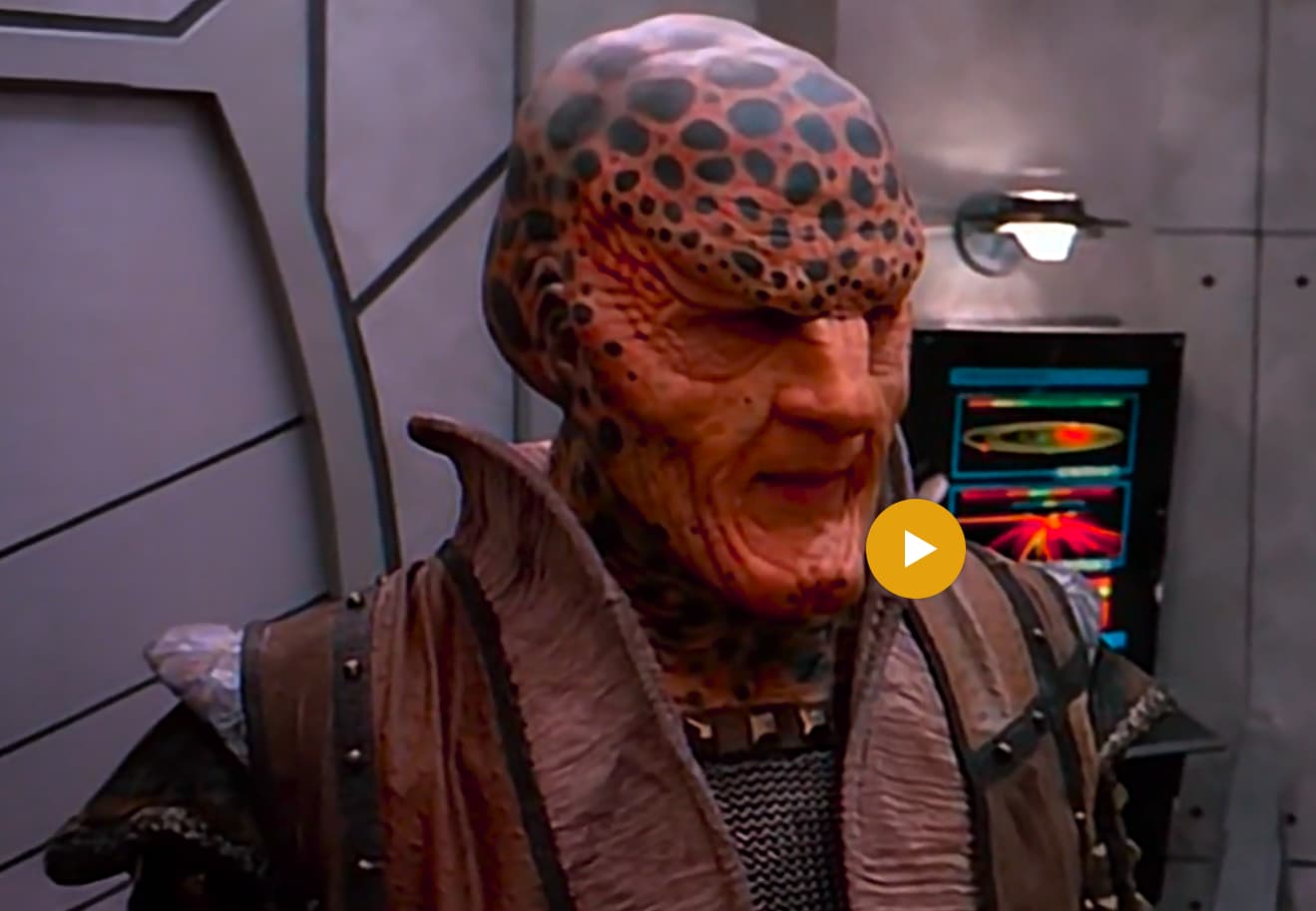
Can somebody please help me understand why is this happening?
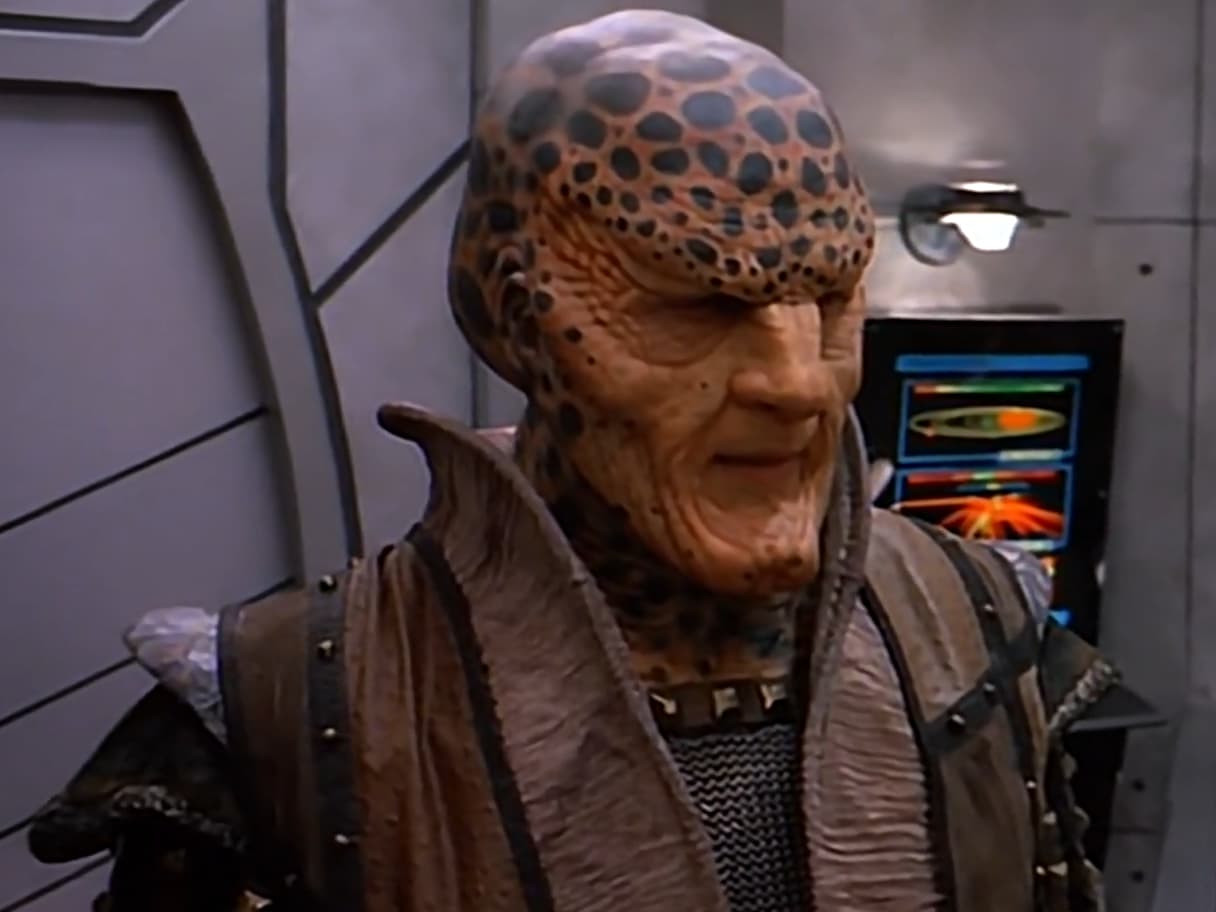
In the Plex windows app the movie is just way too saturated/red, and in the web app and MPC it looks fine. In both plex cases the video was playing without transcoding. (Direct Play)
Here is the video data:
Codec H264
Bitrate 2568 kbps
Bit Depth 8
Chroma Location left
Chroma Subsampling 4:2:0
Coded Height 1088
Coded Width 1920
Color Primaries bt2020
Color Range tv
Color Space bt2020nc
Color Trc bt2020-10
Frame Rate 59.94 fps
Height 1080
Level 4.0
Profile main
Ref Frames 4
Scan Type progressive
Width 1920
Display Title 1080p (H.264)
Extended Display Title 1080p (H.264)
Something doesn’t fit. The above color profile looks like HDR.
The frame rate of 59.94 fps together with the codec of H.264 however point to a vintage TV source with interlaced video stream – which back then wouldn’t be in HDR.
This is the enhanced upscaled/downscaled/sidescaled version of the original series.
To be honest, up until your comment I did not even know what a mpv.conf file is. (I’m not sure I know already, but it is some config file for mpv, which is used in the windows app maybe?)
All I know is that HDR and H.264 don’t mix. Avoid this combination.
I assume that the web browsers silently ignore the HDR color profile, while mpv is trying to use it. Which then explains the oversaturated colors.
Ok, but isn’t this a bug in the windows app when the web app, and Media Player Classic play it just right?
I mean at least there should be an option for the windows app then to tell what to do in these kind of cases if it cannot do the “right thing” automatically.
Uhm… now that would be only true, if and only if non of the other existing mediaplayers for windows could do this.
But unfortunately, that is not the case.
One more thing. Just out of curiosity I’ve opened the above episode .mkv file with mkvtoolnix-gui Header editor, thinking that a wrong color profile must have been added in one of the headers.
But it reports that NONE of the Color information element is present in the .mkv file:
“This element is not currently present in the file”
BT.2020 is an HDR colorspace but as stated above H.264 is the incorrect codec for this task. Likely the issue is MPV tonemapping this color space to your display when the content is not correctly expressed in that color space to begin with.
AFAIK, Babylon 5 has only ever been mastered in the BT.709 colorspace (SDR); if you know different, I would be very interested to find out. This strongly makes me suspect something is wrong with the source file.
Often this is expressed in the codec parameters and not in the MKV file headers.
To diagnose this further, we would likely need a sample file to give to the playback team to understand exactly what it happening.
I’m not saying that the source file is correct. Your answers point to a very valid fact that it is incorrect.
I’m only saying that despite the fact that G’Kar has every reasons to be mad and have his head that red, this one must be a mistake, since other players, even the web player, seems to play it without the over saturation.
QuickTime and VLC also give results similar to what mpv and Plex produce. This file’s H.264 bitstream appears to have been mis-tagged as BT.2020 when it actually contains BT.709 or BT.601 video. When this is played by a BT.2020-aware player, this means that its colors appear oversaturated.
Players often use BT.709 or BT.601 for content with colorspaces they don’t recognize, so your other players are probably not aware of BT.2020 (or how it can be signaled in H.264), so they’re falling back on BT.709, which happens to look better for this particular mis-tagged file.
The case of BT.2020 in H.264 is entirely valid (if uncommon), and mpv and Plex are entirely correct to support it. If we incorrectly played this file as BT.709, it would happen to look better for this file, but it would produce incorrect output for files that actually are BT.2020 (and similarly, such files likely look incorrect in the other players you tested with).
Please check the tools used to produce your file (or contact the author if it was produced by someone else) and see if there’s an issue with their configuration. As a workaround, you could re-tag this file using ffmpeg’s h264_metadata bitstream filter (see the colour_primaries and matrix_coefficients parameters), though details on how to do so are out of scope for this forum.
FWIW, playing this file directly from drive in Firefox on my machine is far too red for this scene. In fact, it looks just like the Plex Windows App picture in your first post. Though I’m playing on a machine where the system H.264 decoder understands BT.2020.
BTW, the framerate is wrong for this content and the deinterlace appears to be poor (it really needs a proper inverse telecine first). This causes some noticeable tearing/distortion in the pans (go frame by frame if you don’t see it playing in real time).
I presume the source of these file was the DVD. There is hope among the fans that the series may be released on BD due to the fact that a good 1080p version was made for HBO (film scans for the live action, upscale of the CGI which had a low res version on the DVDs).
But what about Plex web app playing it just fine then?
Clearly there’s a discrepancy between the windows app and the web player. (at least that is what I’m experiencing, and showed in the 1st post with screenshots).
Also… shouldn’t there be at least an option/flag/text entry in the player setting/at the video file edit section to forcibly tell that even though this file lies about it’s color_primaries being bt2020 please play it just like if it was bt.709?
That’s interesting. I’m also playing it in latest firefox on windows and as you could see in the 1st post on the screenshot, the web app’s colors seemed ok.
Unfortunately true about the distortions. I’ve noticed those myself too. Too bad, let’s hope there’ll still be a better version
The web app is going to play with whatever decoder your browser uses. Most H.264 decoders don’t understand BT.2020. Apple’s and MPV’s H.264 decoders are ones that do. Assuming your browser’s decoder is in the majority here, then it isn’t playing it just fine; it is playing it incorrectly. Just the file’s H.264 bitstream lying about the color space and the decoder not understanding BT.2020 correctly mostly cancels out (a rare case where 2 wrongs make a right).
Is this using a H.264 decoder that understands BT.2020? I expect not. See earlier in this post.
This is an extremely fringe case. You are likely better off using the suggested FFmpeg bitstream filter to correct the file.