XPlay (WebOS)

Can you please roll back the version to v1. I used to be able to play these same 4k videos just fine with the old version. Now they will not play with the new version at all. Being able to play 4k videos was literally the only reason i paid for this app, and now it just doesn’t work at all. I have a broken app that is less functional and less usable than the old version.

If you could roll back, then once things are fixed and work out properly, you can move to the new version of the app again. Thanks!

1 Like

Did you really read my previous messages? I suppose you must read before asking it.
For the moment I can see useless messages that v1 was THE BEST OF THE BEST THE BEST.
It’s not constructive dialog and ppl who write this do not understand tech specs and aspects. And would be also nice if you read how HTML playes video or audio content … try to understand who is actually plays media content HTML app (page) or web browser …
The webOS uses Chrome to serve HTML based apps. Even if I return v1 it will not fix the playback probelm … and as you can guess LG will not allow to pass QA …
Have a nice day …

PS
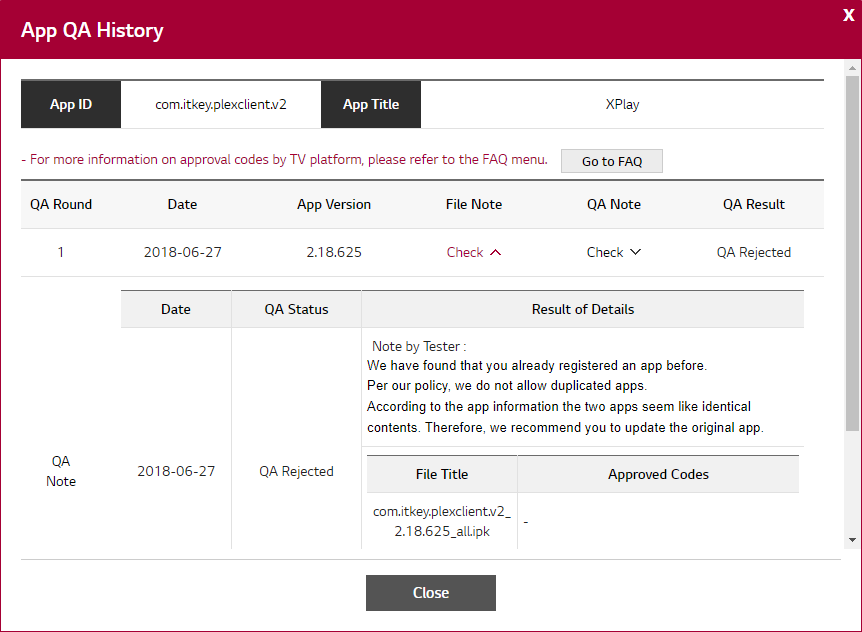
Here is a screenshot … Ive tried to keep v1 in apps store …

Why is it not constructve? As a customer i had a working product which played my videos and was easy to use. Since then, an update was released that broke playback and which has many other issues. It literally is a non-functioning product since the update. I’m a software developer myself, and when this happens we either fix the issue (or if that’s untenable in a reasonabel timeframe), we roll back.

and ppl who write this do not understand tech specs and aspects. And would be also nice if you read how HTML playes video or audio content … try to understand who is actually plays media content HTML app (page) or web browser …

You had a version of the app where this worked. It no longer works. please roll back to the version that worked. I don’t care if the bug is in your code, or in LG, or in the player. Or in the html component. It doesn’t matter. What matters is there was a configuration and version of the app that was totally fine at playing my entire library and now the new version

The webOS uses Chrome to serve HTML based apps. Even if I return v1 it will not fix the playback probelm

Why? It worked before. So if you revert things to v1, then why would it not work again?

I’m a software dev by trade, and from what it sounds like, there’s somehting about your current version that doesn’t play well with all these system component. I understand that you thinkthe issue may be with those components (and that may be true), but it’s likely your v2 code is exacerbating the issue. For example, perhaps you are doing soemthing that is simply causing one of their bugs to trigger more often. However, if you can revert to the original version then it should likely work again (since that’s how things worked in the past).

2 Likes

I suppose you are not good dev by trade … As you still dont undertand what Im trying to say …
And Ive already shared a video where I can start media playback for serveral times but after N-th time it stopped playback and app is waiting for event from HTML VIDEO tag … VIDEO TAG should notify the app that it has loaded media content BUT it does nothing … just does not notify the app … the play function of HTML tag return endless “pending” promise and that is the end … the app is still waiting for any reaction from VIDEO TAG … for media meta loaded … or enougth data loaded and the app can start playback … or even playback error … just nothing … NOTHING … no reaction from VIDEO TAG. Ive even made a small test for VIDEO playback issue if its the app source problem … at the beginning of this video I do test playback from non PMS source … from w3.org … do you know what is it? what this site about? … And yes … at first time I was able to play video file from w3.org … but after the video player started to have playback issue in my app … Ive lauched this small test JS code again to test video playback from w3.org again … and guess what? Yes … the same result as in the app.
So LG insist that its the app’s probelm … and as I can undertsand you are trying to do the same …
And as I can undertand you are not good HTML/JS developer or you just trying to speak about the things which you dont reall know.

Here is this small test JS script … from this video. And please dont try to tell me that this script also has issue and I should return v1.

var v = document.createElement(‘video’)
var s = document.createElement(“source”);
s.type = ‘video/mp4’;
s.src = ‘http://media.w3.org/2010/05/sintel/trailer.mp4’;
v.autoplay = false;
v.appendChild(s);
document.body.appendChild(v);
v.play()

PS
Just please dont try to speak about things you dont know … the reality could be differ from API documentation.

I’ve got 25 years of experience and have shipped software used by tens of millions of users. I’ve got plenty of experience with experiencing bugs, sometimes due to factors outside of your control.

And Ive already shared a video where I can start media playback for serveral times but after N-th time it stopped playback and app is waiting for event from HTML VIDEO tag … VIDEO TAG should notify the app that it has loaded media content BUT it does nothing

None of that is relevant. As stated before, your previous version of hte app worked fine. All my videos played. I could resume videos properly. I didn’t get spinny circles that never go away. There weren’t random crashes. The app did the functions expected of it.

Now, there may have been underlying platform bugs at the same time. However, fortunately, your app did not trigger them. So i had software (whihc i paid for) which worked properly.

Since then, there has been release after release that has been a huge mess. Problems galore, including tons of videos simply not playing. Again, these videos played fine before. The only difference between tehn and now is that your app is updated.

So i am asking please roll back your app to the version taht worked.

So LG insist that its the app’s probelm … and as I can undertsand you are trying to do the same …

No. That’s not what i’m saying. What i’m saying is extremely simple (and you seem to be purposefuly obtuse about this). What is the case is that hte app worked before, and now it does not. All that changed was that you updated your app. The root bug may be in LG’s code. However, it was hte update that elevated this to the point that i have a non-functioning app which i paid for. That is the problem.

The core issue is irrelevant. What matters is your shipping a non-functioning update and your refusal to roll things back.

Just please dont try to speak about things you dont know … the reality could be differ from API documentation.

I have plenty of experience in tihs space. You are not taking responsibility for an outcome that you are directly responsible for. It’s childish and immature and indicates a lack of willingness on your part to address problems (even if they’re due to some shared problem between you and LG).

2 Likes

Im … Ive have … you have … you have … you dont have anything.
And you are nothing in this thituation and you dont have full picture of the situation but trying to speak about it.
You still trying to speak that the problem in v2 … and v1 will work flowlessly … and as I told you dont undretand the nature of the problem but still insist on it. I can see only useless convesation. As you thing that changing car’s body to another will boost your car … but unfortuunatly it will not … as your car has square wheels.
If you have some valuable information why the same code works well on webOS 1.x emulator and has playback poroblem in webOS 4.x you are welcome. Ive asked LG what is wrong with the app’s source… Ive shared its source code with LG and Ive pointed them to the lines where video player start … and Ive no response from developers support team … not from QA … from DEVELOPERS SUPPORT TEAM who answer to 3rd party developers question about developing apps for webOS. They did not even answerd to me that … no words something like “We are not goint to dig your sources” or somthing like this … just keep silence about sources … and only common words that issue must be fixed in the app

Im not going to speak about v1 anymore …

PS
If we speak about exp … Ive certificats LPI-1, LPI-2, two Oracle administation certs … MCP … and etc … Ive exp with C, C++, C#, PHP, JS, HTML … I also used to work as Network administaror but for the moment I work as main developer of online travel booking system … I administarate a data base claster … 4 Cassandra (scylladb) nodes … and etc …
And as I told I welcome only valuable information about the problem and will not answer to messages like “Return v1 becouse it used to work … you fa…in idiot” …
I suppose that I do have right to have own opinion to the situation

The situation is pretty clear. There was a working version that properly could do things like play these 4k videos. Since then you released an update that no can’t even play the same video files. And you steadfastly refuse to take any responsibility here. You won’t even submit the old version as a different app so that people can at least get an app working that they paid for!

You still trying to speak that the problem in v2 … and v1 will work flowlessly

I don’t know if it would be “flawless”, but it would at least work as good as it used to. And that’s all i want. The new version is useless since it can’t even play the videos. At least the old version would.

dont undretand the nature of the problem but still insist on it. I can see only useless convesation. As you thing that changing car’s body to another will boost your car … but unfortuunatly it will not … as your car has square wheels.

Jesus, none of that makes sense. The app worked before. Just revert back to that version. Your analogies are silly since this isn’t some sort of situation where i’m proposing some radical approach to the problem. The approach is to simply use the version that was working. You certainly have that version somewhere right? You didn’t lose it somehow?

If you have some valuable information why the same code works well on webOS 1.x emulator and has playback poroblem in webOS 4.x you are welcome. Ive asked LG what is wrong with the app’s source… Ive shared its source code with LG and Ive pointed them to the lines where video player start … and Ive no response from developers support team … not from QA … from DEVELOPERS SUPPORT TEAM who answer to 3rd party developers question about developing apps for webOS. They did not even answerd to me that … no words something like “We are not goint to dig your sources” or somthing like this … just keep silence about sources … and only common words that issue must be fixed in the app

I completely understand their perspective. YOu’re the one that changed things. Even if it works for you, it doesn’t work for customers. And you are hte one who keeps trying to make the new broken version work, while not moving back to the existing working version in the meantime.

Im not going to speak about v1 anymore …

Because you don’t have a leg to stand on. This is incredibly childish and immature behavior on your part. You’re a dev. You got into a bad situation where one of your updates doesn’t work. That sucks. I get it. I’ve been there before. But what matters is how you deal with it from that point on. Instead of getting people back into a working state by rolling back to a previous known good version, you have just strung people along with a broken app and no positive end in site. This is just irresponsible on your part, and your attempts to obfuscate things by trying to point fingers just makes you look like a sham.

PS
If we speak about exp … Ive certificats

Bully for you. So use your experience to address this problem in a responsible fashion. Until you have a working app that can pass QA, roll back to the version that worked acceptably well.

I suppose that I do have right to have own opinion to the situation

Again, this is both irresponsible and childish. You accepted payment from us. People paid you for this app and your update broke it. I get that you thikn that you are absolved of responsibility here because the issue may be with LG. But that’s not the case. You didn’t have to update things, and you cuold have always rectified the problem immediately by rolling back until the problems could be ironed out. You have chosen not to even though people paid you. So you have taken money, delivered a non-functioning product, and have only pointed fingers at others (and never yourself) for actually being responsible to make customers whole.

Shame on you.
2 Likes

BTW, to give you an idea: I’ve released updates formobile platforms that have broken in the wild or have broken due to bugs in things like Android or iOS. You know what i did when it turned out to be more complex to fix? I rolled things back. I’ve done it at least 5 times in my life, and I did it because it was completely unreasonable for my customers to have broken functionality that they paid for because i wasn’t willing to make them whole.

You have customers. You built a product. Take some damn responsibility for your choices. This started from an unfortunate situation that any dev could find themselves in, to a point where you’ve just shown that you’re completely obstinate and do not care if things don’t work because you’re too proud to just roll things back.

2 Likes

You still thing that system issue might be fixed by rolling back the app version? Are you serious ??? Check up video Ive made for LG about issue shich is blocking update from publishing …
Have nice day …

PS
I still do think that you need to improve your tech skills or at leas digg to current situation to understad it and not just asking me to roll back the app to fix the probelm which is on webOS level. It’s ridiculous. Its like roll back windows cal version to an old one to fix windows issue.
If you dont like new UI just tell “I dont like new UI conception” … and dont try to tell me that rolling back can fix system problem …

I’m still trying to understand how it can be a webOS problem if the same application works well with 4k videos if the store version is used. but after the online update it does not work anymore.

It’s very hard to believe that.

another detail, the official PLEX application works great, and it does not use the same HTML webOS codes to play the videos?

1 Like

Yes. The previous version worked. It was after your update when thngs were broken. So, please roll back to the previous version. It’s not complicated!

PS
I still do think that you need to improve your tech skills or at leas digg to current situation to understad it and not just asking me to roll back the app to fix the probelm which is on webOS level. It’s ridiculous.

No it isn’t. it’s what most responsible devs would do in this situation.

It’s ridiculous. Its like roll back windows cal version to an old one to fix windows issue.

Your analogy is specious. it’s not an update to Windows that broke ‘cal’ It was the update to ‘cal’ that caused things to break for customers. I get that you think this is an issue with LG and you may be correct. However, your previous version didn’t have these problems. So it is the combination of your new version and LG’s stack that is failing. But until you get that all resolved out, please just f’ing roll your software back to the version that actually WORKED.

This is not complicated. It’s bog standard in the industry. Companies do it all the time.

and dont try to tell me that rolling back can fix system problem …

It can. Because your update combined with the system is not working. But it’s totally feasible that your original version works fine. this happens all the time. For example, perhaps your previous version did less stuff that exacerbates a system problem. In both cases the system problem exists, but using teh previous version means that people don’t impacted by it. That’s the part you seem unwilling to acknowledge. Your software may literally not have bugs, but an update to it might still make things worse for customers. You really need to understand this, and you being obstinate and stamping your feet and continuing to pointing fingers everywhere is not helping, and is actively preventing paying customers from having working software.

2 Likes

Technically, this could totally be a WebOS problem. Imagine there’s a bug in WebOS. However, in his previous app version, he never did anything to cause the bug to trigger (or it triggered very rarely). However, after the update, something changed in the app that caused the WebOS problem to trigger over and over again.

In all cases, the bug is in WebOS. However, it’s definitely possible for different versions of hte app to have better or worse experiences for customers.

What Bublikoff is absolutely unwilling to accept or acknowledge is that regardless of where teh bug is, the responsible thing to do is roll back to a version of the app that has less issues for the customer. He feels that if the bug is on LG’s side, that it’s entirely on them to do something about it, and in the meantime his customers are just screwed. The problem is htat LG doesn’t seem to care that much. And, since xplay is likely 0.0001% of their user base, they’re not going to put much resources into it. In the meantime Bubli just bitches and blames them and we’re let with a non-functioning app, even though it’s in his power to just restore the previous version of the app (if he still has it).

My guess is that bubli does not have the app any more. He likely didn’t keep around the source for it, and he doesn’t have the original built version. So he can’t actually resubmit the old one. And he doesn’t want to admit this. So blaming others is his way of trying to save face.

3 Likes

@bublikoff

well, I’m still trying to understand how this can be a webOS problem. the version 2.713.103 of the application store works, which does not work is the version that launched online after installing Xplay downloaded directly from the store.

since yesterday I can not even get into the application due to the loop that is asking to log in to Plex, I do the procedure and it goes back to the login screen and it does not come out any more. I recorded a video demonstrating the problem.

I delete the xplay app from the TV and down again from the app store, and it works normally. but if I turn the TV off and on again, and open xplay, it loads the online version that does not work and does not exit the login screen anymore.

so I think this is not a TV system problem, but rather a bad application development.

1 Like

But there are a lot of people, myself included that has no issue logging in, streaming 4K and has multiple users and i have the latest online version so my TV or app has no issue.

I noticed you’re using the tv web browser to input the Plex code. Just a thought, but could this be part of the problem? Considering you’re now using online version, maybe there is some kind of conflict with ip address or something. Can you try establishing the link from a separate computer?

I do not think that’s the problem, because before I recorded the video I tried to make the xplay link through the browser of a computer. I just used the TV browser to make it easier to demonstrate the problem in the video.

until yesterday I could access the online version, but I could not watch videos in 4k. today I was not even able to open xplay because I asked to login plex to enter the access code.

awesome how this APP works in a strange and different way for different users.

until a few days ago, I did not have any problem, now nothing works.

Can I also add, that I’ve had three wonderful years of using Xplay, I love it.

But of late, its become almost unusable. and constantly buffers with my server only running at under 9% load.

Could I possibly also have a copy of the latest beta?

User ID 2859061-GB

I’ve had the constant looping login and other problems the past few months…but today something changed!

I have version 2.714.091.

I was trying to solve buffering issues in Plex and found this info:

LG B7 OLED TV - Owners and Discussion Thread | Page 206 | AVForums (post #6178)

and this:

Not sure which one of these solved the problem with XPlay but it’s back to working 100%.

4K, HDR, the works.

Hope this helps some others :slight_smile:

2 Likes

Could I possibly also have a copy of the latest beta?

My User ID 9039568-GB thx

Hi @bublikoff, I would like to test the latest beta update. Can you push it to my account please?
1199500-ES

Thanks for your efforts !!!
