SchedulesDirect uses GraceNote EPG data and provides similar graphics. However the servers that Gracenote uses are much faster then SDs at least in my area US/Phila market.
If you are the exploring/experimental type check out NextPVR, MediaPortal or TV Mosaic to see if you can get the channel lineup you want and to make sure it runs smooth. If you get any one of them working the way you want, load the plugin for Emby. This will allow you to use the services mentioned above (there are more but these will run on Windows) and integrate right into Emby. From a client standpoint you wouldn’t know it’s a 3rd party program delivering the streams. This is a popular solution that many Emby users use for added features or device support not built in.
I’ve got Emby, Plex, NextPVR and Media Portal all running on the same machine for playing. Haven’t gotten around to TV Mosaic yet so I really don’t know much about it.
No, all Docker versions are not mine. I also have no idea about Docker, I use FreeBSD. But if you want to donate, here is my xTeVe donation link: https://www.patreon.com/user?u=14544971
Many Thanks
first of all tnx so much for this great plugin, i really like it.
I have only one “problem” with it, how can i assign the channel position inside the m3u file?
I tried editing the tvg-name= with a number but it doesn’t work… Any suggestion?
Sorry you Are right, I mean the provider m3u. I saw that the xteve.m3u has his channel order, but I would like to assign a custom order programmatically to the provider list to skip this job on channel mapping.
The order is ignored. This has historical reasons, in the beginning xTeVe did not have a mapping function, the order was given by Plex or the XMLTV file.
For this reason, the mapping function has been developed, it is difficult to specify an order if you can use multiple M3U files. I’d rather give everyone the freedom to sort their channels themselves.
Ok thank you for the answer, everything is clear now. Could you please confirm me that I can work on the xteve.m3u to edit the order before plex will load it?
The order can be changed in the Mapping menu, just edit the channel numbers. If Plex asks you for the XMLTV file, you specify the XEPG URL of xTeVe there
Is there any easier way to sort the channel numbers? I am using an M3u list with an XML guide. When I do this, it scrambles the channels in an odd order. I would like to keep them in the order of the M3u. I could do it manually, but I have over 300 channels.
I’ve spent the last several hours in extreme frustration. I have successfully deployed xTeve, and even setup a filter list. PLEX, which is running on the same server as xTeve, has no problem finding xTeVe. I even spent an hour matching my channels to a DIRECTV guide because my IPTV provider gives out a really mad xml file.
However, after all is said and done and I go to the “guide” section in PLEX, and click on a channel to play, nothing happens. I get a spinning wheel, and ultimately an error message saying that the channel could not be tuned. This despite me being able to watch the same channels I am trying to watch through plex in VLC on the same machine. My IPTV provider allows for 5 connections, which I am not exceeding. I have also ensured ports are opened in the firewall, and still nothing works.
UPDATE: It appears now that every time I setup the tuner, when I return to the DVR settings in PLEX it states that the tuner cannot be connected this. This is despite the fact that I am literally interacting with the web interface on the same machine.
Plex does not play all streaming formats.
Look into the xTeVe and into the Plex Log, maybe there is the reason why the stream is not played. If Plex says xTeVe is off, restart Plex. If this happens more often, you have a network problem.
The PLEX logs contain nothing and neither does xTeVe. There should be no networking problem. The PLEX server can make the initial connection without problem, and I can access the web UI from that machine as well.
UPDATE: the xTeVe terminal says “PMS can not play m3u8 streams”. Well at least now I know what the problem is. Any ideas for taking what the streaming server returns and making it useful?
Plex uses UPnP / DLNA to determine status of xTeVe, not HTTP. If the UPnP broadcast requests do not reach Plex, Plex will not find the tuner either.
At the first set up xTeVe in Plex this is normal.
Ask your provider how you get a M3U with TS streams.
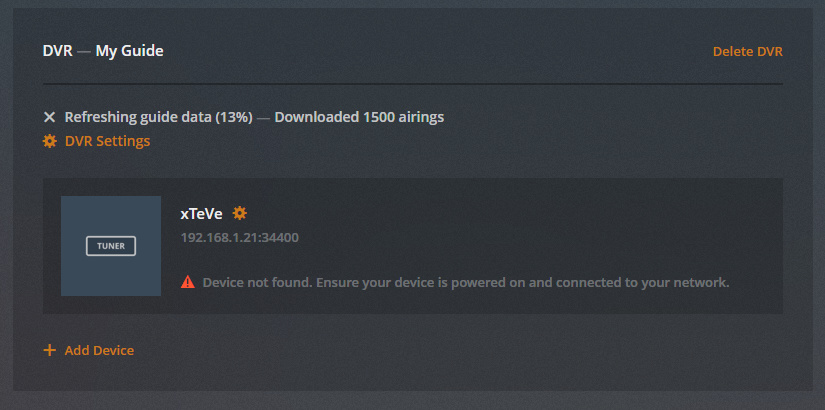
I had one question with an issue I am having. After setting up xteve, mapping the streams I want to pass to plex, I map the DVR however it’s not always found when I search by the xteve IP address. Even if it’s “searching” and I press the Connect button, it finds it with all my channels.
When the setup is completed, I get an error that device is not found however the guide and the streams work. Not really an issue but I’m wondering if I am missing some of the features when the DVR cannot be detected.