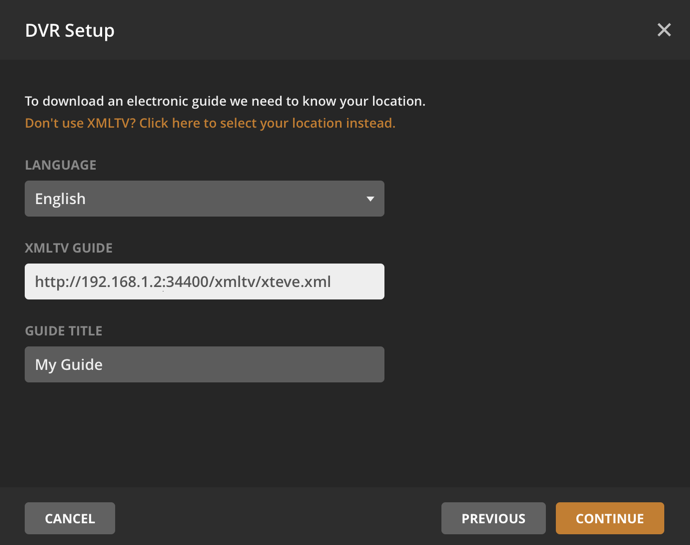
Needs some help, When I add the xteve combined channel guide I get errors in Plex. See pic for my config:

Plex version 1.15.xx has a bug if you use an HTTP link. You can use the local path of the xteve.xml file. The exact path can be found in the xTeVe log.
I have a issue, once i setup the Xteve and plex and load it all up, if i go to play a channel it doesnt load and if i go to DVR settings it says “Device not found. Ensure your device is powered on and connected to your network.” and the xteve is still running from terminal and i can still connect to it from the web GUI
I have the same problem… I see the error “Device not found. Ensure your device is powered on and connected to your network.”
Search in this topic for broadcast
If there is no match for the channel in the EPG, is there a way to manually put that channel into Plex by adding some user defined EPG data?
Am I doing something wrong or is there no way to bulk deselect channels? I’ve set up a couple filters that are about as narrow as possible that still include everything I want, but I still have ~800 channels in the mapping list. Bulk edit works fine to select channels, but it does not deselect those that don’t have their boxes ticked when I click Save. It’ll take ages to manually deactivate the hundreds I don’t want.
What’s the best config to prevent initial buffering when initiating a new stream? I’ve tried both options (Stream Buffering on/off), but it takes a while when changing/starting a new channel. Sometimes more than 20 seconds… Orange spinning circle.
I’m testing this via Firefox browser, on the Plex Server, cable connected to the Internet (1Gbps connection).
Thanks for your support!
You can use the xTeve Dummy for it
3 - 5 seconds would be normal, everything that lasts longer, is due to the Plex transcoder or the provider.
Thanks for the screenshot. Ticking “Active” works fine for me if I want to bulk activate channels. It does nothing whatsoever for bulk DEactivation. Leaving the box unticked, or ticking it and then unticking it again, does not change their active status, hence my question. 
In my M3U, I have local channels from Philadelphia, is there a filtering technique to capture all group-title “USA LOCAL CHANNELS” that have “(Philadelphia)” in the tvg-name?
It’s not the provider. The same channels/playlist in IPTV Pro work instantly…
Really mind boggling how Plex can be so bad handling M3U streams… Emby ate this for breakfast…
Thanks,
anthonws.
So amped for the upcoming m3u8 support in the late may update! Thank you @marmei
@marmei with the stream buffering option, will you be able to extract the TS files from m3u8 streams? This is very important as I get only m3u8 streams. Since they’re essentially broken up ts files, it should be simple to piece together. Otherwise I will need to go with a different proxy, or worst case, build my own.
Yes, I parse the TS links from the M3U8 playlist. Do you know which backend your provider uses?
Right now it’s literally only one channel I’m playing with to figure out how I best want to set it up. It’s Das Erste for international viewers and their playlist has is setup to have varying data rates for the same stream. Obviously, I always want the highest stream rate, so when I pull the stream it’s an M3U8 playlist.
Still late may for the release marmei?