@marmei, I just learned of XteVe through a YouTube video and it’s awesome. I just started messing around with IPTV services and installation went flawlessly, I can even make updates to my m3u file (my service has too many channels) and rerun xTeVe and it will update the channels in Plex.
Here is my problem: I want to test out different IPTV services, but every time now, after the first setup, I try to go to the xTeVe web interface it fails. I searched through this thread and couldn’t find anything like this mentioned. My xTeVe command window says the Web Interface is at http://10.0.0.65:34400/web/ but now when I go to that address (in Edge on Windows 10, where it worked before) I get “Hmmm…can’t reach this page”.
Thanks in advance - Terry
EDIT: On another Windows 10 PC, not the one running Plex and xTeVe, I CAN get to the web interface; very weird.
if xTeVe is running and you can not access the web interface, then the problem is somewhere between your browser and xTeVe (firewall, routing). After all, it works from another computer
Apologies if I’ve missed this question/answer in my search of this topic.
I’ve found a nice m3u playlist of streams I wish to watch in Plex.
They play in VLC, and I can pick just about any of them.
When I extract and run xteve.exe on my system, select XEPG, load the URL, and paste the m3u URL into playlist field, I’m then told in console xteve requires an XMLTV file.
I tried pasting in what was listed in my browser (localip/xteve/data/xteve.xml), but it’s not found.
Does xteve not extract information from #EXTINFO of the m3u to make one?
And if not, how would I go about extracting/converting the m3u data to an xmltv file?
You need a XMLTV file from your provider.
There is no provider. It’s a collection of 3rd party free content sources.
Github link
I was hoping xteve would allow for such a list. Most even have logos.
Perhaps that would be a great feature for Xteve. The ability to ‘export’ from m3u an XMLTV compatible xml file. If the m3u file is missing necessary channel numbers/IDs, xteve could fill in with ‘1, 2, …’ automatically.
EDIT - And while exporting, show a selection of groupings to filter by, or at the least, add groupname selections in the filter screen so one doesn’t have to open the original m3u file to figure out what can be filtered out to get under the Plex 4x0 limit
If you do not have an XMLTV file then you can use xTeVe without it. Change EPG source to PMS.
The next update will change the filter function.
Hey all, I had to restart the computer that runs xteve and the ip reset itself. I have a different IP now than the DVR in plex.
Do I have to install the DVR in Plex all over again?
Thanks,
Probably…Before you do that turn off dhcp and set an ip for your server so it doesnt hapen again
Thanks, it’s the VPN software that changes the ip. If I try what you say, will it still work?
Can you tell me how to do it? Thanks!
Shouldnt effect VPN…you can google how to do it. Im sure that would be better than me typing info
New user of xTeVe (long-time user of Plex.)
Everything was going fine (ish.)
Plex didn’t auto-discover the xTeVE DVR, so I had to leverage the “manual” option:
192.168..69:34400/web/
That went well, too. I used a small set of channels for this initial test (just three channels.)
All three channels were discovered via Plex, and I matched them via the PMS guide.
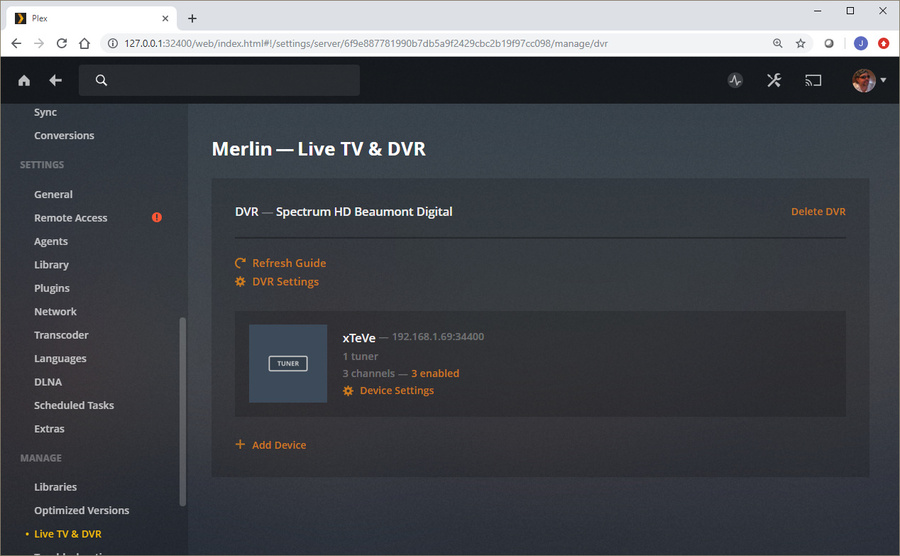
When complete, and I return back to the PMS DVR Settings page, Plex now says:
xTeVe “Device not found. Ensure your device is powered on and connected to your network.”
xTeVe is indeed still running/active. It resides on the same machine as PMS (same IP and such.)
Windows Firewall is also completely disabled (the entire time.)
I’ve tried to delete the DVR and recreate EVERYTHING from scratch (several times) – always the SAME result.

Further info:
When I return to PMS main screen, I indeed see the three channels and their new mappings in the LIVE TV guide.
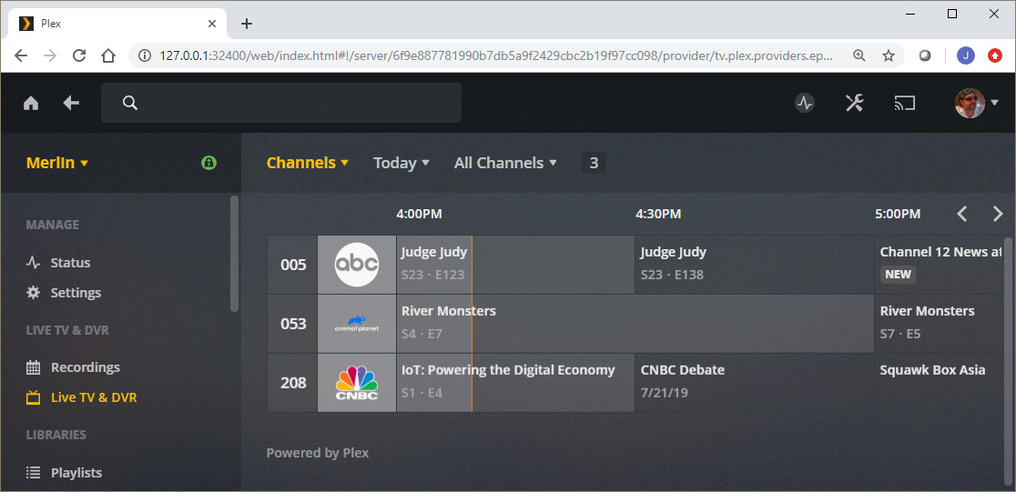
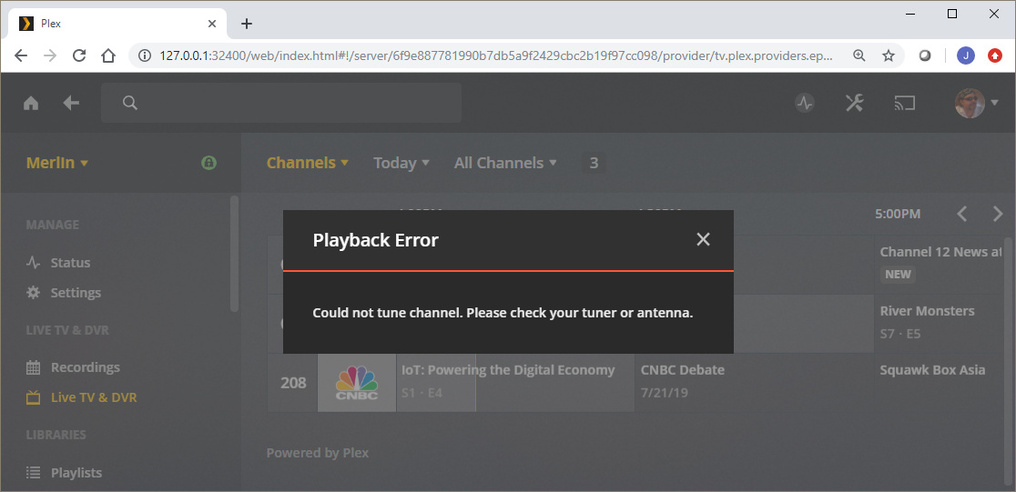
But, if I try to PLAY one of these, I get:
I also receive the following via the xTeVe console:

I find it “interesting” that PMS says that the xTeVe device is “not found.”
Yet, when I press PLAY on any of the channels, it indeed sends the command to xTeVe (as evident by the error messages that the console provides.)
Note: All three of these play perfectly fine via VLC (same m3u file.)
P.S. I also own a “real” HDhomeRun Quatro. I can add/remove it anytime, without issue/incident. I’ve had it removed/deleted (and powered off) during ALL of this, to prevent conflicts and such.
(I’m simply saying that my PMS is indeed capable of working “fine” via HDhomeRun. I simply seem to have some sort of communication error between PMS and xTeVe?)
Thoughts?..
After the first setup, this is normal, restart Plex.
If Plex then still the error to be displayed you have to check your network, search here for DLNA or broadcast.
In xTeVe Log you can see why the stream is not played. M3U8 is not supported by Plex DVR. In a few days xTeVe v2 will be released, then M3U8 will also work.

P.S. I’m also experimenting with “Channels DVR.” It supposedly supports HDhomeRun tuners (and the like.) When Version2 of your app is release, I’ll see whether it plays well with ChannelsDVR, too?
Thanks again!
I can not test Channels DVR, because I would have to complete a subscription. xTeVe passes either the URL or the video stream to the client (Plex / Emby / VLC).
Plex DVR does not support any streaming format. To test the streams, the xteve.m3u can also be opened with the VLC Player.
Will the new release be able to play streams in plex web gui ?
If the streams are not playing in the browser, it’s more because of the browser or Plex. xTeVe has no influence on what your client can play.
I have installed correctly and I never had problems but since a few days ago I only receive that the channel cannot be tuned. I have updated xteve to version 2 and nothing is no way.
this is my error log
2019-08-03 20:37:18 [xTeVe] XEPG: Create M3U file (/home/xteve/data/xteve.m3u)
2019-08-03 20:40:16 [xTeVe] Buffer: true
2019-08-03 20:40:16 [xTeVe] Buffer Size: 1024 KB
2019-08-03 20:40:16 [xTeVe] Channel Name: xxxx L345
2019-08-03 20:40:16 [xTeVe] Client User-Agent: Lavf / 58.9.100
2019-08-03 20:40:16 [xTeVe] Streaming Status: Playlist: AL … - No new connections available. Tuner = 1
2019-08-03 20:41:03 [xTeVe] Buffer: true
2019-08-03 20:41:03 [xTeVe] Buffer Size: 1024 KB
2019-08-03 20:41:03 [xTeVe] Channel Name: L567123 MULTI 3
2019-08-03 20:41:03 [xTeVe] Client User-Agent: Lavf / 58.9.100
2019-08-03 20:41:04 [xTeVe] Streaming Status: Playlist: ALB … - No new connections available. Tuner = 1
2019-08-03 20:41:15 [xTeVe] Buffer: true
2019-08-03 20:41:15 [xTeVe] Buffer Size: 1024 KB
2019-08-03 20:41:15 [xTeVe] Channel Name: L999 123 MULTI 3
2019-08-03 20:41:15 [xTeVe] Client User-Agent: Lavf / 58.9.100
2019-08-03 20:41:15 [xTeVe] Streaming Status: Playlist: ALB … - No new connections available. Tuner = 1
Unfortunately that does not help, the log would be interesting from the point where the first stream was requested.
2019-08-04 10:09:12 [xTeVe] Buffer: true
2019-08-04 10:09:12 [xTeVe] Buffer Size: 1024 KB
2019-08-04 10:09:12 [xTeVe] Channel Name: CANAL 1 FULL HD
2019-08-04 10:09:12 [xTeVe] Client User-Agent: Lavf/58.9.100
2019-08-04 10:09:13 [xTeVe] Streaming Status: Playlist: ALBERHOME - Tuner: 1 / 1
2019-08-04 10:09:13 [xTeVe] Streaming Type: [TS]
2019-08-04 10:09:13 [xTeVe] Streaming URL: http://xxxxxxxxxxxxxxxx:xxxxxx/xxxxxxxx/xxxxxxxx/1885
2019-08-04 10:09:15 [xTeVe] Streaming Status: HTTP Response Status [200] OK
2019-08-04 10:09:15 [xTeVe] Content type: video/mp2t
2019-08-04 10:09:17 [xTeVe] Streaming Status: Client has terminated the connection
2019-08-04 10:09:17 [xTeVe] Streaming Status: Channel: CANAL 1 FULL HD (Clients: 0)
2019-08-04 10:09:18 [xTeVe] Streaming Status: Channel: CANAL 1 FULL HD - No client is using this channel anymore. Streaming Server connection has ended
2019-08-04 10:09:18 [xTeVe] Streaming Status: Playlist: ALBERHOME - Tuner: 0 / 1
2019-08-04 10:10:46 [xTeVe] Buffer: true
2019-08-04 10:10:46 [xTeVe] Buffer Size: 1024 KB
2019-08-04 10:10:46 [xTeVe] Channel Name: M.DEPORTES 1
2019-08-04 10:10:46 [xTeVe] Client User-Agent: Lavf/58.9.100
2019-08-04 10:10:47 [xTeVe] Streaming Status: Playlist: ALBERHOME - Tuner: 1 / 1
2019-08-04 10:10:47 [xTeVe] Streaming Type: [TS]
2019-08-04 10:10:47 [xTeVe] Streaming URL: http://xxxxxxxxxx:xxxx/xxxxxx/xxxxxx/1398
2019-08-04 10:10:48 [xTeVe] Streaming Status: HTTP Response Status [200] OK
2019-08-04 10:10:48 [xTeVe] Content type: video/mp2t
2019-08-04 10:10:48 [xTeVe] Streaming Status: Client has terminated the connection
2019-08-04 10:10:48 [xTeVe] Streaming Status: Channel: M.DEPORTES 1 (Clients: 0)
2019-08-04 10:10:49 [xTeVe] Streaming Status: Channel: M.DEPORTES 1 - No client is using this channel anymore. Streaming Server connection has ended
2019-08-04 10:10:49 [xTeVe] Streaming Status: Playlist: ALBERHOME - Tuner: 0 / 1
