That does not work, xTeVe takes the home directory from the user.
Is xTeVe the only DVR tuner in Plex, or do you have more?
Is it possible to add a configuration option for it? Configuration should not be stored on the system drive on a windows based system.
Is this compatible with Fritz! products (m3u with rtsp streams inside)?
If yes, I have five Fritz!WLAN DVB-C Repeaters with two tuners each. According to your feature description I could add all five m3u files and select 10 tuners available but I assume it wouldn’t handle the logic (each m3u file only 2 tuners) correctly?
Hi, i have two other DVR’s installed on Plex for freeview use. I am assuming now that i need to change these two DVR’s to ‘Sky’ mapping then the xTeVE should default to Sky mappings rather than the freeview list.
thanks for the help so far.
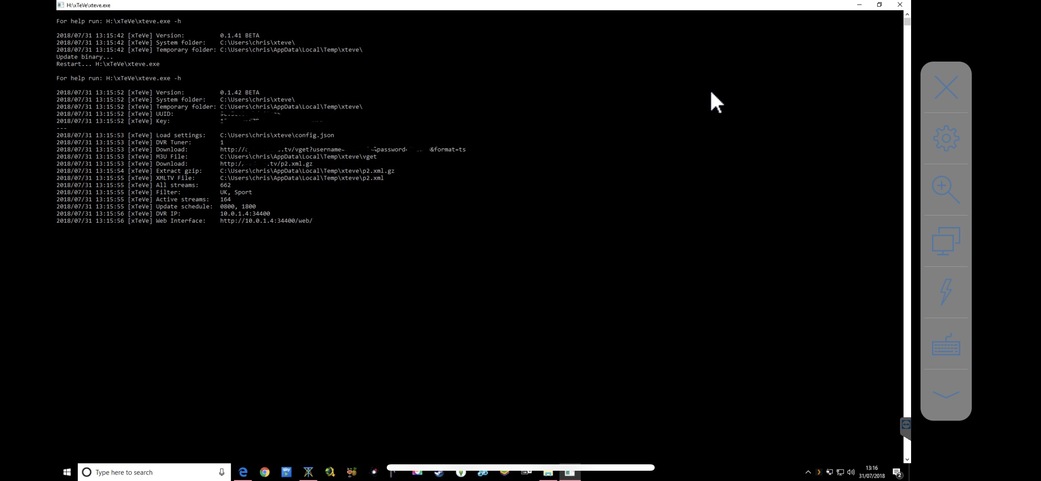
that could be done, only knows xTeVe at start then not where the configuration is. xTeVe would then always have to be started with a parameter, the user then has to take care of all the system authorizations. I do not know about Windows, but to solve your problem I would use symlinks.
sTeVe is compatible with any properly formatted m3u file. I have not seen anyone for a long time, who did not work. The more important question is whether Plex is compatible with RTSP streams?
xTeVe does not know about video processing, if you press Pley in Plex, it only sends the streaming URL to Plex. Everything else makes Plex.
As I understand it, but would all channels be present 5 times? Plex assumes that every channel exists only once in the world.
The tuner limit is a function to stop playing streams as the provider allows. With some provider one is banned for it.
At first glance, this looks good, the m3u was read in and the filter sunned the streams.
have you ever tried to start the non-functioning stream in the VLC Pleyer?
Yes, everything seems to import fine and Plex sees all my channels… It just doesn’t work when I try to play them.
The streams all play fine in VLC
Like I said previously… If I edit the vget file that xTeVe automatically downloads and put in the space manually before the stream link then it works great via xTeVe/Plex - I just can’t get it to play without the manual edit
Wow, what an exciting project - I would really love to be able to assist in the Beta testing - is it too late to join?
I currently use a couple of IPTV providers and the IPTV plugin in the unsupported app store
Kind regards
StalkS
does the streaming URL appear in the console when you press Play?
Without editing the vget file - no url in console - Plex gives unable to tune error.
Manually edit the file to separate the ‘group-title’ from the url - url shows up in the console - Plex plays the stream
I would be fine with a parameter - if not set, use default. I could also imagine to first look for configuration inside the folder of the executable. I know it is very common within the Unix world to use user’s home but not within windows.
Hey 2marc. What ended up being your fix on this?
I’m running into this issue. I have .ts links listed in my m3u file and it just keeps refusing to work and xteve just shows what your screenshot is showing.
I tried the same m3u file in telly and it works so it’s odd than xteve is having trouble.
EDIT: Well I inputted the web based m3u instead of a local version I had created and it works. So apparently I’m formatting my m3u file incorrectly.
Is there an example of a properly formatted m3u file?
Here is what I had going:
#EXTINF:-1 type="stream",Weather Channel
http://removed/play/example.ts?token=token=
EDIT2: Alright I’m good, not sure what exactly I was doing wrong but I got it working right.
I think I’ve sorted my issue… I had the xTeVe.exe located on a different drive to Plex and the xteve temp folder. I’m guessing it needs to be on the same drive to work (on Windows 10 anyway)
These are some minor issues but is anyone else having trouble with channel logos not loading for a lot of channels?
And even more trivial but is there a way to make Plex assume all of the channels are HD? I have quite a few showing up as SD even though they’re really in HD.

Ok - first impressions - xTeVe is awesome - Thank you marmei!! I had to manually map most of the channels in the Tuner settings section and make sure UPnP was accessible across my network so that the tuner didn’t disappear but casual viewing on multiple devices outside of my home network is not bad at all.
Thanks again
StalkS
Just in case people have this issue (On Windows 10)…
xTeVe tried to update today… I just got an error and it quit
I needed to run as administrator and it updated fine.
