If you have 2 tuners and you have configured both in the XTEVE settings that you have 2 tuners, and in the playlist that you have 2 tuners you should be good to go. Please doesn’t care if you have 1 tuner or 100 tuners, it’s sole purpose is to request the channel info from XTEVE. XTEVE will tell you if there are any tuners left.
Do the channels show up correctly under mapping in XTEVE?
So you should see XMLTV under XMLTV File and and channel ID under XMLTV ID. If its has a ’ - ’ through it or says ‘dummy’ you need update update it to at least have xTeVe Dummy and 120 minutes in both fields.
Why does version 2.1.2 for Windows log not capture all the info from the app window?
So I just did an XMLTV update and saw 4 errors in the app window saying that some of the changes has been deactivated but yet when I look in the logs from the web portal it doesn’t show that. Instead it only shows one in the log for one of the 4 channels listed in the app window. 
After doing more of a comparison I noticed the log is missing a lot more. It doesn’t have what you see in the app Window. As a user I would never think to look in the app window for the hidden errors I would always expect them to show up in the logs. This has to be a bug!
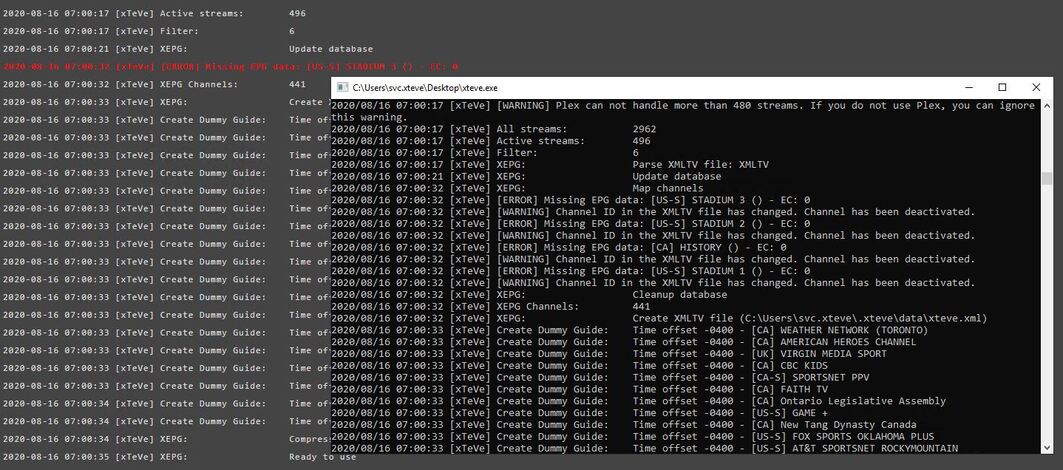
Above the ‘Active steams: 496’ in the logs is my XMLTV server information which is why its not shown. In the apps window you can see two additional lines that don’t appear above it in the log, plus the extra errors.
Hi all. I’d like to watch TV channels from Panama that are available online via plex (e.g. https://www.squidtv.net/americas/panama/). Can I use Xteve to do this? (I have plex pass, running a Linux Server).
Thanks…
have you found any way around the latest issues with the freezing using newer versions of Plex?
Hi everyone
I should do a server change from where xteve is now installed to another server always windows
I would like to know if there is a guide on how to export the xteve backup and put it in the new server so I don’t lose the configurations created
is there a solution to this problem ??
Thanks for your answers
no one can help me understand how?
In the latest version I would like to be able to see how many connections there are and the ability to “kill” them.
Seems out of scope?
Plex allows you to do that with Dashboard - why should it be included in Xteve?
Since the generated m3u file I have not only added to Plex but also to IPTV in the old Samsung TV Tizen.
Hey guys is there a way to get Plex to play an hls stream? I have xteve installed and not sure if I am missing something or what.
TIA
I am having an issue with my iptv channels in Plex resetting at the end of the hour. It will hit the end of the hour and jump back about 20 mins. I have close the channel and hit play and it will go back to correct time.
Any idea why this would be happening?
Find the backups on the XTEVE server and create a task like Robocopy to copy them across your LAN to another sever. I personally don’t get into this kind of bad practice as everything I have runs on a VM which backed up nightly. If I lose the server it takes me less than hour to restore it.
I have xTeVe setup with 3 playlists/xml sources for a total of ~210 channels
It has worked great for the past month or so, but as of yesterday Plex keeps “forgetting” channels. They become unassigned in the ‘Manage Channels’ section, and I have to go through and re-associate a channel # with the channel on the guide. (or delete & re-add the xTeVe DVR and it will automatically re-associate with all of them)
What could be causing this? I am not sure what logs to look at to see where/why this is happening.
The channels that remain are always the same channels so it is not random. I have made sure my Plex and xTeVe instances are up to date, and I have rebooted both of them as well as deleted/re-added the tuner within Plex.
Short of starting a new xTeVe config from scratch is there anything I can do or at least look into within Plex/Plex’s logs to see why Plex is ‘forgetting’ these channels?
I think I found a solution to this.
I realized the number of channels Plex was reducing to was equivalent to the number of channels I had in dizqueTV
This led me to believe dizqueTV was telling Plex how many channels it should see, which Plex was listening to (perhaps because it comes from the same IP address as the xTeVe instnace?)
What I did was not what I would call elegant, but it seems to be working.
I ‘mirrored’ the channel configuration of my xTeVe in dizqueTV. All non-dizqueTV channels in xTeVe (sourced from IPTV and HDHR) were recreated as ‘dummy’ channels within dizqueTV (dummy channel meaning only has flex time on it)
My dizqueTV lineup was originally like this: channels 60-148 with content sourced from plex
So my xTeVe lineup is something like this Channels 22, 27, 33, 36, 59 are OTA channels served from HDHR, then channels 60-274 are a mix of dizqueTV channels and IPTV channels
This is my new dizqueTV lineup: channels 22, 27, 33, 36, 59 all setup as ‘dummy channels’ with flex time. Channels 60-148 are still ‘real’ dizqueTV channels sourced from Plex content, and then channels 149-274 are more ‘dummy channels’ with flex time only.
All dizqueTV dummy channels came in disabled by default in xTeVe and I left it that way.
I also disabled SSDP in dizqueTV for good measure.
I will have to monitor but it seems to persist xTeVe updates now.
Not the most elegant solution, definitely seems like some sort of conflict between xTeVe and dizqueTV communicating with Plex. Bit of a band-aid of a solution but if it works it works I guess.
It would be nice if you could clean up your app a bit, give it it’s own icon make it available to run as a Windows service like all the other add-on’s have done such as Jackett, Sonarr, Tautulli, and other have done.
Thanks,
I’m sorry, I don’t use Windows and I barely have a clue about it. If it helps, there are tools that can start programs in Windows as a service:
@marmei so your not developer of XTEVE?
Thanks,
Yes, I am, but I cannot develop functions specifically for Windows.
Each OS has special programs / functions so that other programs can run as a service. But this is different for every OS.
For the same reason there is also no xTeVe Windows Installer.
Is there a way to force Plex to generate a new poster image per channel, vs per show? I have disabled “enhanced guide” so my Xteve set channel icons are being used for the poster image; BUT if a show is being aired on more than one channel at a time, the first channel image from Xteve that is cached, is used for all instances of that show in the guide. For example, if “SC with Jay and Dan” is on TSN1 and TSN2 at the same time, hovering over the show on TSN2, displays the icon for TSN1. Grateful for any tips anyone may have how to address this! Could I manually make changes in the XML guide without them auto updating in the future?
