It tests it on Qnap from the package qnapclub.eu, the tool seems to be great, the easiest to use.
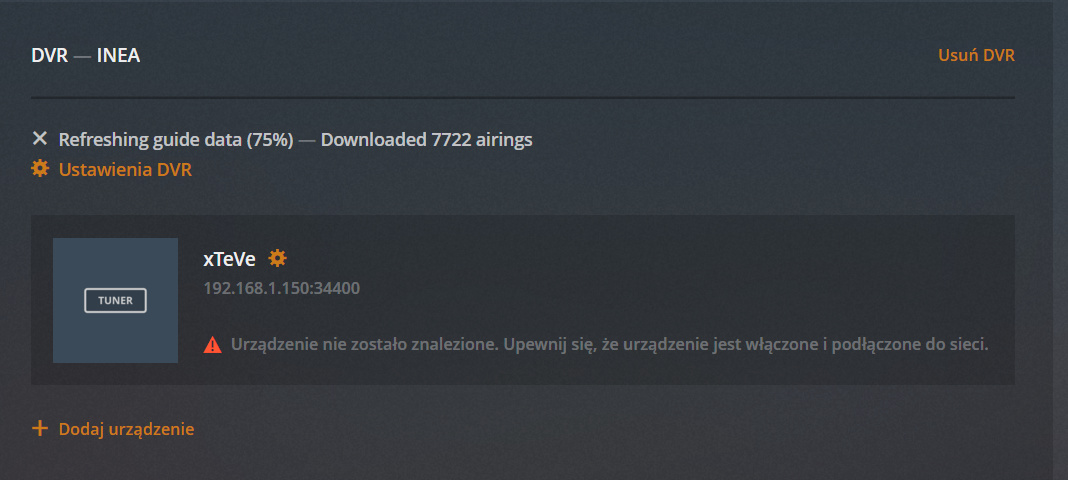
Is it normal that the decoder reports a connection error after installation?
I have it on XteVe and PlexIPTV:
Mayby it`s time for donate?
@ loydKulis
See Post #57 about UPnP needing to be enabled across your network.
Restart Plex (only Plex)
Hey, I think I have my first silly question - How would you go about mapping xTeVe’s device channels to the associated guide channels for foreign IPTV streams within Plex?
As an example, if I filtered UK and US streams and then added the xTeVe tuner to Plex I can then only use a preset selection of only UK providers (e.g “Sky HD” etc.) to map from xTeVe’s device channels to Plex’s guide channels
How would I go about adding the US channels - Would I need to add an additional tuner?
Kind regards
StalkS
I am convinced that I have included uPNP. After installation, I can see the channels, despite the error with the DVR. I have another problem, programs have not worked for some time. When I run the program, I am waiting and an error message appears:

Maybe my provicer blocked me because at the weekend everything worked on PlexIPTV. On Kodi and VLC on android everything works fine.
Maybe xTevE must be running before PlexServer on Qnap.
Can I check if provicer allows you to open this playlist on Plex?
Sorry for my English.
Plex only gives you the option to select EPG for a single country, no matter how many tuners you have. The solution is the XMLTV function, if your Privider provides you with an XMLTV file, you can enter this file in xTeVe, xTeVe will generate a path which you then enter in Plex.
For this Plex DVR has to be set up again.
When you press Play in Plex, the streaming URL must be in the xTeVe console. If this is not the case, it is due to the M3U file or xTeVe.
But if there is the streaming URL, Plex can not play stream because the stream is delivered in the wrong format.
The stream must be a TS stream.
I have an EPG from my provider:
https://XXXXX.iptv.XXX/epg_temp_dl/poland.xml.gz
But Plex will not accept him. Or I can not add it.
When I take EPG from Plex, I have over 70% of channels:
Plex uses Gracenote’s EPG, apparently they do not have all the Polish channels.
I added a playlist:
http://xxxxxx.uno/get.php?username=xxxxx&password=xxxxxx&type=m3u_plus&output=m3u8
when trying to add a format TS receives an error message.
After the restart, XteVe has adopted the link:
http://xxxxxx.uno/get.php?username=xxxxx&password=xxxxx&type=m3u_plus&output=ts
now the program has started!
Congratulations, have fun watching TV. 
can you show me where?
That’s because Plex uses the parameter channel id from the xmltv file for the first column.
Thank you for clarifying marmei - unfortunately my provider does not supply a XMLTV file so I will look into generating my own.
Regards
StalkS
I use ‘WebGrab+Plus’ to grab EPG data and create my xml file.
It takes a little bit of setting up at first and the first grab of EPG data takes a long time (a couple of hours), but now I just run it once every 3 days to keep my (8 day) EPG up to date - an update takes around 30 minutes to complete. I have also edited it so that the created xml file has ‘channel numbers’ instead of names associated to the ‘channel id’ and channel logos added too - some of this is done manually after the xml file is created (takes a little wile 1st time but is just copy/paste from then). It all makes for a much cleaner look
Also by using this program I can get it to grab the EPG data for multiple countries so I end up with a guide that has everything I want correctly in one guide.
You do need to remember to keep a list of what ‘channel numbers’ you assign to each ‘channel id’ as you will need it to associate channels to streams when setting it up 1st time in Plex
That is a really helpful pointer - Thank you chriskeens!
When I turn on Qnap again, I need to configure XteVe again? I restarted the device and after starting XteVe I have a configuration window.
Please look in the config file, if your settings and the key are still in there. If not, turn to the Qnap forum, I know that Qnap does not remember the config after a restart.



