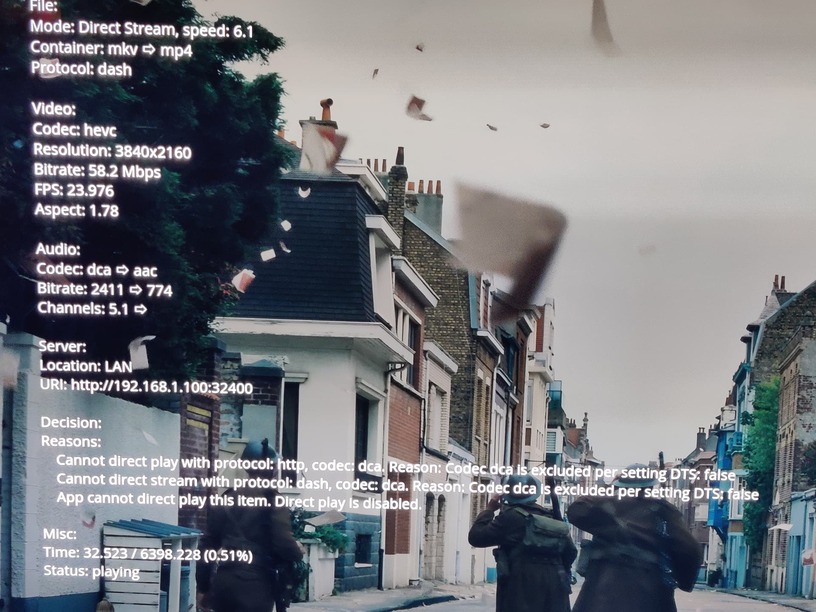
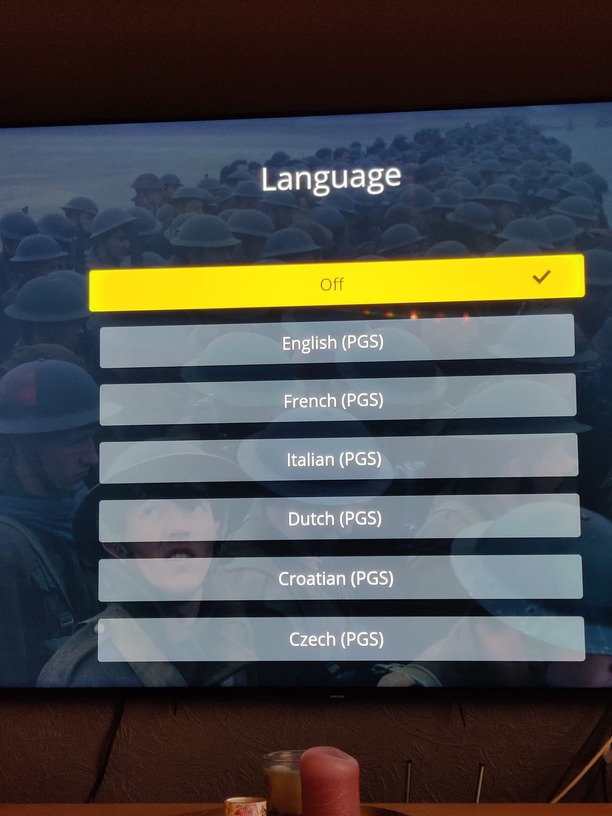
On my new Q90T Samsung 4k ifrpm Plex does not start. On my Mi box s 4k it works just fine. Seems like server tries to transcode when sending to TV but direct play to Mi box. How do we start solving this? Thanks.
Server Version#:
Player Version#:
On my new Q90T Samsung 4k ifrpm Plex does not start. On my Mi box s 4k it works just fine. Seems like server tries to transcode when sending to TV but direct play to Mi box. How do we start solving this? Thanks.
Server Version#:
Player Version#:
during playback look at the playback info and see why it thinks it needs to transcode
Thanks. Where can I see this?
during playback bring up the control bar and select the three dots to the right of the play button. Under for Playback options select Playback Information which enables an overlay on the video
Thanks. But, it never starts. Just spinning the arrow and then the error message.
Then I would turn on logging to server on in the app then after trying to play something get server logs.
Found out that disabeling subtitles did the trick. The Plex app on Samsung “requires” transcoding to show subs and then nothing ever shows. The Plex app on Mi Box S 4k does NOT require transcoding to show subs. Is this deliberate?
It depends on the type of subs and with samsung tv firmware 5.5 is can also depend on the audio stream… But I found that .srt and no DTS works with direct play.
So it is the hardware/software combo on the Mi Box that makes it work there and not on Samsung?
You could say that. But it gets complicated rather quickly…
As far as I know there is still an error in Tizen platform 5.5. That makes one of my Samsung Tv’s (Tizen 5.5) behave very different from the other Samsung tv (Tizen 5.0).
There are also the different formats for subtitles and audio besides the video stream. The Mibox supports DTS 2.0 and my Samsung TV (Tizen 5.0) dosent support DTS at all…
I actually transcoded all of my files to include a AC3 surround track to get rid of any audio stream issues - mostly because of the error in Tizen 5.5. It also assures compatibility with almost all devices…
For subtitles i’m only using .SRT so they don’t have to be burned on - on my Samsung any image formats will trigger a transcode…
There are a lot of variables and that complicates thing qucikly…
If the video is being transcoded when subtitles are enabled, it means the audio was already being transcoded, you just didn’t notice it. But again, providing the logs is the best way for them to answer your questions.
Thanks alot. Do you know if this bug is reported to Samsung?
It is, but I havent received an update yet, so fingers crossed…
 Thanks for helping out
Any update on this? Pretty irritating not being able to play subs.
As far as I know the issue in Tizen 5.5 is resolved…
What types of subs are you using? ass, srt or ?
In the settings on your tv in the about section…
PGS will always trigger a transcode as they are image based - SRT and ASS are text based and can be used without needing to transcode…
Thanks! Solved!