I have a QE55Q70R which supports 4K HEVC but I am having difficulty getting them to play cleanly without significant buffering or even streaming fails - this does not need to be transcoded and can play cleanly from a USB drive plugged in.
However, if I watch it on my UE48H6740 which requires transcoding, it plays cleanly (albeit does hammer the CPU on the server).
Both TVs are connected via a strong 5G WiFI, although have also tried the QE55Q70R on a wired connection too.
The network should be the first thing to suspect. Even if it’s a strong 5GHz signal it could be that the wireless cannot cope with a 4K stream. If it’s a cheaper model I would test with a better model and see if the problem goes away. This is valid for the wired connection as well if the device cannot forward the packets at the rate required for 4K.
Thanks for the response, and it’s given me some points for thought…
I have run an iperf3 test from an iphone7 placed beside the TV to the PC running PMS and it routinely comes out with averages of around 200Mbits/s transfer rates on 40Mhz channels of 5G. I did one last night which showed Avg/Min/Max of 193/134/214 and which I assumed would be OK.
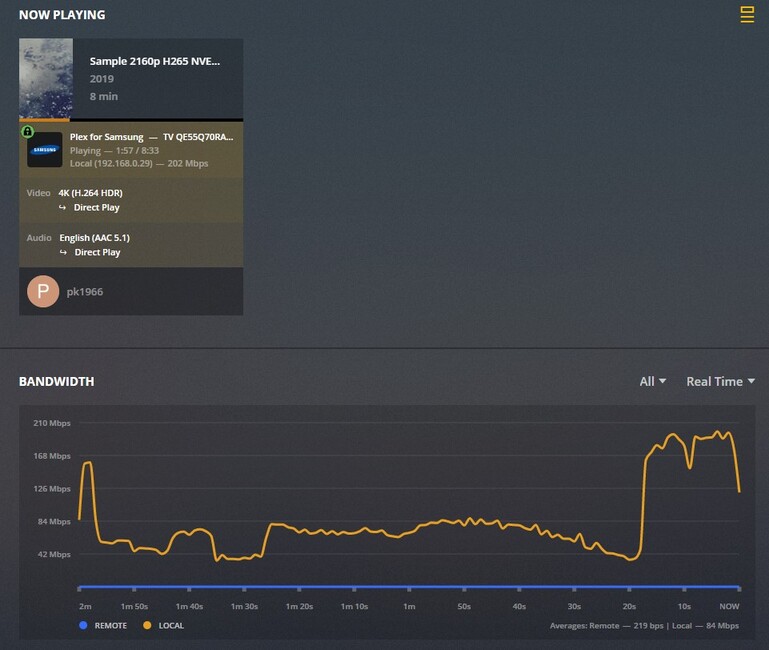
I have encoded some 4K content at about 30 mbits/s assuming there would be plenty of overhead, but when you look at the bandwidth on the Plex dashboard when it’s playing, it does show significantly higher network bandwidth (especially peaks) than the encoded rates, as shown in the attached screenshot.
The TV is a Q70R is ‘upper midrange’ , so hopefully not classed as a ‘cheaper model’ at £1200
I may ‘twiddle’ with my network settings at the weekend to try 80Mhz channels
Lol, I was talking about the wireless router not the TV. That model should have no problem, I have older KS models which work without problems with 4K HDR.
It’s not about the bandwidth. Your wireless router processor may not be fast enough to forward the packets for 4K streaming, testing bandwidth is not stressing enough . You’d have to look at least at mid-range routers, usually entry level wireless routers do not have the power to handle 4K.
I’m using Unifi myself . The ones that you listed should have no problem with 4K.
Perhaps if you post the debug logs here someone from the staff or a more knowledgeable user can help.
Hi, i am trying to stream 4K films from the iMac with Plex to a Sony 4K TV running Android but it’s impossible to watch them because of the stuttering and the freezing. Will the premium membership help with this or if i use ethernet to connect the TV and the laptop?
My response was not for you but the poster above you. Since you’re using a Sony 4K TV and not a Samsung TV you should create a new thread for your issue.
I can say that having a Plex Pass won’t automatically solve your issue.
I just reencoded an 8 minute sample with AAC 5.1 instead of DTS and it played perfectly throughout, and the network usage in the dashboard looked smoother too. I’m going to push the video quality right up to really stretch it, but it sounds like you hit on the problem.
If it is the audio transcoding causing the buffering, is there anything I can do to resolve it without re-encoding all the 4K content?
So is there anything I can do about the audio transcoding or do I need to re-encode the 4K content? (Or perhaps demux/reencode audio/remux but I haven’t mastered that yet for H265)
Thanks - very useful. So far, I only have one video of 4K content, and (by sods law!) it only has HD audio, but that post has some good pointers for me.


 . The ones that you listed should have no problem with 4K.