I have a macbook air running plex media player and a audio interface which supports upto 7.1 surround sound. I have configured the mac and interface to work with 5.1 and knows it works with VLC player. I cant seem to see any settings on plex to enable 5.1 surround. I can tell the film to play in 5.1 but it still comes out as a stereo track. Ive tried looking at all the forums but no answers seem to be about. Thanks
What version of Plex player do you have installed?
Version 1.3.1.916-1cb2c34d
You’ve actually have the desktop player installed which has a limited feature set. For your set up, you’re going to want this:
Once installed, go into TV Mode and then Settings / Audio to select 5.1
You’ll want to use the keyboard to navigate as this is the HTPC Plex app.
Ill give that a go and let you know Thanks
I have the plex media player app as you suggested which gives a lot more settings. I still cant seem to get it to work with 5.1 and an audio interface on my laptop going thorugh the thunderbolt port Thanks
Can you please post a screenshot of your audio settings screen?

Check the options under Device Type. You’ll probably need to change it from Basic to another option. Not sure what options you’ll see using a Thunderbolt port. Double check the settings for Channels, Device, etc. as well, as options may change.
On my Win10 PC I choose HDMI. I then see options to passthrough ac3, dts, etc audio.
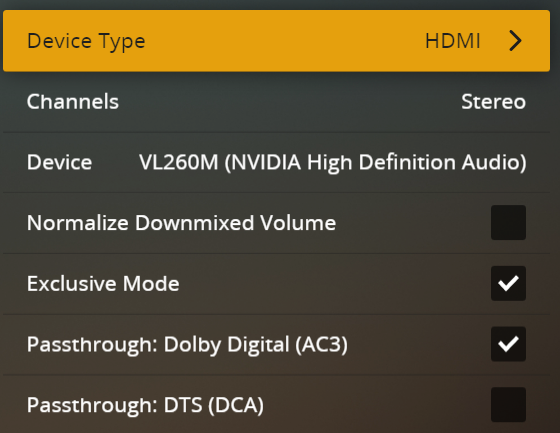
1 Like
Im not seeing anything different. I have tried all options all im wanting to do is output 5.1 audio to my interface and then output the video to my laptop screen.
Are you saying that you’re able to change Device Type: Basic to something else and it doesn’t provide you with other options? Or that you’re not able to change Device Type: at all?
I can change the device type and it provides me with other options such as passthrough but none of them seem to send the 5.1 to my interface just a 2.0
And why are you selecting 7.1 for a 5.1 playback?
I noticed that but ive changed it to 5.1
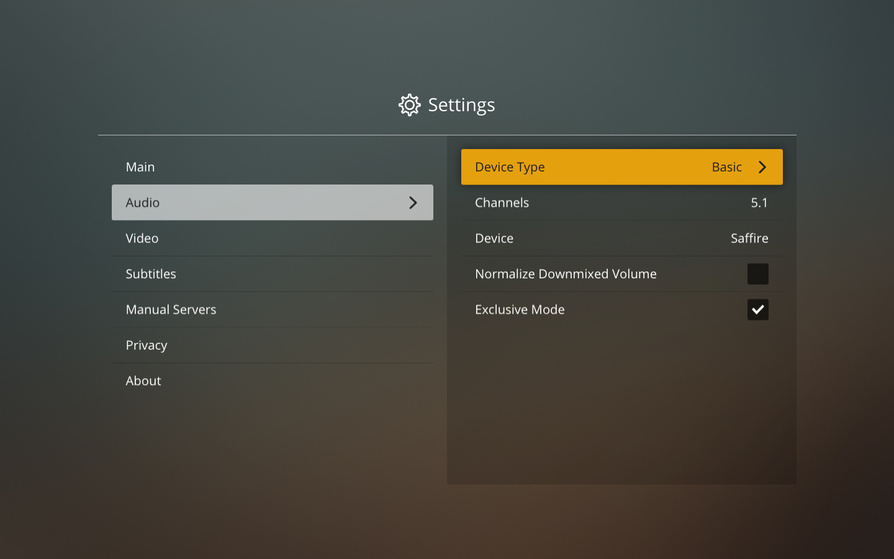
What are all the options for Device Type?
Basic
Optical (S/PDIF)
HDMI
Yeah, this might be an issue:
I can point a dev at this but it’s probably going to next week before we hear anything back…
Don’t worry about it im going to eventually run Plex through my fireTv stick and then into a AV receiver. Thanks for all the help today if you do hear anything can you post it on here
What is attached to the Thunderbolt port? Do you have speakers w/ a Thunderbolt port, use a Thunderbolt to USB/optical/etc adapter?
How does that show up under System Preferences → Sound → Output?
If you play the movie with QuickTime Player, VLC, etc do you get multi-channel output?
Just wondering (a) if there is an OS level setting that needs adjusting, and (b) what the devs would look for with something connected via Thunderbolt.
1 Like
