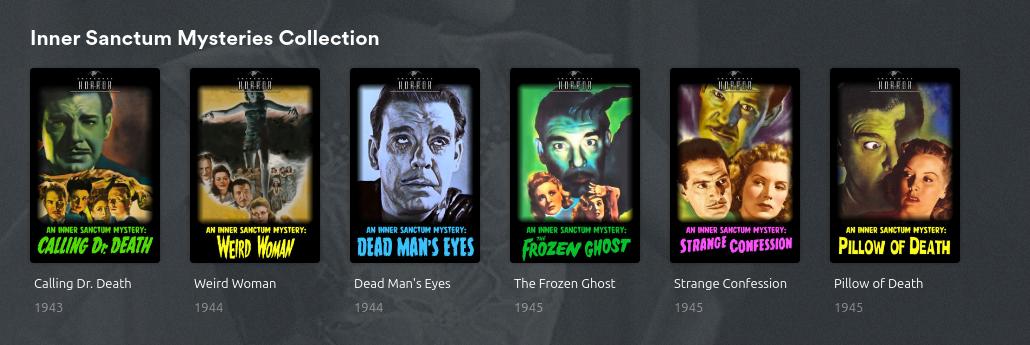
I will list a few movies that all have the same problem. They have correctly tagged posters on themoviedb as “swedish” and yet, Plex uses the english poster. I have tripple checked that everything is correct. I have many hundred movies that does not have this problem. I do not use local metadata and the settings are correct. This is specific to these movies. Perhaps someone can figure out why?
No problem in pinging me. As its just a handful of movies I’ll assume your settings are correct. The posters themselves could be locked. Have you checked if you edit one of the movies if the poster you expect to be there is there ? If so my guess is that its locked and you can try this procedure to unlock them Reset all manual poster selections in a library at once or unlock other metadata fields.
If they are missing and they have been added to tmdb a while ago (meaning the plex back-end cache is updated) then my guess is that as plex has been subject to take down requests for the artwork, like Once Upon a Time in the West metadata - #4 by dane22 and it could be effecting these movies and your region.
Yep. They are there. Actually I could easily chose the correct poster for all of these movies, but I try to avoid it (to avoid locking them, in case better posters gets uploaded etc). So Plex does see them, it simply does not select them, which is why I think there’s something off with how Plex fetches these.
So it’s not settings, locking issue, or copyright issue (good idea, I didn’t know that was going on)
And about local assets: I get it but I intentionally don’t do that. I prefer everything to be community driven. I fix things on tmdb if I see it. I add translations. I add posters and vote. That way, everyone benefits.
At least they are there and yeah its best to avoid changing the default in plex as they become locked or worse blank/missing. My only other guess is then the voting on them at tmdb and how plex ranking them. For the first movie I have down votes the english one and up voted the swedish one. This will have no impact on tmdb as as they are still language specific by maybe (just maybe) it will help you.
Yeap, I am also very community driven with over 55k edits at tmdb dokuro's Profile — The Movie Database (TMDB) but for artwork I still went local assets on plex. I do upload artwork all the time to tmdb and up / down vote so others benefit however I get 95% of my posters from https://theposterdb.com which keep posters uniform across tv series and movies.
I really appreciate the votes, but as Plex should prioritize the language before any vote (as it does with all other movies) I don’t think it will help. Something seem to be wrong with the fetching of these movies in particular.
Maybe @adriana could chip in a little here? tldr: posters are tagged as Swedish and Plex sees them but isn’t selecting them, only on these specific movies.
BTW… these screenshots are also very good examples of the fecking HORRIBLE GREEN TICK plex implemented for played status. THANK YOU PLEX for ruining clean posters
Just wondering - do you have “Prefer artwork based on library language” enabled on your libraries ? You probably do but I’ll mention it just in case you have it disabled.
To be honest, I do a lot of editing on tmdb regarding translations to my language. I add and change both text and posters and sometimes create whole new basic artworks if needed. Also for collections.
So I know well how Plex uses specific language posters. Usually, I just make the changes on tmdb, wait a few days, refresh and voila.
Which is why these movies are so peculiar. I’ve never seen this before. As zoidberg said, I think there must be a bug with the Plex backend somehow. Wonder what makes these movies so special though
I just now tried to update metadata on these movies, and this problem seems to be solved. I assume you changed some logic somewhere? Can I ask what the issue was? I am simply curious.
 tldr: posters are tagged as Swedish and Plex sees them but isn’t selecting them, only on these specific movies.
 sounds very slick though.