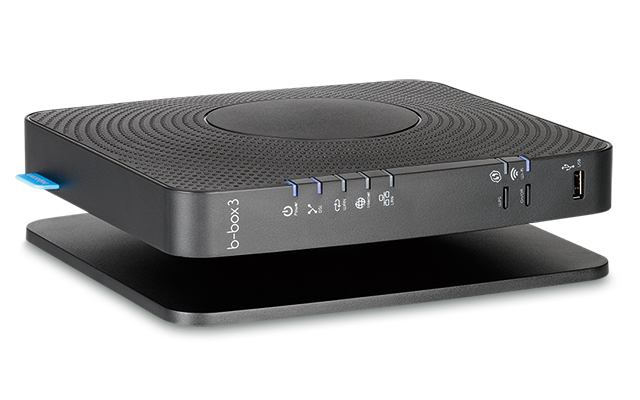
Could you give PLEX access to third party DLNA servers? My internet box turns any harddrive plugged into it into a DLNA Server. I would like to have access to the files this hard drive contains in PLEX but it seems impossible.
VLC can access any DLNA server available on my network. I would like PLEX to do the same.
I’m not quite sure I understand what you’re suggesting.
Is this about integrating that 3rd party DLNA server’s content into your own Plex Server (like an additional source) or would you like Plex Players to integrate such a DLNA source directly?
I’m not sure any of those will give you much of an experience.
If you want to integrate the media into your own server… why not simply point your server to the HDD connected to your internet box? I’m sure they’re not only publishing the media via DLNA but you can access the drive like any regular NAS share.
What the internet box does it to turn the external hard drive into a DLNA server.
What the box doesn’t do is to give me access to this hard drive through Windows Explorer,. As a consequence, I cannot map this drive, I cannot browse this drive and I cannot tell Plex to look for material on it. I can only access the content of this drive though a DLNA client such as VLC.
I would like PLEX to be able to use just any DLNA server as a source.
out of curiosity… what box is that?
all the ones I know try to act like a NAS which usually covers both bases – though sometimes you specifically need to enable the file sharing part. Edit: otherwise… how would you get any movies on that external HDD? (unless you need to carry it around, manually connecting it to a PC all the time)
According to what I could find, the box should have an option to share the media via SMB/Samba protocol inside your network – I suppose there’s an option in its configuration to enable this. However I couldn’t find the correct manual / user guide… those links seem to be broken on their homepage)
Edit: found this instruction from another user in their forum
@clemrossignol Are you not running a Plex server? That is not the same as the Plex client that is on your TV/Media box. You need to run a Plex Server on a computer that loads your movies/tv shows. The Plex server will then server the media to the clients on your TV/Media box.
If you switch your Plex Media Server off, it’s going to be of little use if that server would be able to link library files to a DLNA source… if the server is off, it’ll not be available for streaming any media.
The Plex Server needs to be running on a computer or NAS device that can run applications. Unless your box can run applications and there is a Plex Server for the OS that your box runs, then this will not work.
You access it from e.g. your Windows computer by typing this into the address bar of the Windows file explorer: \\[ip-of-the-box] + Enter
So, if your router (that’s the technical term for “internet box”) has an IP address of e.g. 192.168.1.1, then you use \\192.168.1.1
After doing so, you should be able to see at least one so-called “share” which has the contents of your hard drive inside.
If your Plex server runs on Windows, you can point it to this file share in the same way.
You must append the name of the share and the name of the subfolder(s) inside that share as well.
So e.g. \\192.168.1.1\harddrive\movies
“harddrive” is the name of the share, and is either assigned automatically by your router or can be changed in the settings of the router.
“Movies” is the name of the folder on this external hard drive, which has your movies inside. (You DO use a subfolder, do you? If not, I urge you to do it.)
When creating your movie library in Plex, you type or copy&paste this same “address” right into the properties of the Plex library.
You won’t be able to “browse” to the location in most cases.
Thanks for replying to me without judging me! Since my I move my laptop around a lot, I don’t want to have to carry the hard drive with it like a dog on a leach.
‘\192.168.1.1’ is indeed the address of my router, however I do get the following when I type it in Windows Explorer.
I do get the same message when I type ‘\192.168.1.1\harddrive’.
The only way I can access my drive’s content is by using VLC’s DLNA client capability.
Thanks to your remark, I realized i could type ‘\192.168.1.1\harddrive’ in “Add Folder” but it didn’t detect any content.
I can also confirm that I created subfolders for each type of content.
Thanks again! I will try to focus on my other big challenge: accessing my libraries remotely… I don’t understand how ports work. I know I have three ports open but I don’t know if I need to specify them in my PLEX remote access settings
Then you should read the documentation for your router again, to find out how the SMB access is supposed to work. Sometimes you need indeed to use a username and password to access the files.
The harddrive part of the address is only a “place holder” for the actual share name. Which as I wrote above is determined by your router. The actual name should also be mentioned in the documentation of your router.
Adding to Otto’s comment:
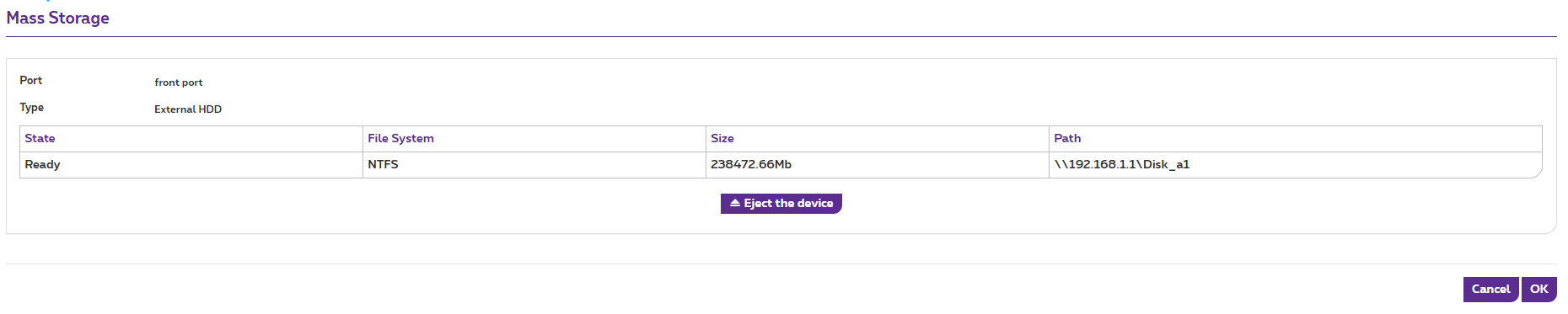
You should be able to see the full name of the hard drive (as seen/used by the B-Box 3) in the USB / Mass Storage settings of the router.
In the exemplary screenshot it shows the full network address in the Path field (there: \\192.168.1.1\Disk_a1)
As good as I can read the French thread, there should be required no additional password/login… though those threads are approx. 4 years old, so things might have changed a bit. here’s another thread from the Proximus forum discussing how to connect the HDD as a regular network share
2022 clean-up: considered obsolete – OP was looking for a workaround to mount a drive connected to their router; there’s no need to do that using DLNA (router supports SMB, so drive can be used as a regular network drive and therefore accessed by PMS).