Server Version#: 1.41.5.9522-72009522
Player Version#:
Tuner Make/Model: SiliconDust HDHomeRun Flex 4K ATSC 3.0 NextGen TV: 2/4 Tuners HDFX-4K
Guide/Lineup name: Local via MOHU Antenna
Using XMLTV?: No
Channel number/Name: N/A
<If providing server logs please do NOT turn on verbose logging, only debug logging should be enabled>
I just acquired all equipment necessary and set up the live tv & dvr feature per guides and Plex instructions. I added a library and tested a channel recording which worked perfectly, allowing me to select the newly added library, which by the way is through the USB Share 1-2 using a blank 5TB drive. I also added a future recording which also worked perfectly. Actually both worked perfectly except for the detect and skip commercials feature, but I’m not trying to address that yet.
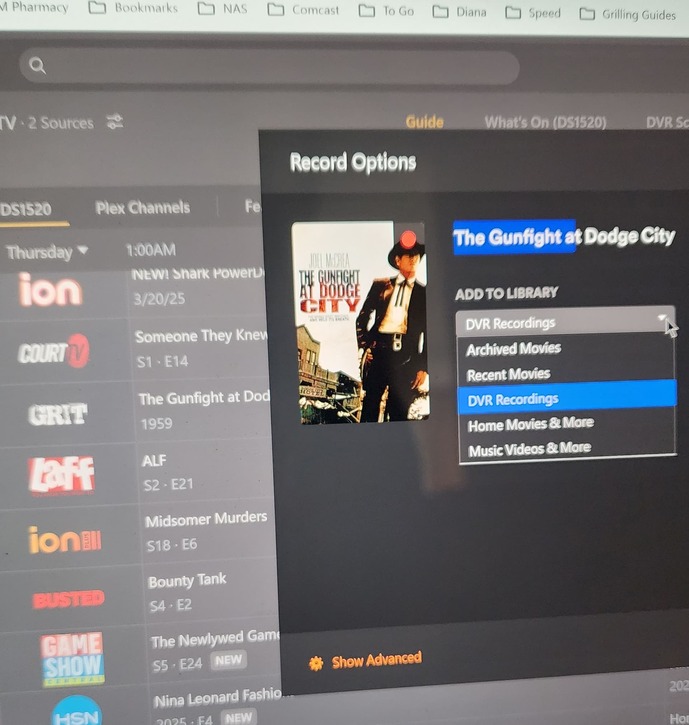
Today I decided to setup some more recordings and the library I created is no longer present in the drop down. When I initially set it up, not only was the new library that I created present, but all libraries were there. Today there are only two and I don’t want any of them. I want/need a dedicated library specifically for DVR.
Anyone know what happened?
UPDATE: After making some additional attempts I found I am able to get access to all libraries when recording certain movies only. At first I thought they were only westerns, but then I was able to see all libraries for a random movie. I don’t know what they have in common. I attached some screenshots to show what I’m seeing.


Thanks
