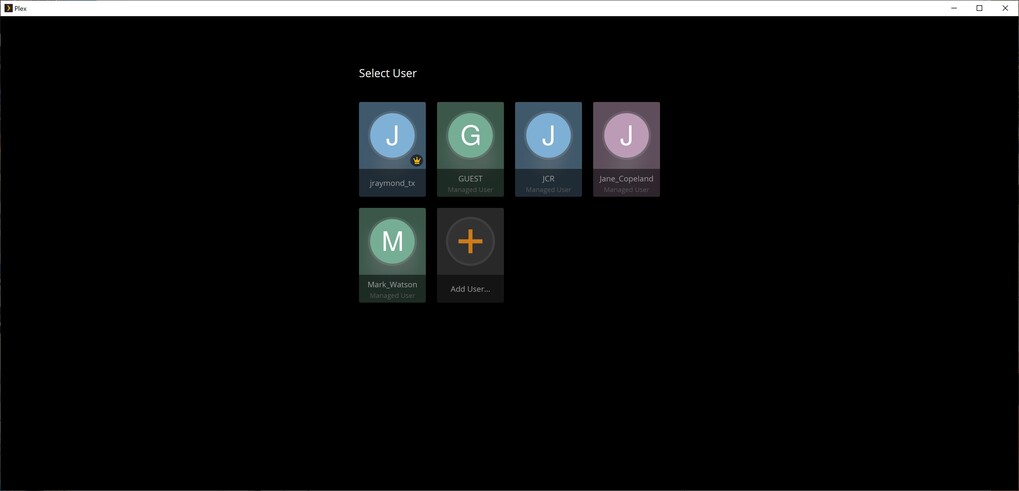
Server Version#:1.23.1.4602
Player Version#:Unknown
I actually have 2 questions to ask and had no clue where to address them. If one of you moderators know where to put this, then by all means move it there so I’m in the correct sub-forum.
So here goes:
We have 2 QNAP NAS to set up for movies, television series and music, one on each side of the river cutting through our property. We will be having wedding guests staying, but I don’t want to give them access to “my” PLEX account as they will have my user profiles all accessible to them.
I’ve read a bit about “sharing” your library with other users…can I create a new PLEX account and “share” the library with that account so all they see is the one user profile? And if so, how do I do that? Does the player just look for servers on the local sub-net first? We planned to keep both sides in a separate VLAN for security. My plan is to have the QNAP’s synch up weekly with each other so they remain up to date with each other. That way I don’t overload our point-to-point bridge with streaming video on a regular basis.
The second question concerns making another server up to send with my other half to the UK so she can set it up in her mothers house. If I use “my” account for the FireTV sticks, won’t it try to access my NAS in the USA instead of the local machine in the house there?
How do I set it up so she has the scaled-down version of our home library (British TV shows and a limited selection of movies) without messing anything up? And without streaming from my (limited) bandwidth since I live in the country and have limited WiFi connectivity?
As for your wedding guests… why not enable the Guest account for them?
(box at the very right in the users & sharing settings)
That way they don’t have to bother with a PIN or mess up your watch history.
I only realized later when reading your post that you’re using those 2 QNAPs as redundant units. Not necessarily the main use case for Plex. I suppose with all the media synching you’ll keep your network quite busy without further streaming
In any way, take a good look at your network setup to ensure the servers can properly communicate with your clients – unless you specifically tell Plex that VLAN is part of your LAN, your clients won’t find the servers inside a different subnet. This setup might also need some extra touches when it comes to enabling your remote access (hopping through your different networks).
As for our mother in law… best create her a Plex account of her own and link that server to this account. Then you can optionally still share media from your own QNAPs with them but otherwise they’ll be using/watching the media linked to the server on their account.
Even if you keep the server under your account you can still share only libraries from that UK server with your UK relatives. In that case they won’t even know/see you got another server (or a multitude of them). Accounts only see what they own or what is shared with them!
I guess you didn’t look closely at the screen capture.
“Guest” can still “see” all the other profiles in my account, and can actually access them (unless I put a PIN on them, which I really didn’t want to do). I’ve got too many pins floating around in my head as it is…didn’t want to add another unless I really had to. I’d rather not have guests know there are other accounts if I can get away with it.
The sync won’t actually be so bad…RSYNC only transfers files that have changed or are new, so the traffic bandwidth isn’t really too bad. It isn’t like I add loads of things every week…I’m nearly done with adding my currently-owned discs to the system…then it’s just new purchases from here out. We’ve got a gigabit point-to-point radio so it’s not going to be that bad.
We don’t intend to “share” these outside of the property, so we won’t be having any external streaming going on. Both here and the UK servers are “private” for all intents and purposes…
I was contemplating having to do a new account for her mom…she isn’t tech savvy (she’s 95 this year) but loves watching the British TV shows, and we would rather keep the “TV” to a minimum because she gets confused & worried (and can’t hear 1/2 of what they say, anyway).
You’re right… I had overlooked that “Guest” user.
That’s actually by design – some users even give a PIN to the guest account to avoid their kids from bypassing the restrictions applied to their individual accounts. If you don’t set any PINs, all members of your home will be able to access all those home accounts.
As for her mom – in that case you’ll be best off by setting up the server under your own account (make sure you have some level of access to the machine for the occasional maintenance / update). Then create her an own account for her, share the libraries of that machine with her and setup her tv/player with that account.
Yeah…we’ve got a VPN server on her end so I can get into the system there fairly easy…
I’m not really worried about the “Guest” account…we don’t have any kids, so it’s not a problem for us. And if guests are watching it…then THEY are responsible for their kids.