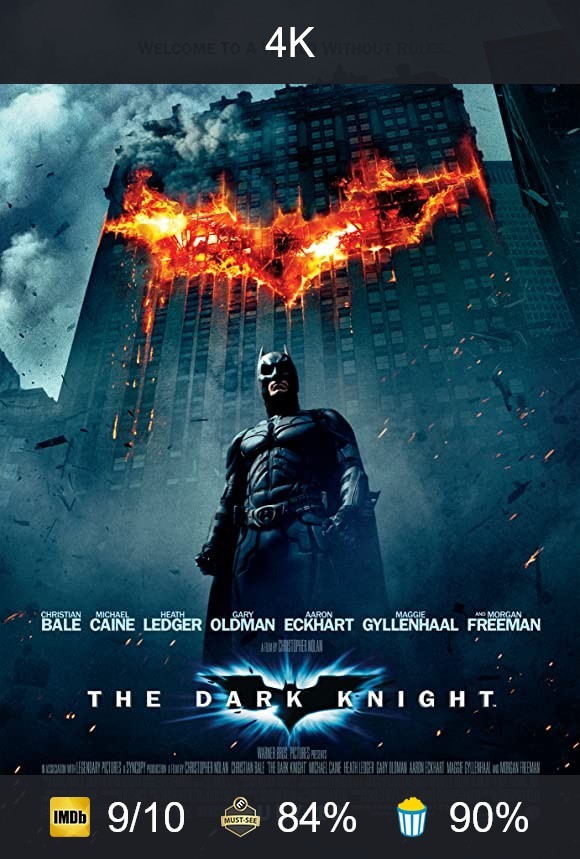
I recently released a service that adds ratings to Plex (and many other media center apps) by burning the ratings on posters directly. You can see some screenshots of how this looks here.
I also created multiple methods to easily integrate the service with any Plex server in order to auto-download these posters for the entire movie / series library and for newly added items as well.
If you want to learn more, check out the RPDB website.
I’m giving away free Tier 1 API Keys for 2 months (they will expire on the 7th of May) for the first 300 people that DM me asking for one.
I am planning on making a lifetime option too, but for now the service is still very new. I need to get a clearer understanding of the resources requirements in order to be able to set a fair price for a lifetime offer.
With the new users of the free Tier 1 keys I will hopefully get enough insights in order to add such a payment option also.
my folders are named with the german film titles. in very many cases they are different from the original ones. when i search for these on rotten tomatoes or metacritic homepage it doesn’t find them, only imdb works with these. would it find the ratings?
and second. the 500 ratings limit would be to high for many of my films because german films don‘t have like a worldwide audience 99% of the time and thus not that many ratings. and of course other films as well will not reach that 500 ratings in years. or ever…
it would be good if i could set it to 50
@plexmei I think it should still find them with german folder names, but it is hard to be sure. If you DM me I can give you a trial Tier 1 API key and you can test if folder names will be matched correctly with a separate (made for testing) media folder.
The RPDB Folders app matches the folder name to IMDB ID based on IMDB search, matching to RT and MC is done by the system based on that IMDB ID.
I already removed the “minimum 500 votes” limit a few days ago, there are no minimum votes limits anymore.
i dont have the files in your prefered naming schema and with german titles and in most cases it matched it. nice
an option to prefer posters in my language like plex have would be helpfull. but i guess they get this from tmdb…
i hope i can do this manually if i buy the tier 3 lifetime.
and maybe an option that a poster is only created if it finds more sources than imdb for a movie
I’m glad to hear it works for your case, you can do it manually with Tier 2 also by using “Edit Movie/Series Poster” > “Choose Poster” you will have a select box there to choose your language and the desired poster for it.
As for a setting to only download the poster if it has more than just the IMDB rating, that is harder to achieve… the apps / plugins request posters directly without knowing what ratings they have. If I were to create an endpoint for retrieving detailed data on posters that would count as a separate request, so it would use one request to retrieve image data and a second request to retrieve the image. (if needed) This is highly inefficient imo and would cause user confusion also…
works great so far - only thing I wish I could do would be to have ability to add the ratings to poster images already saved as many of the default IMDB posters are covered in lots and lots of text which I tend to avoid using
Hi, I am happy it works great for you. Regarding the default posters, this has been requested by other users as well, and changing all the default posters from IMDB posters to the TMDB posters is scheduled as one of the next tasks as specified in the last Patreon update post: https://www.patreon.com/posts/new-features-49946101
This will most probably take around a month or so I believe as the service will be modified to overwrite all current posters on the server with their TMDB equivalent (and there are… a lot of posters)
I will make a new update post on the Patreon page and notify all subscribers when the server has been completely updated, at which time you will be able to initiate a full overwrite scan in the RPDB Folders app to replace all the posters.
Until that time, you should slowly see the service start providing TMDB posters instead of IMDB posters while it is going through this change.
i like the last update which gives me to option to put a resolution mark on my posters. i’d definitly use that for my 4k movies. but i don’t really like the look of it
it would be amazing if you could use something like this in the left top corner of the poster. (small and without banner)
since the last update it don’t name the posters posters.jpg anymore but uses the filename of the movie.
i use the metacritic option but in the backround it shows rotten tomatos as well.
great that we can use tmdb posters in the future! can we get the ratings from there as well?
i’d love to use rotten tomatos for plex and have posters with imdb, metacritic (audience and critics) and tmdb.
and maybe even posters with imdb, rotten tomatos (audience and critics), metacritic (audience and critics) and tmdb. of course with the current design this would be impossible for posters…
an option to choose the poster quality would be nice
it would be amazing if you could use something like this in the left top corner of the poster. (small and without banner)
That can be arranged, I opted to add label support first as it is easily extendable (any text can be a label and added at the top of posters.
since the last update it don’t name the posters posters.jpg anymore but uses the filename of the movie.
Can you tell me what OS you use and how your directory structure is formed? The last update added support for movie media folders that do not include subfolders for each movie, this is the only case where the poster should have the same name as the video file, but maybe some OSs are triggering folder / file change events differently than in my tests.
i’d love to use rotten tomatos for plex and have posters with imdb, metacritic (audience and critics) and tmdb.
Are TMDB ratings interesting to you? This is the first time I see someone request them, and there have been quite a few requests for Letterboxd ratings which I know is more popular and seem to hold more value in general.
and maybe even posters with imdb, rotten tomatos (audience and critics), metacritic (audience and critics) and tmdb. of course with the current design this would be impossible for posters…
You might be the greatest rating fanatic this service has ever seen, lol… I wouldn’t even know where to begin regarding this and the complexity of the settings required to configure it…
an option to choose the poster quality would be nice
This will most surely come to Tier 3, but I cannot give an ETA for it as there are quite a few priority tasks for this service right now.
i have windows and i tested a movie folder without any subfolder. so it works as intended.
i have tier 3 lifetime but only did tests so far…
i wait for the tmdb posters to do the big shot.
yes, tmdb ratings would be nice.
i don‘t know what letterboxed could mean here, sorry
i would prefer to have the possibility to have 4 ratings on a poster (if tmdb is available)
maybe a way would be not to do imdb „7,7/10“ but do „77%“ or just „7,7“. this could be good for uniformity and could safe space. but it‘s just an idea…
one other thing is that i have 1 folder active and every time i start the software it starts scanning.
in the future when i want to do all my movies and shows this would be a problem.
i will have to do a lot a work renaming folders, choose the posters i want, find costum posters and so on (we talking about more than 10 hours for sure, maybe 30)
will this software safe what poster i choose for what movie in any case?
have it a database i can backup?
one other thing is that i have 1 folder active and every time i start the software it starts scanning.
That’s true, but it won’t overwrite the posters unless the “overwrite posters” setting is turned on and even then it will overwrite them monthly / bimonthly depending on the settings you choose.
Otherwise, it will only attempt to find posters for what was not found in the past.
i will have to do a lot a work renaming folders, choose the posters i want, find costum posters and so on (we talking about more than 10 hours for sure, maybe 30)
will this software safe what poster i choose for what movie in any case?
All changes you make in the RPDB Folders app are saved in it’s internal configuration file, for windows this should be: %LocalAppData%\RPDB-Folders\RPDB-Folders\config.json
This file holds all RPDB Folders configurations and data, backing it up will ensure that you will not loose anything from the app.
Must admit I am literally going through manually adding posters as I simply didn’t like the ones produced by autoscan (too much extra text and titles being covered by the ratings) so is taking me a while.
opting not to use the backgrounds as none of the devices I use plex for actually show the backgrounds fully
But it definitely adds value seeing ra5tings on the initial library screen
I am very happy u like it, and I am working on changing all of the posters to their TMDB counterparts with the most votes.
As for the backdrops, I use them mainly because I like Plex’s feature to enable showing random backdrops in screensaver mode on TV versions and Android TV, helps discover a lot of great content while the player is paused.
i upgraded to the new plex scanner today and made custom posters for my 300 shows. every one of them got matched and created a poster.jpg. after a library scan plex adopted like 10 of them. 20 more i could choose manually with edit show in plex.
after reboots, 2 full scans, 10 normal metadata scans nothing changed.
the poster.jpg files are there, so this is a plex problem. but still very bad
one other thing is that the first rating on the backround ist cut off on the top by plex a little bit. maybe put the ratings a little bit lower