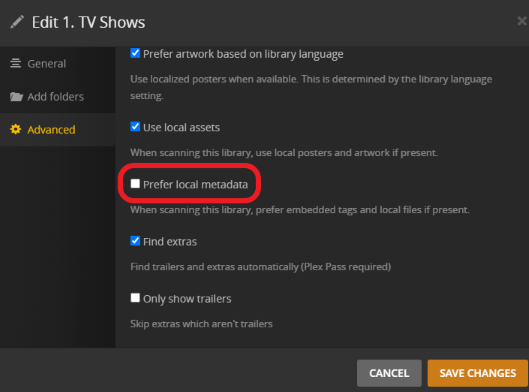
You can use a metadata editor and place the information as embedded tags right into the file. If you configure your server to prefer embedded metadata, it’ll pick that information up from mp4/m4v/mov containers.
I alreaay turned on prefer local metadata and I am using the plex tv series agent. I checked the video files myself to make sure the metadata was present and plex is not picking up the title from the media and using it as the title when viewing my library. It only shows the season and the episode number.
What type of file is and what are you using to edit metadata? Unfortunately I cannot reproduce the issue. I added this episode title in metadata of file using MetaZ on Mac.
I just figured my issue. Looking at the file with handbreak does show a tag for title but it only takes the filename and displays it as the title. You actually have to re-encode the file for the tags to be saved. This takes a long time and I have a few thousand files.
You know how much faster it would be to just do a rename on those and add {title-blah blah blah}
Since the title is already part of the name it would be way faster to do a mass rename than to modify the tags and rencode every file. Even just adding the tags one at a time without a re-encode would take forever.
I am not a linux user but I’m willing to bet there are things you can use to edit tags without re-encoding. Even VLC allows you to do this while looking at mediainformation during playback.
Using the right software, you can insert meta tags into hundreds of files at once, too.
On Windows, one can use mp3tag for this purpose (among many others).
It can even create tags from (parts) of the file name or vice versa.
First im closer to a solution. Thanks for all the replys.
I agree. I have been looking for a way on linux to do this all at once but I’ve only found an app that creats nfo files which plex does not appear to use because after generating the nfo files and rescanning it made no difference when looking at the library. Im still looking.