Server Version#: 4.72.0 running on Ubuntu
Player Version#: N/A
This issue started a few months ago and I have upgraded the server a couple of times which did not fix the issue.
When I scan library files for TV Shows, I can see the server discover the new episodes. I can see it initially update the show title with the information from TheTVDB but when the scan is complete, all the titles revert to the file name of the episode.
The summary information remains as does the originally available date and rating. I can manually change the episode name and that will solve the issue, but I shouldn’t have to do that.
Anyone see this before and have a fix?
Most likely it’s picking up embedded data in the file for the title. You can 1) scrub the files of the embedded metadata or 2) disable Prefer Local Metadata under the advanced settings of your library.
Once you do either of the above then force a refresh of the show should then update it.
However, if you edited it in plex it won’t as its a locked so you’d need to remove the lock before refreshing.
Thanks for the quick response. 2 dumb questions:
- What do you mean by “scrub the files”? I performed a database optimization and that didn’t fix the issue.
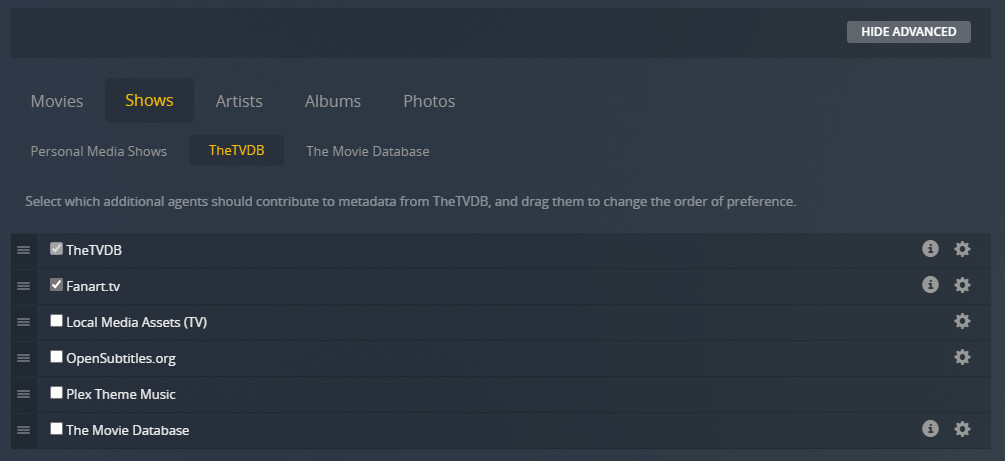
- I can’t find the Prefer Local Metadata option. I have multiple options for locating metadata in Assets and “Local Media Assets(TV)” is one of them but not selected. I can move them around to set the priority but with it not selected, it shouldn’t matter where it is, right? See image below.
There is no Prefer Local Metadata option under Library.
There are no dumb questions 
- depending on your file type you need to use a third part tool like EasyTag (mp4) or mkvpropedit (mkv) to scrub (remove) any embedded metadata.
- I assumed you are using the new modern Plex TV Scanner/Agent. If so select settings → manage → libraries and then edit your TV library. On the advanced tab look for
Prefer local metadata and if its selected de-select it (see screenshot below).

Much appreciated. #2 fixed the issue. I guess I just needed to know about the option and where to find it.
The new agents are configured via these advanced settings. The screenshot you included above is for the old legacy agents and is no longer used, assuming you’ve upgraded which you have.