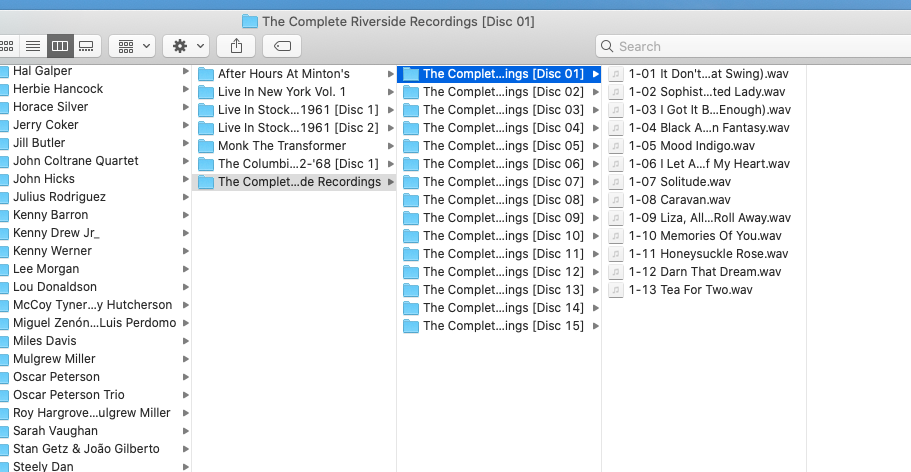
question. I have a fair number of artist collections (not various), so “Thelonious Monk: the Complete Riverside Recordings” on 15 CDs. I have them storied on my Mac before transfer as separate discs. As far as I can tell, the individual tracks are named correctly using the naming conventions (as above). When I transfer these to my Plex server folder on my Synology, they come off as scrambled. Some are renamed under the individual discs that they were originally issued as (e.g. “Solo Monk”) and I have renamed those by hand successfully. But some songs have disappeared all together. I can’t find them at all on Plex with a general search which makes no sense because they are there in my Plex files (see Disc 13 image). I’m still pretty much a newbie, but this is a vexing problem in setting up my library. Any help appreciated. I get that some Plex metadata must be interfering with my original file set up, but don’t know how to prevent it. Thanks for any help.
Not sure how much you can do with waws these days, but Plex messing up sounds like typical Meta Data issue.
I would suggest something like Mp3tag but no clue if its avail. on Mac’s. Possibly musicbrains? Anyway, any decent similar program should suffice. If the metas can even be edited like this.
Thank you. I have tried using Picard, but can’t figure out how it improves the situation. As fast as I can tell the metadata on my original downloads are correct, they are getting scrambled when transferred to Plex. So Plex is picking up metadata or adding it. I guess I’m not aware enough of the subtleties of metadata figure out where the problem is. But appreciate your quick reply.
I think maybe plex cannot even read metadata from wav files (but not totally sure so apologies if I’m wrong on this!) so it might be relying completely on the naming/file structure.
I have always found success using the Plex naming conventions from Plex Support so I’d follow the fully supported method there.
Lastly, just my own personal opinion but why not just split & add them as the respective individual albums in Plex, as it doesn’t really make sense to have a fifteen disc album for listening purposes
Thanks fro the replies. I had no idea that the file type affected metadata. What file type is best for Plex? @jimbob100101 I will check out the naming conventions material. I had read it before and thought I was following it. As to the why, Some of the “albums” don’t really have a separate existence (more than half). All part of this larger Riverside Collected that I want to keep together. Alternate takes, etc. Thanks.
I read the Plex support file again (thanks). Under Pink Floyd, for “the Wall” the tracks are marked “101, 102, 201, 202”. Mine (as image above) are “1-01, 1-02…). Could that be the problem? Is the actual naming conventions to leave out the dash?
“Ummagumma (Live Album Disc-1) (1969) [EAC - FLAC]”
|→ files: “01 - Astronomy Domine.flac” etc
“Ummagumma (Studio Album Disc-2) (1969) [EAC - FLAC]”
or this: “Watching The World Upon The Wall - Godfather Records 1981-06-16”
with the subfolders “CD-1”, “CD-2”.
Or this crazy one: “Soundboard On The Wall (PFR-CDR-001)”, subfolders “SBD On The Wall - Disc One”, “SBD On The Wall - Disc Two”, files named: “pf1980-08-09d1t10.flac” (No issues as the meta data is correct)
…
Or add the Discnumber meta tag (IF even possible on wav’s)
I would also suggest to convert the Wav’s to Flac. Saves space, more compatible with Plex, no loss of quality.
As I find it easier to read and it still works, but your files are in subfolders whereas they are all in the same folder for multi discs in that example (which is how I have it - i know other formats probably still work like subfolders but why not follow the documented best practice!!)
I use flac with nearly all my files and very rarely have issues
@jimbob100101 Thanks. So making sure I understand, you’re saying that the individual subfolders may be the problem. If the naming convention is used then the best practice is to have one folder “Monk Riverside” and all discs in that folder. Thanks I didn’t understand that. Also, for whatever reason, Mac transfer doesn’t allow me to select FLAC.
I’m not exactly sure but I think if you use subfolders they should just be named “disc 1” etc, but then you don’t need the disc number in the name as well so either use…
Album (Year)/Disc 3/01 - track.flac
Or use a flat album folder but put the discnumbers in the name…
Album (Year)/3-01 - track.flac
Regardless of which you go with the metadata must have discnumber tags.
It might just be a unique combination of the files/tags/wav format causing your issues.
Also just looking back at your earlier images and it occurred to me that you used square brackets in your disc folder names [Disc 01] - Plex scanners are designed to ignore any text in square brackets so this is possibly also contributing to the issue!
I’ve followed the advice here and rescanned my files. There are still apparently random missing tunes. So there’s just some metadata conflict that I can’t find. I’ve seen that Plex has a way of reverting to the original metadata, without applying its own, but it sounds like you can’t do that for one set of discs, it’s all or nothing. So if I turned off Plex meta data capacities, it would never update, or alternatively, if I turned it off to transfer these files, and then turned it back on, it would probably do what it’s doing now. So I think I’m at a dead end. Thanks to @jimbob100101 and @PunkleJones for your help.
It matches and handles the metadata in the individual files (after accepting the proposed match)
As part of the saving, it renames the files and places them according to the directory structure rules I’ve written.
(I always have work to do in the music library. Please forgive the untidiness)
The general structure (which matches what Plex expects)
@ChuckPa thank you this is very helpful. I just recently downloaded Picard. I have what seems like a pretty basic question. Are these operations done on the original files (e.g. on the Plex server side?) Or done within Plex itself? Thanks, trying to figure this all out.
@ChuckPa I’ve been working with your script all morning and it works beautifully. Thank you. The only bug (probably me, not a bug) is that when I save it doesn’t move the renamed files but I can figure that out. Really appreciate it. To @PunkleJones@jimbob100101 thanks so much for your help. It was the metadata but I couldn’t see it or get to it before.
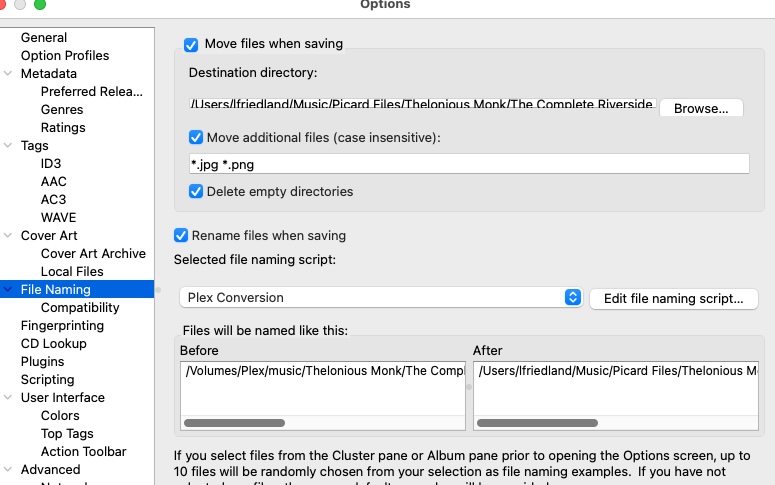
I actually did do that. Attaching a screenshot in case you can see something. In this first preferences screen I have Picard/Thelonious Monk (a file I created in “Music”) selected. Oddly only one song is converting when I save.
May have something to do with this? You can see that one song is checked on the right, presumably the one saved converted. I have select all others, and hit save, but nothing appears to happen.
All the other tracks are still in the middle tab where it says ‘unclustered files’ - you need to drag all those into the right hand tab so they match up with the filenames then save
Edit: Actually it’s generally easier to use a setting in Picard - Options - General - Automatically cluster new files.
This will ‘cluster’ all files from a folder together then you just click on the cluster and click ‘lookup’ and if it finds a match it will automatically place the files in the right-hand tab ready to be saved


 (No issues as the meta data is correct)