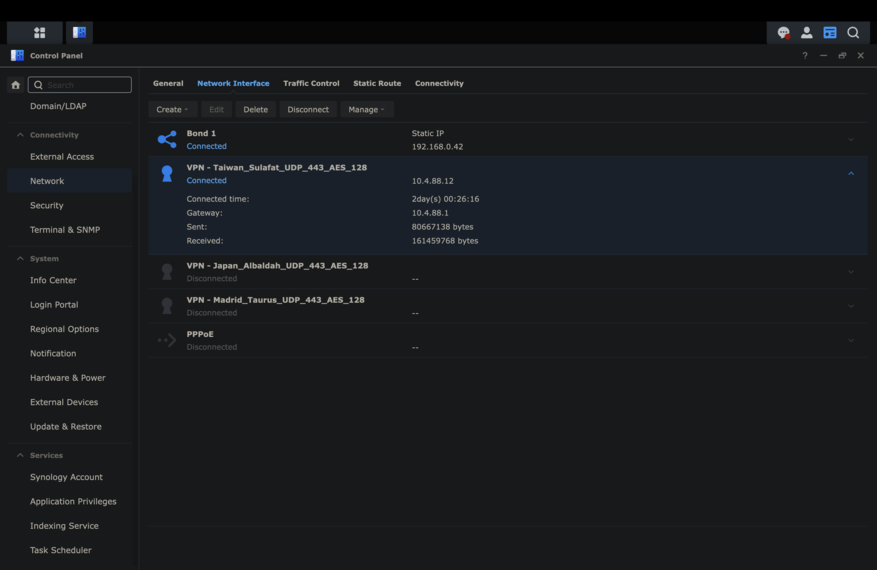
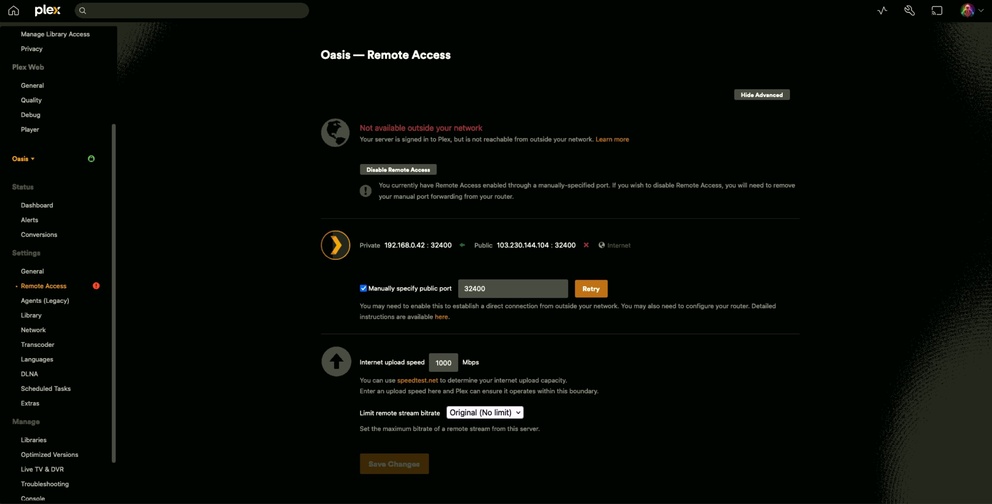
After Synology 7.22 update latest Plex does not detect VPN gateway

Server Version#: 1.41.1.9057-72009057

I’ve been using Plex through Airvpn for years opening the port needed on the vpn service and now plex does not detect the virtual gateway the vpn creates on the synology NAS so I can’t remote access it anymore.

Is this a known issue?

It’s not a known issue but, as you know, VPNs do require manual intervention to work correctly with Plex.

PMS for DSM 7.2.2 is the same executables as for DSM 7 → DSM 7.2.1.
Only the package internals changed for Package Center.

Without seeing DEBUG logs, it’s not possible to know what might be happening.
(Restart PMS and allow to sit idle for a few minutes; PMS full startup Then pull the logs)

To be honest I’ve never needed any extra configuration for Plex, I was just connecting to the VPN and plex was getting the IP from the VPN service, then I was opening port 32400 through the VPN service.

It was working always perfect for me, for years, until this 7.22 update. I did a clean install of the package just in case but I still have the same issue.

For logs you mean system logs? Full logs will show my entire library.
Plex Media Server.log (312.1 KB)

There is clearly a connectivity issue to Plex.tv

This block from your log shows PMS trying to conduct its normal dialog with Plex.tv during startup.

Oct 28, 2024 08:52:18.901 [140489903508280] VERBOSE - WebSocket: processed 1 frame(s)
Oct 28, 2024 08:52:28.902 [140489901398840] VERBOSE - WebSocket: processed 1 frame(s)
Oct 28, 2024 08:52:38.902 [140489903508280] VERBOSE - WebSocket: processed 1 frame(s)
Oct 28, 2024 08:52:41.044 [140489901398840] DEBUG - [EventSourceClient/pubsub/139.162.75.196:443] Failure: 125 - Operation canceled.
Oct 28, 2024 08:52:41.044 [140489901398840] DEBUG - [EventSourceClient/pubsub/139.162.75.196:443] MyPlex: We appear to have lost Internet connectivity, resetting device URL cache.
Oct 28, 2024 08:52:41.044 [140489901398840] ERROR - [EventSourceClient/pubsub/139.162.75.196:443] Retrying in 15 seconds.
Oct 28, 2024 08:52:48.903 [140489903508280] VERBOSE - WebSocket: processed 1 frame(s)
Oct 28, 2024 08:52:56.044 [140489901398840] DEBUG - [EventSourceClient/pubsub/139.162.75.196:443] Resolving 139.162.75.196 port 443
Oct 28, 2024 08:52:56.044 [140489903508280] DEBUG - [EventSourceClient/pubsub/139.162.75.196:443] Resolved 139.162.75.196 to 139.162.75.196:443
Oct 28, 2024 08:52:58.905 [140489901398840] VERBOSE - WebSocket: processed 1 frame(s)
Oct 28, 2024 08:53:08.904 [140489901398840] VERBOSE - WebSocket: processed 1 frame(s)
Oct 28, 2024 08:53:16.045 [140489901398840] DEBUG - [EventSourceClient/pubsub/139.162.75.196:443] Failure: 125 - Operation canceled.
Oct 28, 2024 08:53:16.045 [140489901398840] ERROR - [EventSourceClient/pubsub/139.162.75.196:443] Retrying in 30 seconds.
Oct 28, 2024 08:53:18.905 [140489901398840] VERBOSE - WebSocket: processed 1 frame(s)
Oct 28, 2024 08:53:28.906 [140489901398840] VERBOSE - WebSocket: processed 1 frame(s)
Oct 28, 2024 08:53:38.906 [140489901398840] VERBOSE - WebSocket: processed 1 frame(s)
Oct 28, 2024 08:53:46.045 [140489901398840] DEBUG - [EventSourceClient/pubsub/139.162.75.196:443] Resolving 139.162.75.196 port 443
Oct 28, 2024 08:53:46.045 [140489903508280] DEBUG - [EventSourceClient/pubsub/139.162.75.196:443] Resolved 139.162.75.196 to 139.162.75.196:443
Oct 28, 2024 08:53:47.017 [140489901398840] DEBUG - [EventSourceClient/pubsub/139.162.75.196:443] Connected in 971 ms.
Oct 28, 2024 08:53:47.017 [140489901398840] DEBUG - [EventSourceClient/pubsub/139.162.75.196:443] Wrote data, reading reply.
Oct 28, 2024 08:53:48.242 [140489901398840] DEBUG - [EventSourceClient/pubsub/139.162.75.196:443] Read HTTP reply header.
Oct 28, 2024 08:53:48.242 [140489901398840] DEBUG - [EventSourceClient/pubsub/139.162.75.196:443] MyPlex: We appear to have regained Internet connectivity.
Oct 28, 2024 08:53:48.762 [140489901398840] DEBUG - [EventSourceClient/pubsub/139.162.75.196:443] PublicAddressManager: Obtaining public address and mapping port.
Oct 28, 2024 08:53:48.762 [140489693809464] DEBUG - [EventSourceClient/pubsub/139.162.75.196:443] PublicAddressManager: Obtaining public IP.

I’m upgrading my DS920+ to 7.2.2 as I write this for further testing.

It’s possible DSM changed something internally. (PMS relies on DSM for all network communication)

Thanks a lot for the support. Please let me know if you need any info from my current configuration.

Thanks but no more info is needed.

You will need to track down, one by one, the devices between the syno and the ISP modem/router to figure out which is not behaving as expected

When I upgraded my test machine to 7.2.2, it came up as expected and without issue.

What do you mean? Plex is not detecting the virtual gateway from the VPN connection on the NAS and that was working before, at least for me.

Can you select in Plex the virtual gateway created from a openvpn config on the network tab on the NAS?

As has always been the case with PMS:

  1. PMS will use the first interface it finds which has a valid LINK and Gateway as its Primary interface. It will send data from this one.

  2. PMS can be a “Preferred Interface” to use when RECEIVING requests.

  3. Since a VPN is started up AFTER , and dependent on, the primary interface, PMS will never use it unless you manually go into the routing table and set the routes.

It’s always been this way. Even on Linux, it’s always been a PITA.

My solution for this was to put the VPN in the modem/router and set that alternate LAN IP as the default gateway.

Can you help me to do that?

I am trying to understand how I’ve been able to see Plex getting the virtual gateway from the NAS for years then. The VPN Gateway is the preferred interface on the NAS, but I’m not sure if you mean I need to configure that somewhere else.

My router does not have a VPN option in its config. But what’s more weird, currently, on the NAS, I’m using the option of using multiple gateways. In the router, I have port 32400 open, and even doing that, I can’t see Plex outside of my LAN.

It is always in indirect mode, and that’s limiting the max speed on plex to 2000 mbits/s making it impossible to reproduce anything.

If the VPN gateway is the preferred interface – as defined by DSM –
then that’s what PMS will see first.

Are you using, or did it silently turn itself ON, the Synology firewall ?


If it used to work but now does, it isn’t Plex.
The networking code in PMS hasn’t changed since the “Preferred Adapter” code was added years ago.

The biggest problems I see with folks having VPNs is “Split tunnelling”.

PMS will always look at the IP address at the modem/router. (It queries the LAN for that).

If you look right here, from your logs,

Oct 28, 2024 08:48:38.839 [140489918724752] DEBUG - Detected primary interface: 10.4.64.8
Oct 28, 2024 08:48:38.839 [140489918724752] DEBUG - Network interfaces:
Oct 28, 2024 08:48:38.839 [140489918724752] DEBUG -  * 1 lo (127.0.0.1) (00-00-00-00-00-00) (loopback: 1)
Oct 28, 2024 08:48:38.839 [140489918724752] DEBUG -  * 5 bond0 (192.168.0.42) (00-11-32-B2-15-7D) (loopback: 0)
Oct 28, 2024 08:48:38.839 [140489918724752] DEBUG -  * 1 lo (::1) (00-00-00-00-00-00) (loopback: 1)

PMS is seeing 10.4.64.8 as the primary interface (Your VPN Gateway?)

Where things go sideways, which is what you’re asking about is why it doesn’t show up in the “Network interfaces” list.

For it to show up here:

  1. It must assert that it has a Link status of UP (The adapter is UP)
  2. The adapter must have an address
  3. The adapter must have a gateway address assigned.

If one of these is missing then the interface will not be acknowledged.

If you go into DSM, using Putty or SSH , and type ifconfig what does that show?

I ask because ifconfig will show us everything PMS will be looking at to determine if the adapter is valid.

This topic was automatically closed 90 days after the last reply. New replies are no longer allowed.