I have some episodes of “Der Bergdoktor” stored under:
Der Bergdoktor/Season 10/Der Bergdoktor - S10E03 - Fremdes Herz.mp4
Der Bergdoktor/Season 10/Der Bergdoktor - S10E10 - Blut und Wasser.mp4
If you check thetvdb.com for “Der Bergdoktor” you will find two entries:
Der Bergdoktor TV, 1992
Der Bergdoktor TV, 2008
The agent will use the first entry “Der Bergdoktor TV, 1992”. This will result in no information for the episodes, because these episodes are from “Der Bergdoktor TV, 2008”
Have tried to change the directory name to "Der Bergdokto (2008), but this does not solve the problem.
I have some episodes of “Der Bergretter” stored under:
Der Bergretter/Season 08/Der Bergretter - S08E01 - Achillesferse - pt1.mp4
Der Bergretter/Season 08/Der Bergretter - S08E01 - Achillesferse - pt2.mp4
The import of 2 parts works well, but the name of the episode is “Achillesferse - pt1”. It seems plex will use the full “title” incl partnumber.
Yes, I can edit it manually, but if this can be renamed automatically, it would be nice.
This show seems a bit tricky as it’s actually listed under the same name on TheTVDb.com.
You could try naming them with the year of release in brackets alongside the show name parts of your naming, e.g.
TV Shows   <- the folder linked to your tv-show library
  Der Bergdoktor (1992)
    Season 01
      Der Bergdoktor (1992) - s01e01 - Auferstehung.ext
      Der Bergdoktor (1992) - s01e02.ext
      ...

  Der Bergdoktor (2008)
    Season 01
      Der Bergdoktor (2008) - s01e01 - Heimweh.ext
      Der Bergdoktor (2008) - s01e02.ext
      ...
Where .ext refers to your actual file extension (here: .mp4).
If that doesn’t work you should be able to manually match the show using their ID from TheTVDb.com and that particular agent:
You might want to check if there’s some embedded metadata (title) in those mp4 files that might override the actual online metadata.
Personally I prefer avoiding those stacked files and merge them instead (e.g. using MKVToolNix). This is helpful as not all players support playback of stacked files…
A major problem is the order of operations. If you want it to combine pt1 & pt2 into a single Episode try naming them Bergretter S08E01 pt1 - Achillesferse.mp4
& Bergretter S08E01 pt2 - Achillesferse.mp4
The scanner is supposed to ignore anything after the last - & the episode could be named "Achillesferse - Pt1" & "Achillesferse - Pt2" as separate episodes. Generally TVdb tries to avoid those issues by not using (Part1) or (Part2) but rather (Part 1)
If that doesn’t work try naming it without the title Bergretter S08E01 pt1.mp4
There was a time Plex had trouble with multi-part episodes & that was the only way to get it to work. It’s not usually like that anymore, but if nothing else that might be your only solution.
@tom80H: Unfortunately the hint does not solve the issue.
But what do you exactly mean with:
" If that doesn’t work you should be able to manually match the show using their ID from TheTVDb.com and that particular agent:
Der Bergdoktor (2008) -> 195681"
Is there a way to add the id to the series ?
@LostOnTheLine : Unfortunately it does not work. I will edit the episode manually.
At the moment I have created a new library and use the agent “XBMCnfoTVimporter”, this works very well, BUT now I have two libraries (Serien and SerienXMBC).
Feature request:
Is there an option to merge 2 libraries with different agents in only one library (still using the different agents) ?
Is there an option to define in a library which “folder” should use which “agent” ? There could be a default agent (thetvbd.com), but there should be an option to edit the agent for a dedicated folder.
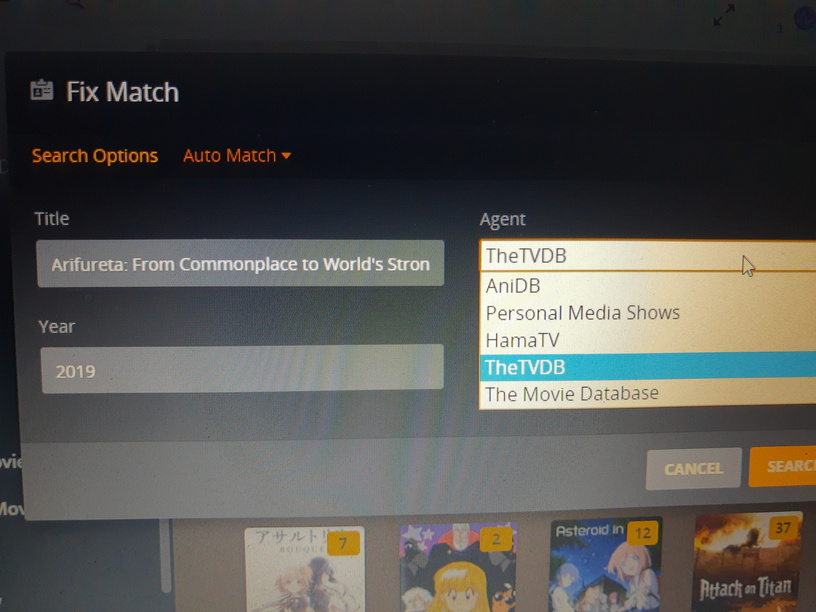
No, when you are using Fix Match just enter the TVDB ID rather than the series name.
ie: for Der Bergdoktor you would enter 260811 in the search box.
This may work for the shows you are referring to now but can cause you problems with others.
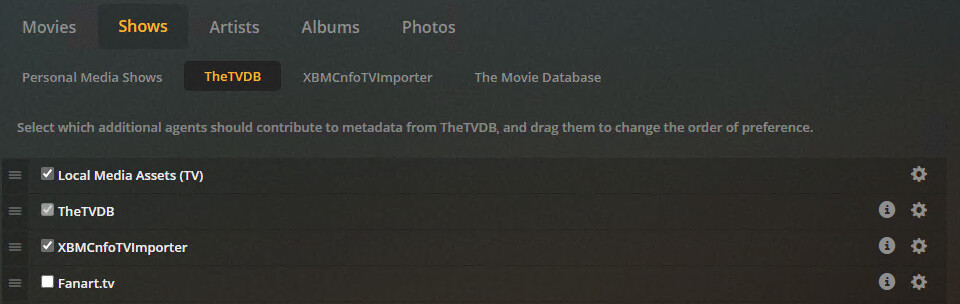
Putting Local Media Assets (TV) at the top means Plex will read any embedded metadata from .mp4 files. If that metadata is incorrect it will be used anyway. Of course not all .mp4 files have metadata embedded.
If you just want to use a different Agent for a single series there’s no need to have 2 libraries. You can simply choose the other in the Fix Match screen
You might have to add it to your sources on the Agent settings, it does not matter what order it’s in so long as it’s checked. Though if it’ll only be used for fixes I’d suggest putting it at the bottom of the list.
This is only a problem for people who download stuff via torrents, that was how theirs was setup before so it is unrelated to this issue.
One thing to be aware of though, there’s a new TV Agent in testing, it seems to be similar to the new Movie Agent which does NOT allow you to get metadata from any other source, so I assume the new TV one would be the same. So this solution will probably not be very future proof unfortunately