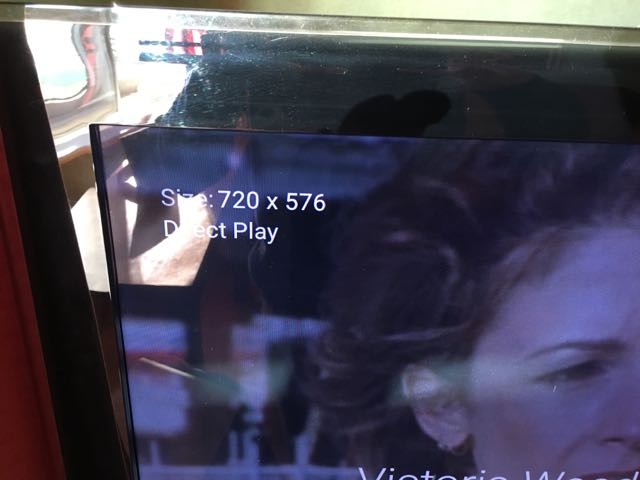
All MPEG2 in MKV with 'original display aspect ratio' flag play at wrong resolution

Joined up to beta as a thought to contribute to seeing if this might be addressed:

But basically:

On the Nvidia Shield TV all MPEG2 inside MKVs direct played with the ‘Original display aspect ratio’ flag play at the wrong resolution; this doesn’t occur on a transcode or with Plex Media Player on the Mac. And also doesn’t happen if all hardware decoding is turned off in kodi (with the plex addon). It’s an exoplayer issue?

Display aspect ratio : 16:9
Original display aspect ratio : 2.40:1

720x576 wrongly playing as 540x576 and 720x480 wrongly playing as 540x480, for example.

This file: https://dl.dropboxusercontent.com/u/13997835/wrong%20width/70028.xml (media info export: https://dl.dropboxusercontent.com/u/13997835/wrong%20width/1.txt)
Sample: https://dl.dropboxusercontent.com/u/13997835/wrong%20width/Victoria%20Wood%20with%20All%20the%20Trimmings%20(2000).mkv

Doesn’t display correctly. Should be 720x576 but direct plays 540x576 instead which cuts off the screen:

Wrong:

When I force transcode, displays correctly:

Here is another mkv: https://dl.dropboxusercontent.com/u/13997835/wrong%20width/Daniel%20Barenboim%20-%20Ruhr%20Piano%20Festival%20(2007)%20(1).mkv that is 720x480 but Plex on the Nvidia Shield will only direct play it at 540x480; as you can see here: https://dl.dropboxusercontent.com/u/13997835/wrong%20width/984.xml everything is as it should be on the media server end.

Still an issue on nvidia shield 5 with android 7

This is posted on the main discussion on this. I so hate this double posting, but the main post is all put overlooked, and at least it annoys less people hidden in a beta forum. So very sorry.

Okey. I remuxed from .mkv to .ts and the audio and video direct streamed; now the correct aspect ratio and resolution are displayed. This would be a temporary fix for anyone not wanting to reencode.

So, if direct stream ignores the ‘original display aspect ratio’ flag in a .ts, can we get direct play in a .mkv to work?

And now it displays correctly at 720x576 instead of 540x576:

A reply from someone at plex would be welcomed; i’m in the beta forum too, so I could help with this but I have had no replies there either, and I started this post in June 2016 (with nothing from plex in all that time).

@Afullmark said:

A reply from someone at plex would be welcomed; i’m in the beta forum too, so I could help with this but I have had no replies there either, and I started this post in June 2016 (with nothing from plex in all that time).

we have a better chance to die from old age.

@TwistedEndz said:

@Afullmark said:

A reply from someone at plex would be welcomed; i’m in the beta forum too, so I could help with this but I have had no replies there either, and I started this post in June 2016 (with nothing from plex in all that time).

we have a better chance to die from old age.

That’s harsh. They are usually quite good, in my opinion.

Don’t mind him, he’s been bitter posting on every forum I see him on.

@Andrroid said:
Don’t mind him, he’s been bitter posting on every forum I see him on.

I’ll hold out for a reply here in the beta forum. I’m patient but I’d appreciate some response from plex people.

@jesusMC

have you had a chance to look into this issue?

@Andrroid said:
@jesusMC

have you had a chance to look into this issue?

Thanks. I’m stumped as to what to do.

Found this: Video decoder detects wrong pixel aspect ratio · Issue #507 · raspberrypi/firmware · GitHub

Display aspect ratio : 16:9 Original display aspect ratio : 2.40:1 … Fix aspect ratio issue by implementing same logic as kodi …

From what I can work out, plex is putting a 16:9 border over the 2:40:1 starting from the left and displaying what is in the 16:9 border, hence missing out what is on the right!

Another fudge is to disable audio passthrough, then this happens:

Now we have the current resolution of 720x576. so direct streaming works; can we just get direct play for mpeg2 in mkv to work please.

Direct play doesn’t work, plays at 540x576:

Should I just bother Nvidia about this?

Update 21/02

For others that might have this issue, I have now found a solution that involves no fiddling with the source at all; no passing through restream (which had damaged some video files) and no re-encoding (losing quality in the process and is a bother).

I use SPMC with the plex add-on, and it’s rather great: you need to have acceleration settings for MPEG2 set to ‘HD and up’ and then MPEG2 will be software decoded rather than hardware; you loss no quality and the media plays in the correct resolution, which it does not if you have hardware decode (with files that have the Sequence Display Extension).

This video acceleration option for MPEG2 is NOT in the GUI of the official Kodi release, so I use SPMC instead.

Update 16/02

I now do not recommend this solution; running files through restream has resulted in some problems for some films: artefacts introduced that are not in the original and other glitches (restream does NOT transcode so its processing is ‘damaging’ the files in some way).

My updated solution - because no one from plex has commented on this post at all - is to turn off direct play, so that files are direct streamed instead. This is a workaround that means files are displayed at their correct resolution: http://forums.plex.tv/discussion/comment/1351200/#Comment_1351200

But obviously I would very much like Plex to fix this; if Direct Stream works then I hope that Direct Play can be fixed.

Just for information (and i’ll post this in the common forum too to help others) I have found a acceptable workaround that amends the MPEG2 elementary stream without re-encode:

If you can afford to demux/remux (this being the better approach, because here the correct flag is changed):

I’m on a Mac, so I had to use old work junk that’s windows to do this:

  1. You need the elementary MPEG2 so: ffmpeg -i 'Victoria Wood with All the Trimmings (2000).mkv' -c:v copy victoria.m2v
  2. YOU HAVE TO USE WINDOWS. Open ReStream, found here http://www.videohelp.com/software/Restream (ReStream can only handle elementary MPEG2, VOBs are not implemented).
  3. Reflag Sequence Display Extension -> change Horizontal Size: 720. Or you can remove the flag.
  4. Now MediaInfo reads the .m2v as 16:9 here.
  5. Remux the .m2v and the audio and subtitles etc from original backinto MKV with MKVToolnix

If you need ffmpeg on the mac then I suggest home-brew: http://brew.sh
Just put /usr/bin/ruby -e "$(curl -fsSL https://raw.githubusercontent.com/Homebrew/install/master/install)" into the command to install. Then ‘brew install ffmpeg’

And now it’ll direct play at the correct resolution:

Of course, it would be much better for plex or nvidia to just ignore the ‘original display aspect ratio’ caused by the ‘Sequence Display Extension’ being 540 (in my case).

I think this might be fixed in the latest beta! Haven’t tried your sample yet.

@danjames92 said:
I think this might be fixed in the latest beta! Haven’t tried your sample yet.

I wouldn’t have thought so. It’s an issue with the Nvidia mpeg2 decoder - i’m on to them about this - so I’m not sure what plex can do really.

@Afullmark said:

@danjames92 said:
I think this might be fixed in the latest beta! Haven’t tried your sample yet.

I wouldn’t have thought so. It’s an issue with the Nvidia mpeg2 decoder - i’m on to them about this - so I’m not sure what plex can do really.

I’ll try your sample today and see.

@Afullmark your sample file link is dead, can I get another?

https://www.dropbox.com/s/47s9bfkbmh9w5ef/sample.mkv?dl=0 720x576 wrongly playing as 540x576

I updated the links in the public forum but not here. Here’s one.

@danjames92 said:

@Afullmark said:

@danjames92 said:
I think this might be fixed in the latest beta! Haven’t tried your sample yet.

I wouldn’t have thought so. It’s an issue with the Nvidia mpeg2 decoder - i’m on to them about this - so I’m not sure what plex can do really.

I’ll try your sample today and see.

@Afullmark your sample file link is dead, can I get another?

I tested myself. Still same issue.

Same here as well.

@Ach!lles said:
Same here as well.

Just have to wait for nvidia to fix it.

This is the last I heard from them (29th march 2017):

Hello Andrew,

Thanks for the information. NVIDIA QA and Engineering are investigating this problem with the respective ISV’s. If more information is needed or there is an update I will contact you.

Best Regards, Troy NVIDIA Customer Care

Had this today from nvidia:

Hi Andrew,

NVIDIA QA has reproduced the problem with Plex. If more information is needed or there is an update I will contact you.

Best Regards, Troy NVIDIA Customer Care L2 -----------------------