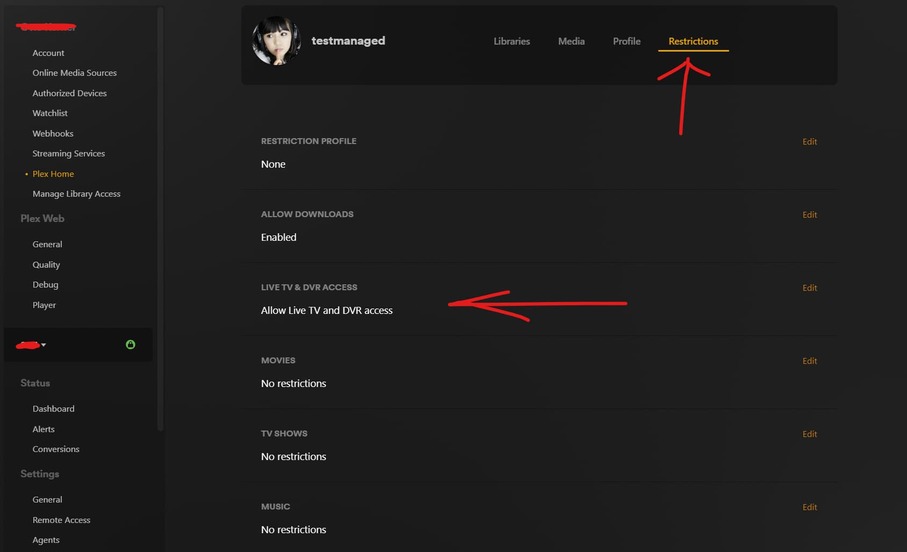
Been using plex for a while, but just added an older HDHomerun unit and loving it. Works great. But…
I have two managed/remote users. One of them I’d like to give access to the livetv and dvr. If I open up a connection to my plex server via a web browser and go to manage library access, user, and restrictions, there is no option to add/remove access to livetv. I assumed managed users couldn’t get livetv/dvr and perhaps it was only available to local/home users. But when I happened to open a connection to my plex server via the plex app on an android device, select same server, manage library access, user, and restrictions, there IS 3 settings (no access, livetv, livetv+dvr).
Why doesn’t the restriction appear when accessing via the web, yet does appear in the app?
Even more importantly, if I give the user access to livetv (or livetv/dvr) in the app and exit the app, go right back and look, they still have the access. But if I leave and come back some time later, the user is set back to “no access to livetv”. Why is the setting going back to an old value later?
Under Account, Online Media Sources, there is an enable/disable for livetv. Is this the same livetv as we’re talking about under user restrictions coming from the HDHR4-2US? Is this a related setting or something entirely different? I can’t really find docs on this either.
Any clarification or pointers in the right direction would be sincerely appreciated.
J
Server Version#: 1.32.0.6973
Player Version#: 4.100.1 on desktop and 9.21.1.1169 on android (lenovo smart tab m8)
Tuner Make/Model: HDHR4-2US
Guide/Lineup name: ??
Using XMLTV?: I dont think so
Channel number/Name: N/A
<If providing server logs please do NOT turn on verbose logging, only debug logging should be enabled>
I haven’t encountered this behaviour myself.
Try enabling the access via the web app and don’t forget to Save.
It is related, but not the same.
There are some streaming “live TV” channels available on plex.tv. This setting is what makes them available.
If they are enabled, their program guide data is available on the same screen as the program guide of your local OTA channels.
The media source “Live TV & DVR” on your local server is then hidden and only “Live TV” from plex.tv is available (but it contains all program data of your local tuner as well.)
After toggling that setting, you may have to check the sidebar in your Plex client(s) and pin one of the mentioned media sources to it.
AH ok. You are right, in the desktop browser, the ability to restrict only shows for plex home users, not for managed users.
But I can tell you for sure, in the most recent android app, you most certainly DO have a ‘restrict livetv/dvr’ in managed users, not just in home. So wonder why the app appears to support this, but the web doesn’t. If plex devs intended it to only be for home users, wonder why they obviously added it to the app?
And thanks for the explanation of online-media-sources ‘live tv’ toggle. That makes perfect sense, thanks!