In my libraries when logged in with my own profile, I can see all movies including those in sub folders.
My kids however can only see the movies placed directly in the folder added to the library.
Why is that, and how do I allow my kids to also see the movies in the subfolders?
None of the movies in my folder or subfolders has any rating so it shouldn’t be due to false ratings of the movies. Also the movies in all the folders/subfolders are allowed for all.
I tried asking ChatGPT and it came up with this solution:
- From my admin account:
- Go to Settings
- Choose Users and Sharing
- Click on the childs user
- Go to the Library Access pane
But in Settings I cannot find the Users and Sharing part.
Does that mean that you have created an “Other Videos” type of library, instead of separate “Movies”, “TV Shows” type of libraries? The latter would automatically fetch age ratings.
So, enter https://app.plex.tv/desktop/#!/settings/plex-home
click on the names of your kids
then inspect their Restrictions tab.
Is there a “restriction profile” defined for any of them?
If the Restriction profile is set to None, are there any rules defined for Movies, Shows, or Music below?
IT’s correct that I’m not using the standard “Movies” library.
Instead I have several other libraries (and folders added to those) and that way I’m controlling who can see what in Plex.
When I follow the link and click on my childrens names I do not see any “Restrictions” tab. - Actually I don’t see any tabs at all, so I don’nt even know where to look for the Restrictions tab?
Most of our childrens movies are not recognized by Plex’ systems as they are short Danish cartoons not known by Plex’ databases. (Plus we have some other films as well - f.i. some of our own private holiday-recordings)
So Plex is unable to recognize data like age ratings for many of those. I have tried before to save such data for each movie - only to suddenly realize that they got overwritten and all my work was wasted.
So now the solution is to maintain the movie files in different libraries instead.
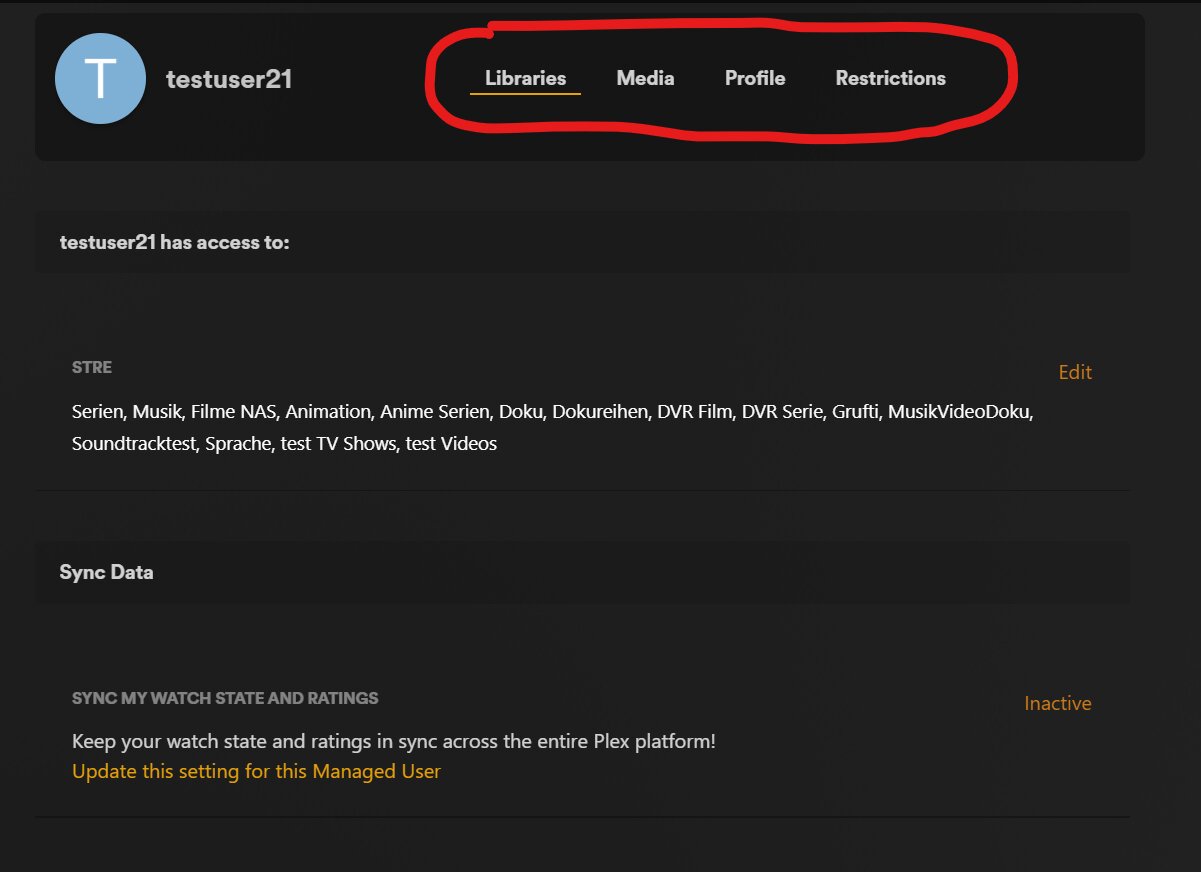
It’s supposed to like this:
I have encircled the different tab names. If you see them, click on them.
If you don’t, check that you have Switched User to the Server’s admin account before clicking the link.
I also noticed that your server is shown as being remote. Is this expected? Did you take this screenshot while being outside of your home network?
If you explicitly “Unmatch” a show or movie before filling in your custom metadata, this should not happen.
That being said, it will probably be better to contribute metadata of at least a few titles to TheMovieDB.org. This will not only help yourself, but other Danish media collectors.