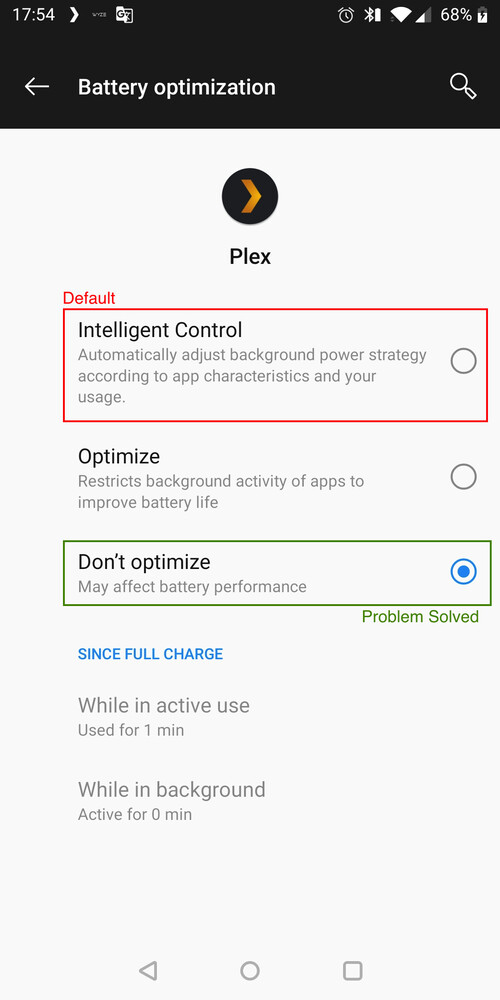
I also face that bug. My Android app logs look extremely similar to mattpr. In my case, just unlocking my phone gets the music playing again.
Phone infos: i: Manufacturer: Google Device: walleye Model: Pixel 2 Product: walleye Version: 11
Relevant logs from the app:
02-14 21:17:13.126 i: Fetching [method:GET] https://192.168.1.110:32400/:/timeline?bufferedTime=317258&duration=419000[...]
02-14 21:17:23.165 i: [PlaybackTimeBehaviour] Time: 130342 IsStarted: true
02-14 21:17:23.173 i: Fetching [method:GET] https://192.168.1.110:32400/:/timeline?bufferedTime=306444&duration=419000[...]
02-14 21:17:25.028 e: [ServerWebSocket] Websocket error
02-14 21:17:25.032 e: An exception occurred: java.net.SocketException: Software caused connection abort
02-14 21:17:25.033 e: Stacktrace: java.net.SocketException: Software caused connection abort
at java.net.SocketInputStream.socketRead0(Native Method)
at java.net.SocketInputStream.socketRead(SocketInputStream.java:119)
at java.net.SocketInputStream.read(SocketInputStream.java:176)
at java.net.SocketInputStream.read(SocketInputStream.java:144)
at com.android.org.conscrypt.ConscryptEngineSocket$SSLInputStream.readFromSocket(ConscryptEngineSocket.java:936)
at com.android.org.conscrypt.ConscryptEngineSocket$SSLInputStream.processDataFromSocket(ConscryptEngineSocket.java:900)
at com.android.org.conscrypt.ConscryptEngineSocket$SSLInputStream.readUntilDataAvailable(ConscryptEngineSocket.java:815)
at com.android.org.conscrypt.ConscryptEngineSocket$SSLInputStream.read(ConscryptEngineSocket.java:788)
at f.n$b.read(SourceFile:4)
at f.a$b.read(SourceFile:2)
at f.r.h0(SourceFile:3)
at f.r.E0(SourceFile:1)
at f.r.readByte(SourceFile:1)
at d.g.a.c0.l.c.p(SourceFile:2)
at d.g.a.c0.l.c.n(SourceFile:1)
at d.g.a.c0.l.a.f(SourceFile:1)
at d.g.a.d0.b.c(SourceFile:17)
at d.g.a.d0.b.a(SourceFile:1)
at d.g.a.d0.b$a.a(SourceFile:1)
at d.g.a.e$c.a(SourceFile:4)
at d.g.a.c0.d.run(SourceFile:3)
at java.util.concurrent.ThreadPoolExecutor.runWorker(ThreadPoolExecutor.java:1167)
at java.util.concurrent.ThreadPoolExecutor$Worker.run(ThreadPoolExecutor.java:641)
at java.lang.Thread.run(Thread.java:923)
02-14 21:17:30.074 e: [ServerWebSocket] Websocket error
02-14 21:17:30.076 e: An exception occurred: java.net.SocketTimeoutException: failed to connect to /192.168.1.110 (port 32400) from /192.168.1.100 (port 39685) after 5000ms
02-14 21:17:30.077 e: Stacktrace: java.net.SocketTimeoutException: failed to connect to /192.168.1.110 (port 32400) from /192.168.1.100 (port 39685) after 5000ms
at libcore.io.IoBridge.connectErrno(IoBridge.java:190)
at libcore.io.IoBridge.connect(IoBridge.java:134)
at java.net.PlainSocketImpl.socketConnect(PlainSocketImpl.java:142)
at java.net.AbstractPlainSocketImpl.doConnect(AbstractPlainSocketImpl.java:390)
at java.net.AbstractPlainSocketImpl.connectToAddress(AbstractPlainSocketImpl.java:230)
at java.net.AbstractPlainSocketImpl.connect(AbstractPlainSocketImpl.java:212)
at java.net.SocksSocketImpl.connect(SocksSocketImpl.java:436)
at java.net.Socket.connect(Socket.java:621)
at d.g.a.c0.f$a.d(SourceFile:1)
at d.g.a.j.e(SourceFile:2)
at d.g.a.j.c(SourceFile:11)
at d.g.a.j.d(SourceFile:6)
at d.g.a.u$a.h(SourceFile:1)
at com.squareup.okhttp.internal.http.h.h(SourceFile:7)
at com.squareup.okhttp.internal.http.h.D(SourceFile:15)
at d.g.a.e.e(SourceFile:13)
at d.g.a.e$b.a(SourceFile:6)
at d.g.a.e.f(SourceFile:2)
at d.g.a.e.a(SourceFile:1)
at d.g.a.e$c.a(SourceFile:1)
at d.g.a.c0.d.run(SourceFile:3)
at java.util.concurrent.ThreadPoolExecutor.runWorker(ThreadPoolExecutor.java:1167)
at java.util.concurrent.ThreadPoolExecutor$Worker.run(ThreadPoolExecutor.java:641)
at java.lang.Thread.run(Thread.java:923)
On my android, Plex app battery setting was set to “Intelligent”. This is I guess the default?
Anyway I turned off battery optimization and the problem went away.
End-users shouldn’t have to resort to this, so hopefully Plex can figure out how to package/declare the app differently to either disable this setting or work around it. Lots of music streaming apps run in the background, so there should be a non-hacky, non-battery-killing way to work around this.
Hi, OP here.
I would like to point out that turning off battery optimization helps solve the long-running android problem of playback stopping after a song or two during active playback with a locked screen (or in background), but does NOT solve the issue which I presented in the first post in this thread (regarding playback getting hung up after RESUMING playback after the app has been idle for a period of time).
As I stated before, back in November, @jesusmc thought he had identified the issue and sent me a build of the app to try.
It did not resolve the issue, I let him know, but I have heard nothing since.
Ultimately, I am unsure if this issue has been resolved in the main Plex app since that time (have not seen it addressed in any update notes) as I have been using Plexamp for music playback. Plexamp does not have this issue and everything is generally working just fine.
I suspect this means that the Plex and Plexamp android apps have different dev teams since this can’t seem to be resolved on the regular Plex app.
Appreciate the clarification. And my apologies for hijacking your thread, I didn’t realize this was a different issue.
There are definitely some other weird things going on as you might have seen in the log I posted. It could be strange android things that require working around…or could be indicative of just generally buggy code base for the Plex android client. These little broken/buggy/flaky user-experiences add up and really make a difference in whether people love or hate the app…so I wish Plex would spend a bit more effort on polish.
I have been experiencing this problem, probably since updating to v 8.12 for android (Samsung S9. I think 8.11 was stable). Turning off optimisation, not allowing Plex to sleep, nothing worked. Yesterday I updated to v8.13.0.22986 and the problem persists! I am going to try to roll back to 8.11. But this really needs to be fixed.
Rolled back android app to v8,11.0.22186 and now remote music streaming is rock solid. Unfortunately though the app does not see the music Library page so only music from the
“Recommended” page can be seen and played. I suspect this is because PMS has been updated and the rolled back app is not fully compatible with the updated server. (Is this plausible?) I guess I will have to try to roll back PMS to a previous version as well. I hope this problem, which seems to have persisted forever, might soon be fixed.
Unfortunately, this does not work for all users/devices.
I have had battery optimization off and still had this problem on multiple Samsung devices.
For me, it has been a problem since before July of last year…
I’m having this issue also. Good lord is it annoying. It happens on my Galaxy S8 Plus and my wife’s Glalaxy S8. Over cellular and wifi. I’ve done a LOT of testing and it’s either the Galaxy phone or the Plex app on the Galaxy phone. When I turn on the S8 Plus hot spot, then connect my LG phone to the hot spot, I do not have the issue. So it’s either the app or the Galaxy phone. Uncompressed blu ray videos will play over my connection, so it’s not a bandwidth issue.
I’ve done EVERYTHING suggest on various sites when I search for this issue on Google, including the above. I just now tried turning off Galaxy Switch, rebooted and am testing ‘as we speak’.
This needs to be fixed! Plex has had soooooo many issues over the years, it is very frustrating. Plex is totally worth the money, when it actually works.
When it happens, if I hit the button to show the screen, the music starts playing again. However, the music does NOT stop when the screen goes out. It seems random. And if the music stops, if I let the phone sit for long enough, it will start playing again for no apparent reason. Other apps, such as Spotify and Podcast Addict, do not do this.
Yes this is super annoying. I’ve noticed the problem occurs on android with BOTH plex and plexamp.
The problem does NOT occur on android with synced music (ie stuff synced locally)… this indicates to me that this is not so much a background play music problem as a background fetch next song over the network problem. The fact movies play in foreground without issue (no bandwidth problem) also seems to confirm this is a “plex using data in background” issue rather than a “plex playing music in background” issue.
I included debug logs of the playback failing in background earlier in this thread that showed specific network related errors, but as far as I know no one at plex has bothered to even look at that…which is sort of annoying because we are paying customers doing software QA for them and doing the work to help them track this issue down…and they don’t even bother to followup on the logs we sent.
This doesn’t seem to be some weird edge case for power users but a general problem for plex on android. You would think this would be high priority to fix as a important fundamental plex feature is broken… but I think they are spending more time on their content offerings. Possible they realized the lifetime-plex-pass was a bad business model as they have no reliable future revenue from many users. So I understand the need to chase new revenue streams…but at the same time if the fundamentals are broken and you lose your user base over time…then those new revenue generating features aren’t going to save the company unless you reboot with a completely different product and business model and manage to completely rebuild your user base, as well as trust and loyalty from your future users. Seems like someone needs to be thinking carefully about product and business strategy over there…I hope they are, because when plex works it is awesome and I would rather see it fixed than abandoned.
From what others tell me on this forum, and what I’ve experienced, this type of support from Plex is par for the course I’m sorry to say.
I’m not totally convinced this is a Plex issue, since it works fine on my LG phone connected to my Samsung hotspot, but yet both my and my wife’s phone have the issue even on wifi. But, this issue is above my pay grade, so I could be wrong.
Indeed. Happens on my Galaxy S8 Plus and my wife’s Galaxy S8. I tried Googling the issue and tried all the advice I could find. Also happens over home wifi with the Samsung phones.
I tried playing music using my LG phone connected to the Samsung hot spot, and there was no issue.
Moves and TV (as well as uncompressed blu ray) play fine.
Been there done that. See link above (and below). But I’ve also done a LOT of googling on this and still can’t find a fix. Plex has full and complete rule over my phone, as far as I can tell.
Hi, I am OP.
Unfortunately there are two different issues being discussed in this thread.
The issue of music playback stopping while the screen is locked can usually be solved by turning off battery optimization.
However, my issue described in the first post of this thread is resuming playback of a music queue after pausing playback for a while. Please see the first post of this thread, and any others by me for further details on this issue.
For reference, I have never even once encountered this issue with PlexAmp, only in the standard Plex app for Android.