Ok, so I’ve notices 480p 4x3 videos are now being jammed to the right side of the screen if you pause/tab out of the player. Im watching 1979 4x3 capitan america and it plays fine with the black bars in the right place but if i pause it and minimize or tab out then go back to the latest plex player there is ONE huge black bar on the left. Is there any way to get older player versions before the UI was updated cause reverting to a older server version (1.32.5.7349) fixed the random freezing, and I want a version of the player that doesn’t have the updated search UI and stuff cause it just worked, is there a place I can get the version before you changed how the search bar looked, i never had problems like this with plex (running on a dedicated server) and the plex player app for windows forces you to update so I dont even know if going back to a older version of that will make a difference. I guess for what I paid for a lifetime pass on sale years ago, i cant complain about essentially having to be a beta tester but it’s like every new version of either the player or the server breaks more stuff than gets fixed
Plex Desktop version?
Does the problem occur with all 4:3 media or just Captain America?
I’m using 1.79.1.3984 and my 4:3 videos play OK. I can pause & minimize or Alt-Tab to another window and the video is still correct when I return & resume playback.
Hoping to replicate to try and figure out why yours is not working correctly.
all 4x3 pure unupscaled video. if i pause it or minimize it or close it and restart plex, it slams the 4x3 to the right side and puts both black bars to the left,
I’m using a 4090 BTW with win 10 and i never had a problem til the late august-september server/player updates
Search is still messed up to with the new player and old server. if i search in the search box, i get like 2 results even though i know the rest are there, it just says i dont have them unless i click on them, But searching actors and stuff through a movie preview works with the old server version and it’s NOT freezing/spinning making me restart plex for windows.
Hey, I just think I found something out
this is happening in full screen, it’s chopping the right side off of EVERY video now in plax media player for windows, I can’t find a setting to explain why but now even with widescreen videos it’s chopping the right side of the screen off, so it’s not just 4x3
yep, if i start the video with plex player as a window and not full screen, when i go full screen it chops the right off. if i start the video in full screen its fine BUT if i go back to a window, the video is now mis scalled.
I keep getting a error trying to upload a pic to show you (its a 202k jpg)
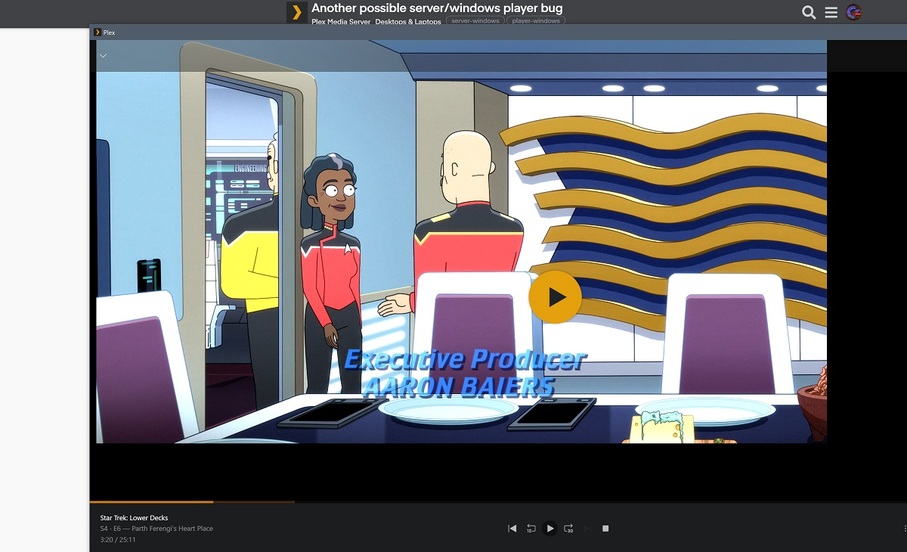
ok also, im using the latest player that got auto-updated (1.79.1.3984-879339ed) and server version 1.32.5.7349 because if i use any server newer than that search is broken,to the point that why bother using search since it wont search my library, only the 3 i’m shared with and also the newest 2 version just freeze going through libraries, this version doesnt.
it’s like the paula abdual song. two steps forward one step back.
What kind of graphics hardware is in your computer?
What is the “Video Playback Quality” selector set to?
What is your native screen resolution?
Did you enable text resizing in Windows’ display settings?
Have you ever modified the mpv.conf file manually?
answered in order asked
Nvidia 4090 latest drivers
Make my GPU Hurt
3840x2160 on a 32" odyssey neo g8
no
no
My display is 1920x1080. Not sure if using a 4K display makes a difference.
A couple of things to try:
Reset to default settings.
- Quit Plex Desktop for Windows
- Navigate to
%LOCALAPPDATA%\Plex. - Rename
plex.initoplex.ini.bak. - Launch Plex Desktop for Windows
You’ll have to login again, configure settings, etc. If it does not help, you can restore the original plex.ini to return to your original settings.
Try previous version
Plex stores previous versions in %LOCALAPPDATA%\Plex\cache\updates.
To stop auto-updates, see In the Plex For Windows client, how can we tell if we're running the current version? - #3 by FordGuy61.
Adding to the above and cross posting for @Commodore1581
To disable automatic updates on the Desktop app open %LOCALAPPDATA%\Plex\plex.ini
- Find the
[debug]section - add one if one does not exist - Add
disableUpdater=truedirectly under the[debug]header - Save your changes
i havent seemed to have the problems again since a driver update, but im still running the old server until searching and displaying searches from my library get sorted out
The resizing started happening again, along with the player freezing so I downgraded to 1.77.3.3966-a5ddb215 to see if anything changes and reset my plex.ini file and reset the player settings. The resizing still happens if i start the video in the player with the player as a window and maximize/full screen it. If I start videos in full screen they’re fine.
I dunno, that’s the oldest version I had in the cache folder. I just let it update so maybe the freezing when i hit back after looking at items will stop since everything got reset. I dont think it’s the server causing that since if i exit plex player and instantly restart it everything is fine.
Shrug
Oh and the size/scaling thing only seems to happen on the very first video I play after opening the player, once I get it to display correctly everything else displays correctly. Maybe it is a nvidia driver thing since i have the RTX Super resolution enabled and set to 4 (not even sure if that does anything with plex)
ok, it’s something with my windows 10 install
It happens with the built in 7800x3d graphics too but not on the server machine running plex player
same resolution (4k)
Oh, the new player is broken too.
I can’t tell from your recent comments if the original issue with 4:3 videos has been resolved. Is this issue resolved? I know you have other issues being reported but if this one is closed then we can move on to the others.
It’s resolved to the point I think it’s something with my system as the problem still happens with the embedded amd garbage graphics from the 7800x3d… might be something with 4k or hdr i dont know, it doesnt happen on the server box using the player in 4k non hdr so I’m chalking it down to this system. It’s easy to work around. hit play, hit stop, hit play again and everything is fine. and it only does it when i first run plex (and oddly when I do that the screen flashes and all the desktop icons reset… shrug). I’m more concerned with the other stuff since I’ve noticed some games are doing this scaling issue too until I quit/reload. So yeah, this issue is on my end and you guys dont need to worry about it.
