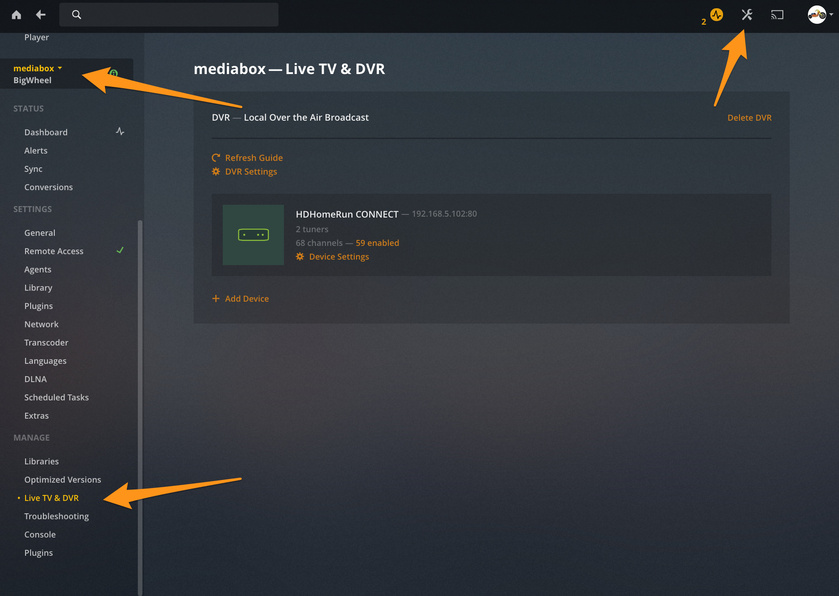
Hi. I am running Plex media server on my iMac. I have a HD Homerun attached to the network and it’s working fine. I can view and record TV. But I wanted to make a change to my DVR settings but the options are nowhere to be found.
I checked the status of my Homerun on http://my.hdhomerun.com/ and it all comes up green. Well, when I first did it said I needed to upgrade the firmware, which I did, and I now get two green ticks.
I have upgraded the PMS software again today, when prompted, and still no DVR Settings option.
Or am I looking in the wrong place? I click settings and just no options.
All help greatly appreciated.
Thanks
Andrew
Do you have more than one server? Logged into right account? Should be on the bottom left side bar

Hi - and thanks for replying. I’m sure I must be doing something really stupid here, as I can’t find a ‘Manage’ section in the settings. How did you get to that screen?
Thanks
Andrew
On the upper right select the gear and wrench icon. Near your account avatar.
Make sure you are on the correct server/account if you have multiple.
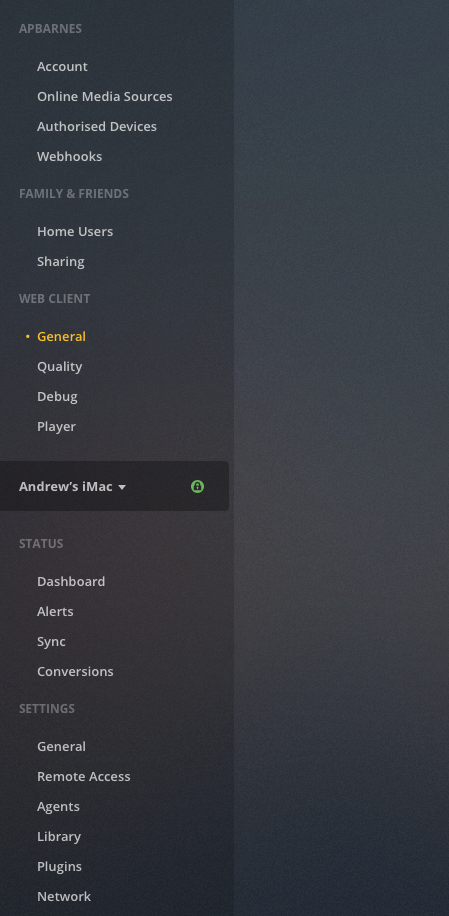
Hi again. When I click the spanner/wrench icon, my screen looks like this…
The entire left side bar should scroll. Even before you get to the Manage section there should be more below Network. Are you using app.plex.tv/desktop?
Hi - and thanks for your patience. On my mac I have the media server icon at the top of the screen. I click that and select ‘Open Plex’. It opens a window in my safari web browser. I tried the link you just sent and it’s the same as what I already see. No scrolling possible.
You don’t have any extensions or anything running do you? Would you mind trying it in chrome https://www.google.com/chrome/
Aha! You’ve cracked it, my friend.
I made Chrome my default browser, clicked ‘Open Plex’ and all the options have appeared, including DVR.
Many thanks for your help!
Cheers
Andrew