I have just signed up for plex pass and I have an hdhomerun quattro i will be using with it. Im been trying all night to set things up. I have all equipment hooked up and i have the latest versions of plex and plex media server on my macmini which has the newest version on MacOs on it.
I can sign into account with plex and get desktop up but there is no option in the settings column for live tv DVR. What am I missing?
I see older posts on this issue from 2017-2018 but nothing recent and really dont see any good answers.
Any ideas?
You should be able to setup DVR / live TV following this support article:
https://support.plex.tv/articles/225877347-live-tv-dvr/

Have you rebootet your server since you got your Plex Pass?
Bonus question… do you actually have a Plex Media Server installed on your Mac Mini?
Your screenshot looks like all you got is a Plex account (Plex Pass or not) and access Plex via app.plex.tv/desktop – at least the screenshot implies that your Plex Media Server is not linked to your account.
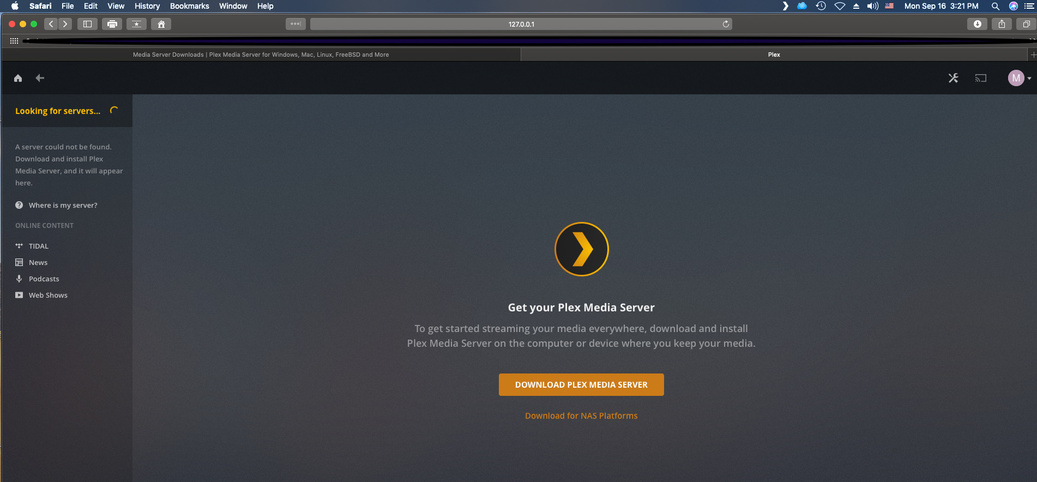
In the last hour i deleted everything and started new. From step one on plex web page. downloaded new plex media server which you can see at the top of this screen shot is open. From that media server icon at the top I clicked open plex. I then got the screen you see here. This screen say get media server(which I do know why since the media server is installed and running) and in upper left circle keeps spinning and keeps saying looking for server.
This is as far as I keep get no matter what I do.
Im not sure why…but i saw somthing in different post about going to
Finder/Go/go to folder and find file ~/Library/Preferences/
I deleted it and rebooted everything and now everything seems to work.
If I still have issues I will repost here.
Thanks for sharing!
This behavior can happen if you had a server installed on your machine that had been associated with a different account… deleting the preferences also removed the reference to the previous claim.
Thanks for you help! That could be I had a 30day trial before and now just bought six months but used my other email for it. But just to be clear, with this issue I was sure everything I was doing I was signed in with the right email account.
Thanks Again!
is this ~/Library/Preferences/ on the server or on the client? I am having the same issue you had.
This is a folder on the server side (macOS).
For other platforms, you’ll need to lookup the respective folder (for Windows, part of the information linking the server to your old account are stored in the Registry).
I edited the Preferences.xml as described on the page. (I ssh’d into my qnap server to make the edits, I launch the Plex server via the QNAP applications webpage on my Windows10 laptop). I launched the local Plex web app–and the absence of the LiveTV on the menu is fixed. However, it says ‘found an unclaimed server’. When I try to claim it, it just sits and spins for 5 minutes–eventually returning…just to again say ‘unclaimed server’. I cannot connect to my HDHomerun Connect device because of the ‘unclaimed server’ issue.
Additionally it say an update is available–to install manually. I installed the update manually, but it did not fix the ‘claim the server’ issue.
