I’ve seen this come up in the past, but as the last post was made a year ago, I’d like to broach the question again: will we ever get a way to remove the “recommended” default tab in our Plex libraries in the Plex app? It’s now 2025 and it appears there’s still no way to change this. The UI confuses the hell out of everyone I show it to—my girlfriend, parents, friends, all normies and tech-savvy people alike unanimously agree it’s confusing, and it’s all because of the “recommended” tab being the default. All we want to do is get into a library and pick something to watch.

it will only remember the tab if you enable remember last tab in settings.
Long story short: No, there is no way to remove the Recommended Tab. As mentioned by starkraven, if you enable a setting in most clients, Plex will remember the last-selected tab and show that by default in the future. I have heard of one person here in the forums that this unfortunately seems to reset after a client update though…
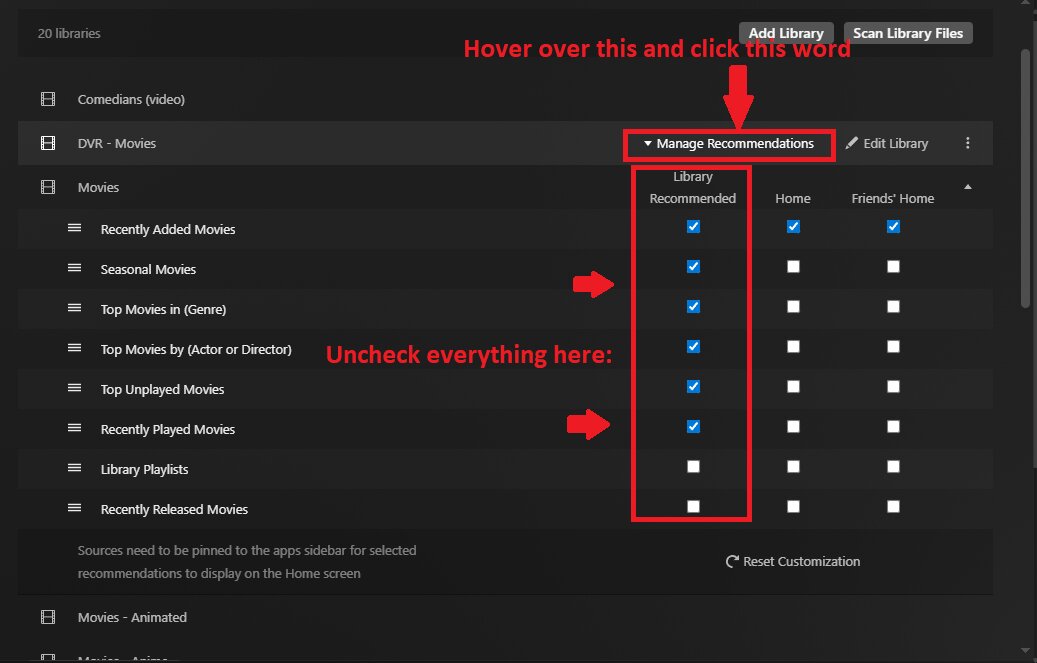
As for the recommended tab, you can “mitigate” the pain of it by going into your server settings and remove/disable as many of the recommended boxes to remove them from the “Recommended” tab. The only thing left will be “Continue Watching”, which helps the user resume in-progress TV Show episodes, or unfinished movies. That should prompt them to change to Library to see the rest of the media, hopefully.
My TV does NOT remember last-selected tab… my iPhone does NOT remember last-selected tab….
It’s so ridiculous that Plex don’t give an easy option to completely remove this tab. It’s a feature requested for years!
plex app is great, though, the “RECOMMENDED” tab is the first and only major negative and nonsense issue, i realized, since installing and started plex first time. as the 4 tabs on top are relatively hidden, my friends and family are lost searching for my library as they are stuck in “RECOMMENDED” menu.
-
because i want to browse my library
-
dont need a recommendation in the first place
-
if recommended tab needs to sit there unconditionally, please switch places, “LIBRARY” needs to stay first, then “RECOMMENDED”
please fix this, plex developers, by adding an option in settings
workaround: “remember last tab in settings” > works sometimes, but new users are lost
thanks
Thanks for this!
Yeah, it’s strange to me that such a DIY-enthusiast platform restricts customizability to such a great degree. I hope they take this feedback seriously some day
In the current mobile app you can go to Settings, Experience, and change the default library view to always start with Browse.
However I have seen that every time the app updates this reverts back to recommended even though they say it shouldn’t.
For chromemake sure cookies are not cleared for site when closing browser
Are you on Android or iOS?
iOS 26.2 but this was happening on 18 as well. The last update that dropped reverted it again 
hmm. ok. i’ll try to remember to check next iOS update.
