I know it is a lot but for anyone having audio sync issues:
If you could try with the new audio renderer on and off and also send me a sample file that will be helpful.
I’m trying to get the new audio renderer to work for all our use cases because it is an easier Apple API and seems to work better with multi-channel audio.
One thing I noticed in this release on AppleTV 4K with the new audio renderer on or off is that if you switch from DTS audio to TrueHD while playing content (forcing an audio transcode), audio will sometimes go completely silent until you exit playback and resume. I can’t get it to happen every time, but I’ve only noticed with switching to TrueHD. I’ll pm you the logs.
I am also finding that playing with the Apple match content settings can affect audio sync issues. Turning on Match Framerate requires me to adjust my sync offset on my Denon, or disable/enable Auto Lip sync in the Denon audio delay options, but once adjusted it’s staying in sync when compared to Infuse. I do notice some frame dropping if you pull up the tvOS menus (ie switching audio to AirPods, or just checking HomeKit stuff) and that can cause audio to drop out of sync. Pausing and resuming the media though will restore sync.
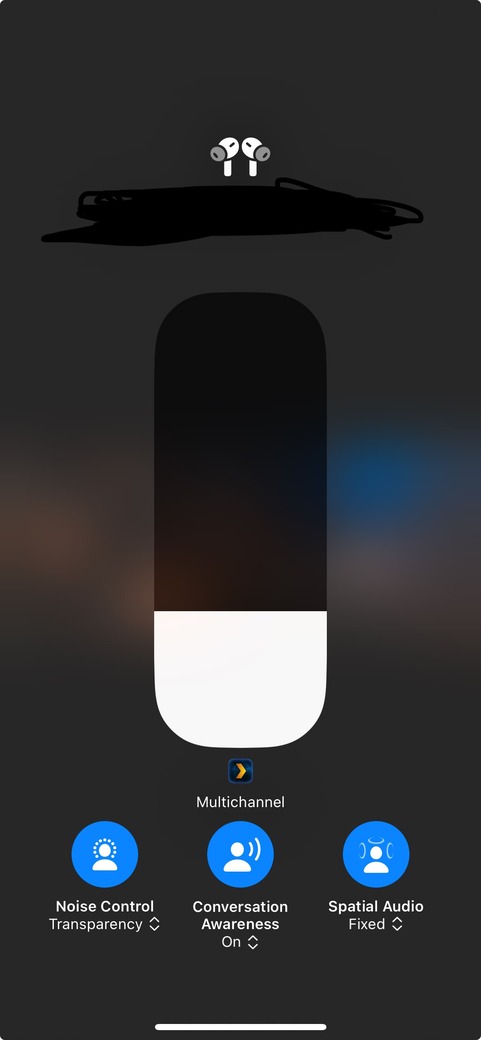
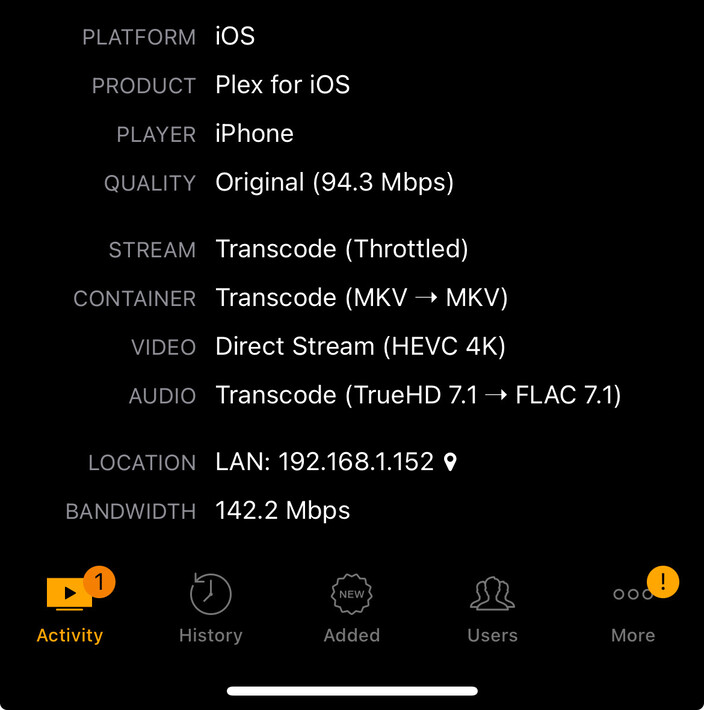
One other note, and this may be an apple API support issue, I am also seeing in this that Spatial Audio on AirPod Pros is only available in stereo on Apple TV 4K running tvOS 16.6, but that it is multichannel on tvOS 18.1. All codecs (except for TrueHD) on iOS 18 are also working as multichannel. TrueHD Multichannel is still transcoding down to FLAC 2.0 on iOS devices, but transcoding properly to Multichannel FLAC on Apple TV 4K. Is it possible to transcode TrueHD Multichannel on iOS to FLAC Multichannel as well, rather than stereo? Has there been any more though to allowing direct play of TrueHD connect instead of transcoding it at all?
Like mentioned - live tv is still a no go. The app closes, tried to open PiP and then the channel crashes. All my sources are 50p.
I run my HDHR through threadfin/xteve to use the yadif_videotoolbox deinterlacer (to double the framerate) - could that be used for deinterlacing player side?
Will send through the subs and do some testing on the new audio engine and HomePods later.
Just to clarify I’m not meaning a 2s audio sync delay I’m meaning a 2s delay before audio starts playing again. Not a huge issue as I set plex to resume from 3s. But thought was worth a mention anyway.
Thanks for the thorough testing!
The issue with audio going silent is not expected but I have come across it in other scenarios as well. I’ll be investigating it more.
I’m not sure about the API limitation with tvOS unfortunately. It should be working the same as I don’t believe the API has changed for a while. 15+ should all be working the same with how we’re rendering audio.
If I remember correctly, that issue with transcoded multi-channel content was reported previously as well? Did you try changing the iOS.xml profile for your server and changing <UpperBound name="audio.channels" value="2" onlyTranscodes="true" /> to >= 8?
I just tried that and it seemed to work but I just asked internally why we might be doing this.
I run my HDHR through threadfin/xteve to use the yadif_videotoolbox deinterlacer (to double the framerate) - could that be used for deinterlacing player side?
Yes those filters are what I have been trying. So, to get technical, we use libavfilter under the hood and it seems like we have everything setup properly to deinterlace the AVFrame but there is an issue when we finally move to render the frame. But essentially if we get it working correctly, the player would be using those exact same filters.
Oh sweet I would be over the moon if that was implemented. One less link in the chain and always nicer to deinterlace client side rather than server side.
Always wanted to request it but wasn’t sure how many people it would effect.
This would be the equivalent of yadif=1, not yadif=0 right?
Out of curiosity, do you use any streaming apps other than Plex/Infuse? Is their Audio offset about 125ms? Just curious if that’s the latency of your setup (similar to my Denon AVR latency). Especially if both Plex and Infuse are at 125ms.
When you do see the drift with fast forward or skipping forward, does pausing and resuming the media correct it? If you have the overlay on, does it show any frame drops?
My setup is very simple: I just AirPlay to a pair of Sonos speakers. I don’t have HomePods, so I can’t be 100% certain if this applies to them as well or only to third-party speakers. The delay could be due to downmixing multi-channel audio, as files with stereo AAC tracks play in perfect sync. However, since stereo FLAC tracks also have the delay, a more likely explanation is the on-the-fly transcoding to AAC that Apple does with AirPlay 2. I’ve also noticed the delay when using the native player for Apple TV+.
As for the drift, it turns out I had been using the same audio engine that’s been available for more than a year, so it’s no surprise my results weren’t any different (I’ve already edited the previous post).
Yea it should be okay to implement but it can be CPU intensive. Which is an issue for something like Apple TV.
But I’m looking at implementing the de-interlacing with Metal as a part of our new pipeline. Similar to how yadif_videotoolbox does it.
Definitely a good addition to have when I can get it to work
I’m looking to release another update with more possible audio fixes and with audio offset enabled.
This beta has not been closed and I did invite everyone that have filled out the form. DM me if you haven’t received an email because it does seem like a number of people are “invited” but TestFlight has plenty of bugs.
I also saw the issue with episodes starting without Audio. I’ll take a look at it.
Lastly, in the Preview iOS app the audio should continue when backgrounding. We’ll be implementing PiP and the options to turn those two features on and off at the beginning of the new year.
The Experimental beta is not supposed to continue playing audio in the background in tvOS. That is a bug that will be fixed with the next update.
@Craig_Holliday converted an interlaced mpegts recording to mp4. When the interlaced mp4 plays I think it is successfully deinterlacing from 25 to 50 fps according to the overlay.
Plex dash indicates it’s a 480i file and is direct playing.
Maybe the deinterlacing issues for live tv are related to all the other mpegts issues people are having (seeking, pip, new audio engine)?
@Craig_Holliday can you confirm the audio offset option will return on release? I don’t see it in the last experimental player release “8.45 (9616)” and have one system where it’s quite noticeable (~ 175ms). Thanks!
EDIT: Somehow I posted this right as 9644 was being released with offset support. Glad it’s back.
I just pushed 8.45 (9644) which has a few hopeful improvements but also provides a way to capture helpful logs for the issues we are still seeing.
Here is what is in the build:
Support audio offset for “Newer Audio Engine”
Different method for A/V timing for “Newer Audio Engine”
Always try to fallback to HDR10 for supported Dolby Vision profiles
Verbose logging for player
Please continue trying the “Newer Audio Engine” and the “New Renderer” together.
It would be very helpful to get information about media and the verbose logs for any of these issues (and others):
Audio sync issues with any playback (Airplay, receivers, etc)
Content not playing back at all or like the playback failing and moving on to the next video.
Issues specifically with interlaced content (Also mentioned above)
If you could go into Help & Support > Debugging, enable Verbose Logging, reproduce the issue and share the logs, that will be very beneficial.
I would turn that setting off for normal use though. It essentially tells the player to log every thing that is happening for every frame which is too verbose for all other use cases.
Does the message say there is no direct play profile for “dvhe” codecs?
For DV Profile 5 we always use AVPlayer to play that media. It has trouble playing some dvhe media though.
This logic hasn’t changed for a long time so I’ll take a look if it seems off.
If you could test with the verbose logs on in the newest build, that will be helpful.
The logs should now provide enough information for us to diagnose.
 (I’ve already edited the previous post).
